
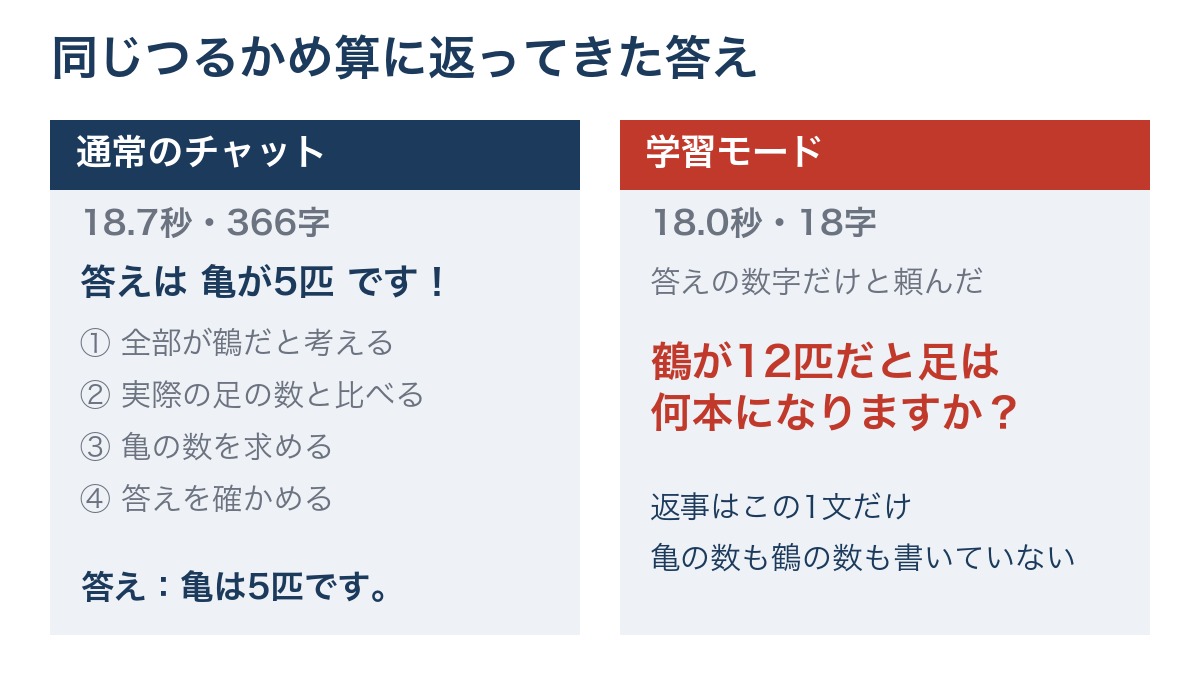
ChatGPT’s study mode turns on when you type @study in the input box or open its dedicated URL. When we tested it on October 16, 2026, the regular chat answered a classic crane-and-turtle math problem in 18.7 seconds with 5 turtles. Study mode, even when asked to give only the number, replied with an 18-character question instead, and it did not state the answer even for a one-line calculation.
- Study mode turns on by typing @study in the input box or opening chatgpt.com/studymode. On October 16, 2026, the label on screen read “Study.”
- The regular chat answered the crane-and-turtle problem in 18.7 seconds with 366 characters, opening with “The answer is 5 turtles!”
- Study mode, even when asked to give “only the number,” took 18.0 seconds and returned only an 18-character question without stating the number of turtles
- Even for a first-year junior high calculation of -3+8, study mode stopped at a 28.9-second, 64-character hint and never stated the answer outright
- Attaching notes produced a 32.2-second, 186-character reply showing “Question 1 of 8,” presenting only the first question and waiting for an answer
- Check the “Study” label in the input box before sending. A conversation sent on a screen where the label wasn’t visible answered 5 turtles in the first line
ChatGPT’s study mode replied with an 18-character question even when asked for just the answer
Here is the conclusion up front. ChatGPT’s study mode did not write the number even when asked for the answer. AInformation ran six submissions between 11 a.m. and noon on October 16, 2026, using the browser version of ChatGPT Plus. The toggle at the top of the screen was set to Chat, and the thinking level was set to medium (shown on screen as Medium).
The clearest difference showed up with a classic crane-and-turtle math problem aimed at first-year junior high students. When we sent it to the regular chat, the answer came back in 18.7 seconds with 366 characters, opening with “The answer is 5 turtles!” Adding the study mode label and one extra sentence, “Please give me only the number for the answer,” produced a reply in 18.0 seconds consisting of a single 18-character question: “If there are 12 cranes, how many legs would that be?” The number of turtles appeared nowhere in the reply.
The same held true for a calculation that fits on one line. Asked “What is -3+8?”, study mode took 28.9 seconds and replied with a 64-character hint using a number line. It ended by asking back, “If you move the remaining 5, what do you get?” There was no sentence that stated the answer outright.
Study mode proved most useful for a quiz. Attaching class notes and asking for questions one at a time produced a 32.2-second, 186-character reply showing “Question 1 of 8.” It presented only one question, along with an answer field and a “Submit and grade” button.
OpenAI’s official help page says study mode “may sometimes show the answer directly.” That did not happen in any of the three attempts we made with the label turned on. If you want the answer quickly, use the regular chat. Switching to study mode only when you want to work through the problem yourself lets you get the best of both.
How to turn on ChatGPT’s study mode: type @study or open its dedicated URL
Study mode isn’t something you turn on from a settings screen — you call it up from the chat input box. OpenAI’s official help page, “Using study mode in ChatGPT,” describes two steps for the browser version. The first is to type @study in the input box, or select + and type study to search the menu. The second is to pick “Learning” from the suggestions; the page also mentions opening chatgpt.com/studymode directly.
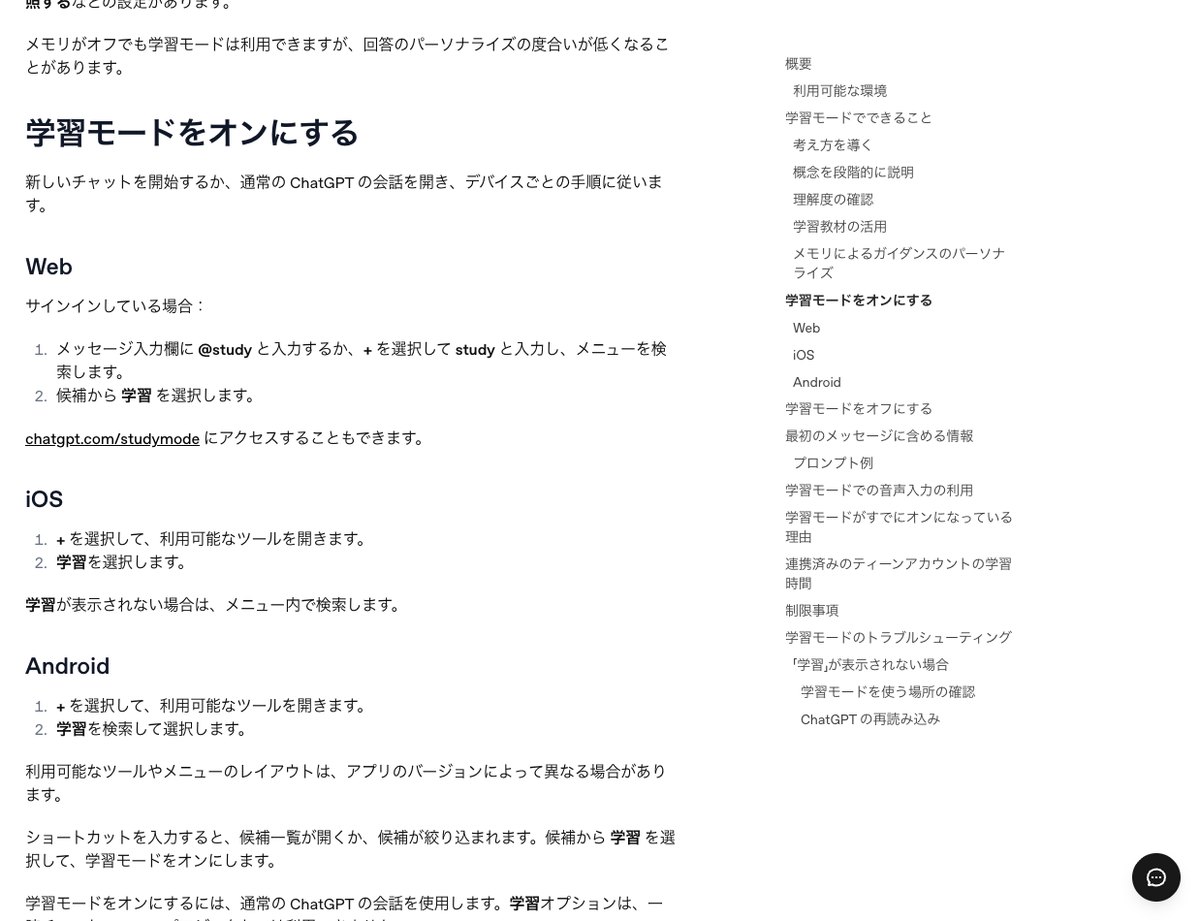
Here is the process we followed on October 16.
- Open ChatGPT and check that the toggle at the top of the screen is set to Chat
- Type @study in the input box and select “Study” from the suggestions, or open chatgpt.com/studymode
- Check that a book-shaped icon and a “Study” label appear in the input box
- If you have notes or a handout, attach them using + (the label stays after you attach a file)
- Write your question and send it. If you mention your grade level or the date of a quiz, the reply picks it up
The third check matters most. If the label is showing, the same “Study” label stays attached to the top of the message you send. Looking back later, you can tell which questions you sent in study mode.
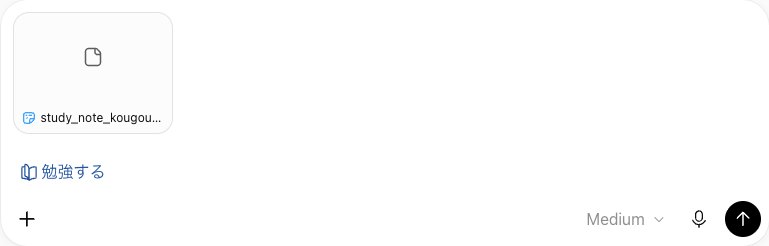
The label’s name differed between the screen and the official help page. On October 16, both the input box label and the label attached to the sent message read “Study.” The Japanese version of the official help page called it “Learning” and showed a notice that the page had been machine-translated. In our preliminary check, typing @study brought up only one suggestion, “Study.” Searching for “Learning” turns up nothing, so it helps to remember this naming difference.
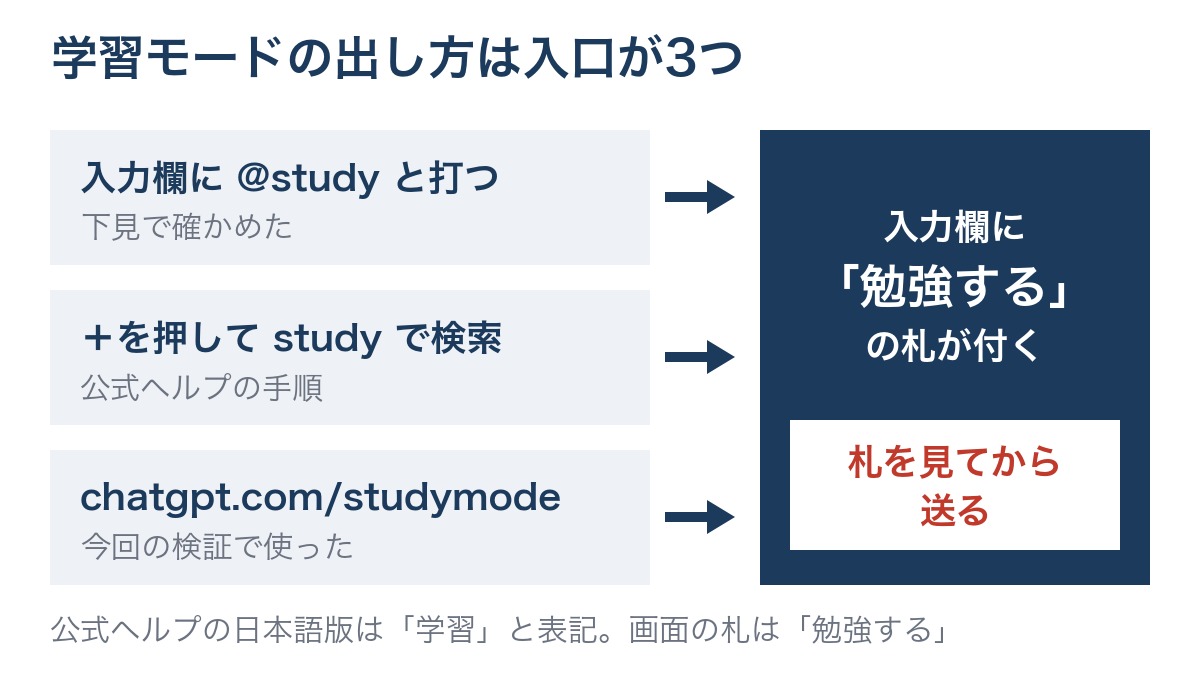
Using the + menu takes some care. In our preliminary check, pressing + on the Chat screen did not show study mode among the listed options. The official help page also describes typing study to search after pressing +. Rather than scanning the list, typing @study from the start is the more reliable path.
It isn’t available everywhere. The official help page states that the study option is not available in temporary chats, GPTs, or projects. In the iPhone and Android apps, the steps are to select “Learning” from the + menu, but we did not test this on the apps.
The regular chat answered the crane-and-turtle problem in 18.7 seconds with 366 characters
As a baseline, we first sent the question to the regular chat without study mode turned on. We opened a new chat at chatgpt.com with the toggle set to Chat. Here is the message we sent.
I’m a first-year junior high student. There are 12 cranes and turtles combined, and they have 34 legs in total. How many turtles are there?
The answer came back in 18.7 seconds with a length of 366 characters. The first line read “The answer is 5 turtles!” It then explained the solution in four steps, from “1. Assume they are all cranes” to “4. Check the answer.” The calculation started with 12×2=24 legs and arrived at the number of turtles using 10÷2=5.
In the checking step, it added 5 turtles’ 20 legs and 7 cranes’ 14 legs to show the total comes to 34 legs. There wasn’t a single question (a sentence ending in “?”) addressed back to the user. It closed with “Answer: There are 5 turtles.” For anyone who just wants to copy the homework answer, reading the first line is enough.
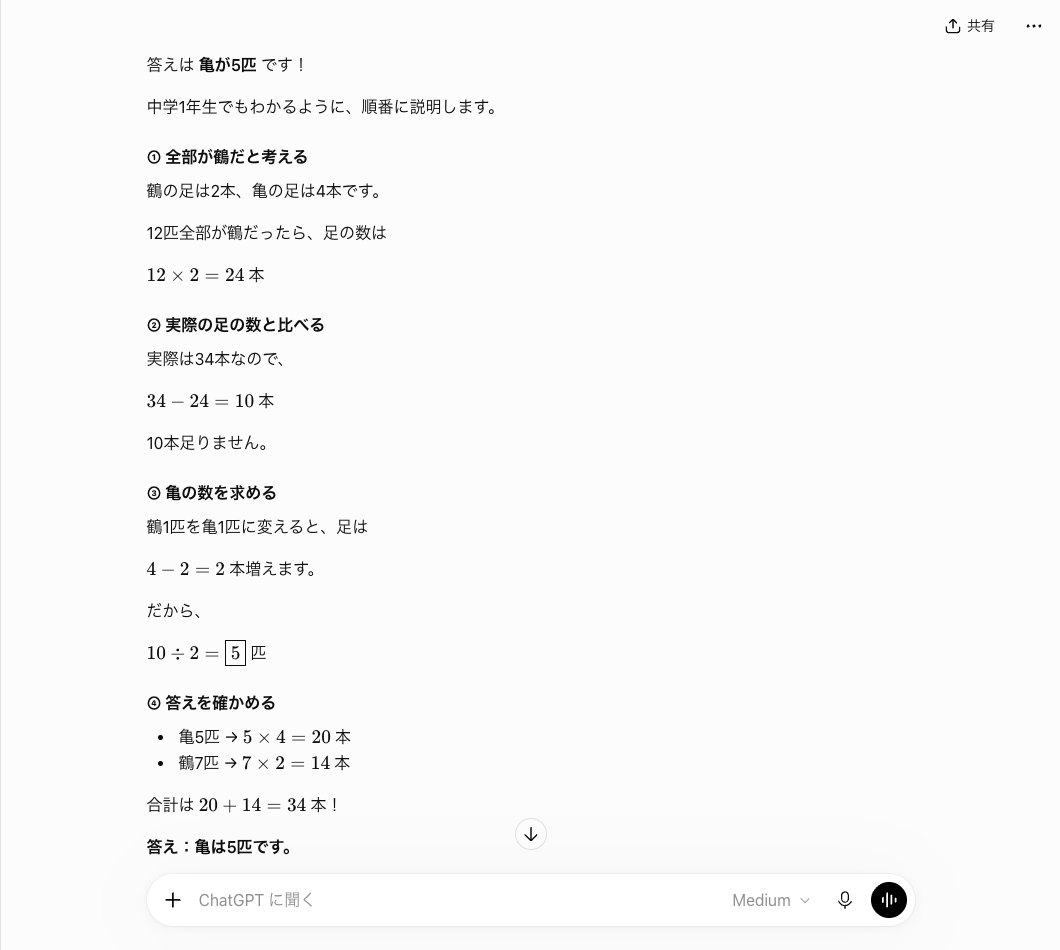
For reference, the first run on October 13, when the same text was sent under the same conditions, is still on record. That time it took 20.5 seconds and ran 380 characters, with the same opening line, “The answer is 5 turtles!” In both runs, the normal chat gave the answer first and added the method afterward.
Even in a chat where the tab wasn’t visible, the first line still said 5 turtles
On the same day, when chatgpt.com/studymode was opened for the first time, the input box did not show the “Study” label. The input field still read “Ask ChatGPT.” Sending the same crane-and-turtle problem in this chat produced a response in 20.4 seconds and 383 characters, with the first line reading “The answer is 5 turtles!” The content was almost identical to the normal chat, with one line added at the end: “This kind of problem is called a ‘crane and turtle calculation’ (tsurukame-zan).”
We did not confirm why the tab failed to appear. It is possible the message was sent before the tab loaded. We excluded these two runs from the study mode results and grouped them with the normal chat instead. In the other three runs opened from the same URL, the “Study” tab appeared at the top of the message sent.
Even when asked for just the number, study mode replied with an 18-character question
Next, we sent the same problem in a new chat with the study mode tab on. We changed only one sentence, adding the request “Please just tell me the number for the answer.” This run was designed to see where the official help page’s note that it “sometimes shows the answer directly” actually happens.
I’m a first-year junior high school student. There are 12 cranes and turtles in total, and they have 34 legs altogether. How many turtles are there? I don’t need an explanation of the method, so please just tell me the number for the answer.
The reply came back in 18.0 seconds. It was 18 characters long, and the full text read: “If there are 12 cranes, how many legs would there be?” It didn’t state the number of turtles or cranes, and it gave no explanation of how to solve the problem. Instead, it offered a single question meant to make you think about what would happen if every animal were a crane.
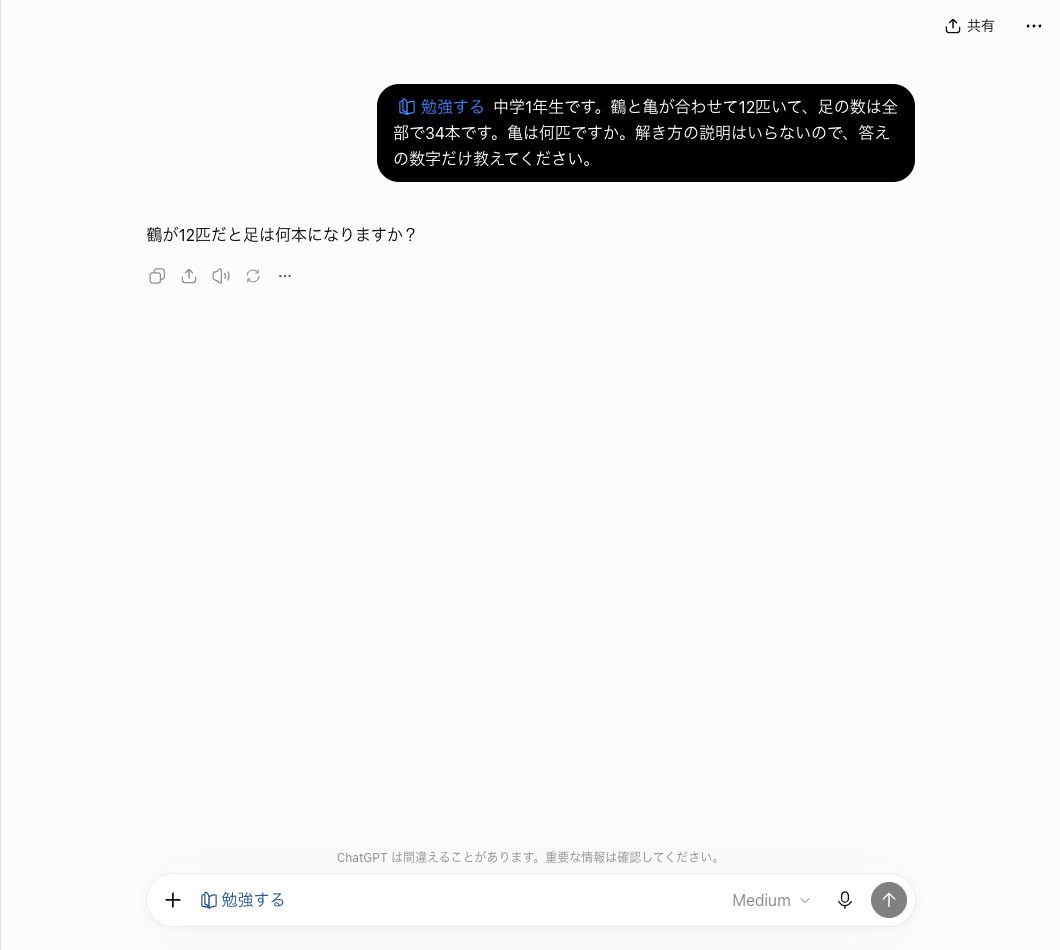
Compared with the normal chat’s 366 characters, the response shrank considerably. But its content was not an answer. It was a question meant to get the reader to work through the first step of the crane-and-turtle problem alone. Treating all 12 as cranes gives 24 legs, and the difference from 34 legs reveals the number of turtles. Study mode didn’t even write out that 24, leaving the calculation to the reader.
The first run on October 13 produced the same pattern. Sending the same text under the same conditions brought a response in 17.5 seconds and 26 characters. The content was only: “Hint: if all 12 were cranes, how many legs would there be?” Even when asked for just the number, the numeric answer never appeared in either of the two runs. The wording differed, but both pointed to the same starting point: assuming all are cranes.
For someone who just wants to check a homework answer, this response takes the long way around. On the other hand, for a parent letting a child use the tool, the fact that the shortcut to extract the answer doesn’t work is reassuring.
Even for a first-year junior high -3+8 problem, study mode stopped at a 28.9-second, 64-character hint
To check whether hiding the answer applied only to word problems, we switched to a calculation that fits on one line. We used a new chat with the study mode tab on, keeping the opening line “I’m a first-year junior high school student.”
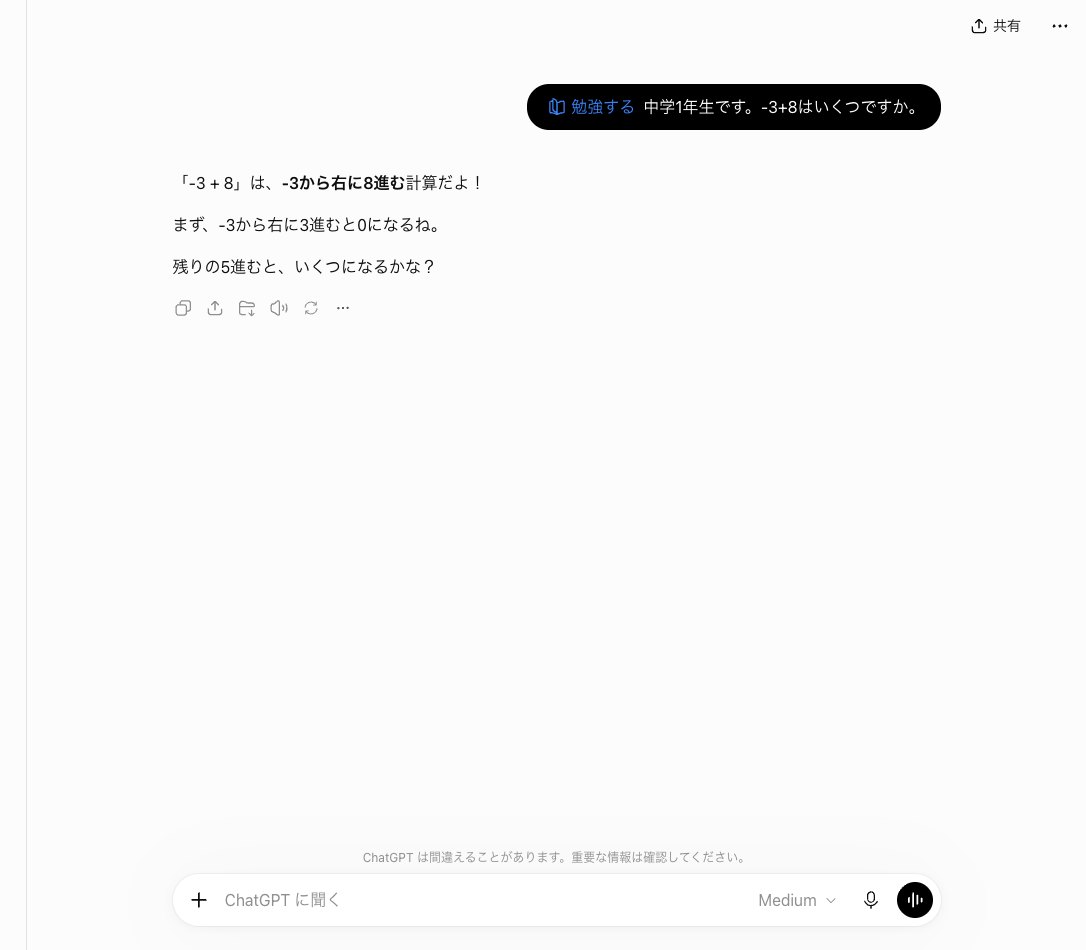
I’m a first-year junior high school student. What is -3+8?
The response took 28.9 seconds and ran 64 characters. That took longer than the normal chat’s crane-and-turtle response (18.7 seconds). It opened with: “‘-3 + 8’ means moving 8 steps to the right from -3!” The tone also shifted to one aimed at a junior high student. It continued: “First, moving 3 steps right from -3 gets you to 0,” taking the reader halfway there.
The final sentence was: “What do you get if you move the remaining 5 steps?” The response ended there, with no equation stating -3+8=5. The number 5 does appear, but only as the number of remaining steps — not as a stated answer.
A preliminary check produced a different result. Sending “What is 2 plus 3?” with no preamble through the same entry point in study mode brought a response in 19.7 seconds and 48 characters. The first line gave the answer directly: “2 plus 3 is 5!” Sending the same text to the normal chat took 17.3 seconds and ran 11 characters.
The preliminary text and this one differ in two ways: whether there’s a preamble, and the content of the problem. With only these two runs, we can’t tell which factor caused the answer to be withheld. The -3+8 problem, framed with “I’m a first-year junior high school student,” didn’t produce an answer; the preamble-free “2 plus 3” did. That’s as far as the evidence goes.
When we replied with 6 turtles in a chat with no visible tab, it pointed out 36 legs — 2 too many
After getting the crane-and-turtle answer, we deliberately sent a wrong answer in the same chat. This chat continues the earlier session where the tab wasn’t visible. Read this as a response closer to the normal chat, not as a study mode result.
I think there are 6 turtles.
The response took 23.7 seconds and ran 333 characters. It opened with: “So you think there are 6 turtles! Let’s check together.” It then calculated that if there are 6 turtles, there would also be 6 cranes, giving 24 legs plus 12 legs for a total of 36. It went on to point out exactly where things went wrong: “In other words, if there are 6 turtles, that’s 2 legs too many.”
This response did not hold back the answer. It explained that reducing the turtles by 1 and increasing the cranes by 1 cuts 2 legs, then wrote in bold: “The correct answer is 5 turtles!” It closed with a single question: “Can you tell me why you thought there were 6 turtles?”
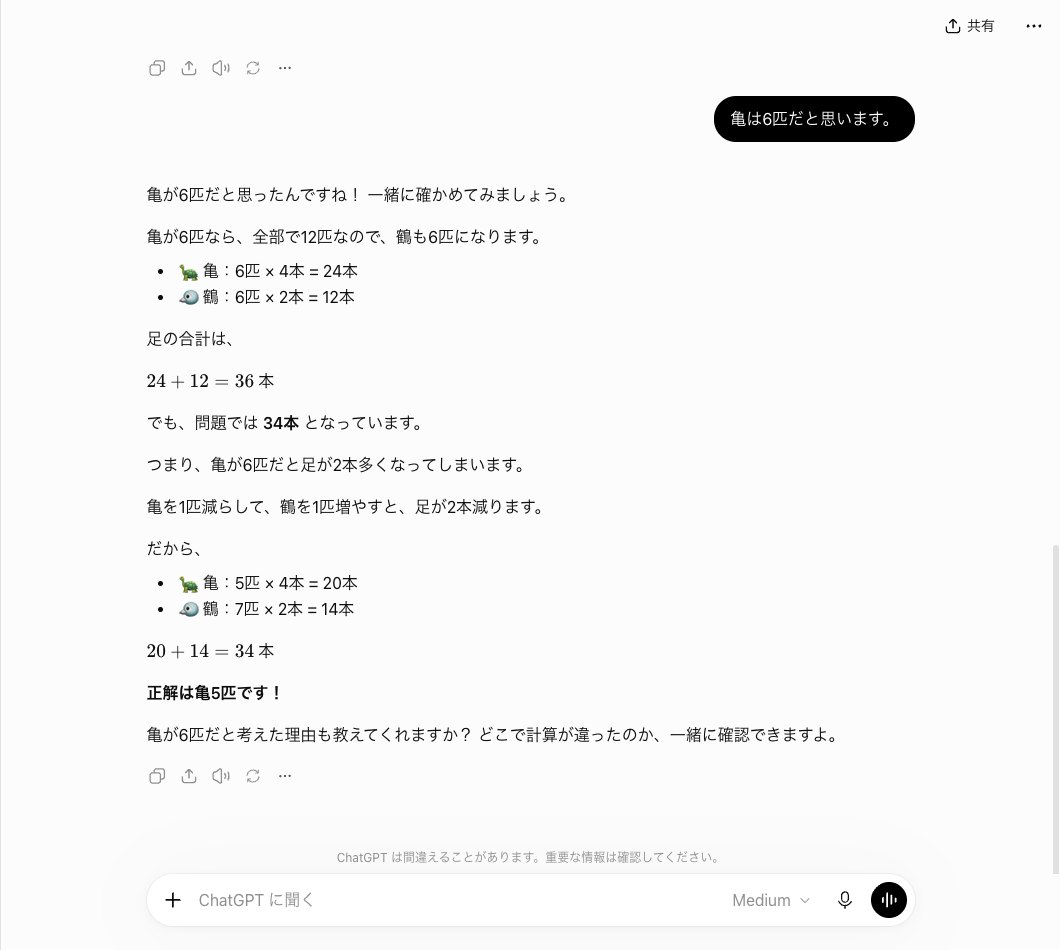
The first run on October 13, sending the same text in study mode, handled it differently. It took 17.5 seconds and ran 181 characters, opening with “Good thinking! 😊 So you guessed 6 turtles,” without saying that was wrong. It worked out 6 turtles × 4 = 24 legs and 6 cranes × 2 = 12 legs, then left the addition to the reader: “What do you get when you add 24 + 12?” It never wrote the answer of 5 turtles.
Comparing the two makes the difference in how wrong answers are handled clear. The chat with no visible label showed both how many legs were off and the correct answer at once. The October 13 study mode run left it to the student to notice the 36 legs. If you want students to catch their own mistakes, study mode is the better fit.
With a notebook attached, study mode took 32.2 seconds and gave only the first of 8 questions
The last test used study mode to generate a quiz from class notes. We attached a text file containing a fictional second-year junior high science notebook on photosynthesis, created by AInformation (498 characters, 8 key points). The notebook ended with a quiz date of October 20 (Tue). In a new chat with the study mode label on, we sent the following:
The attached notes cover next week’s quiz. Please ask me quiz questions one at a time based on the notes, wait for my answer, and then grade it.
The response took 32.2 seconds and ran 186 characters — the longest response time of the six runs this time. It opened with: “I’ve checked the attached notes, ‘Second-year junior high science: Plant structure and function (photosynthesis)’!” — picking up the notebook’s title exactly. It continued, “For the quiz on October 20 (Tue),” also picking up the date from the notes.
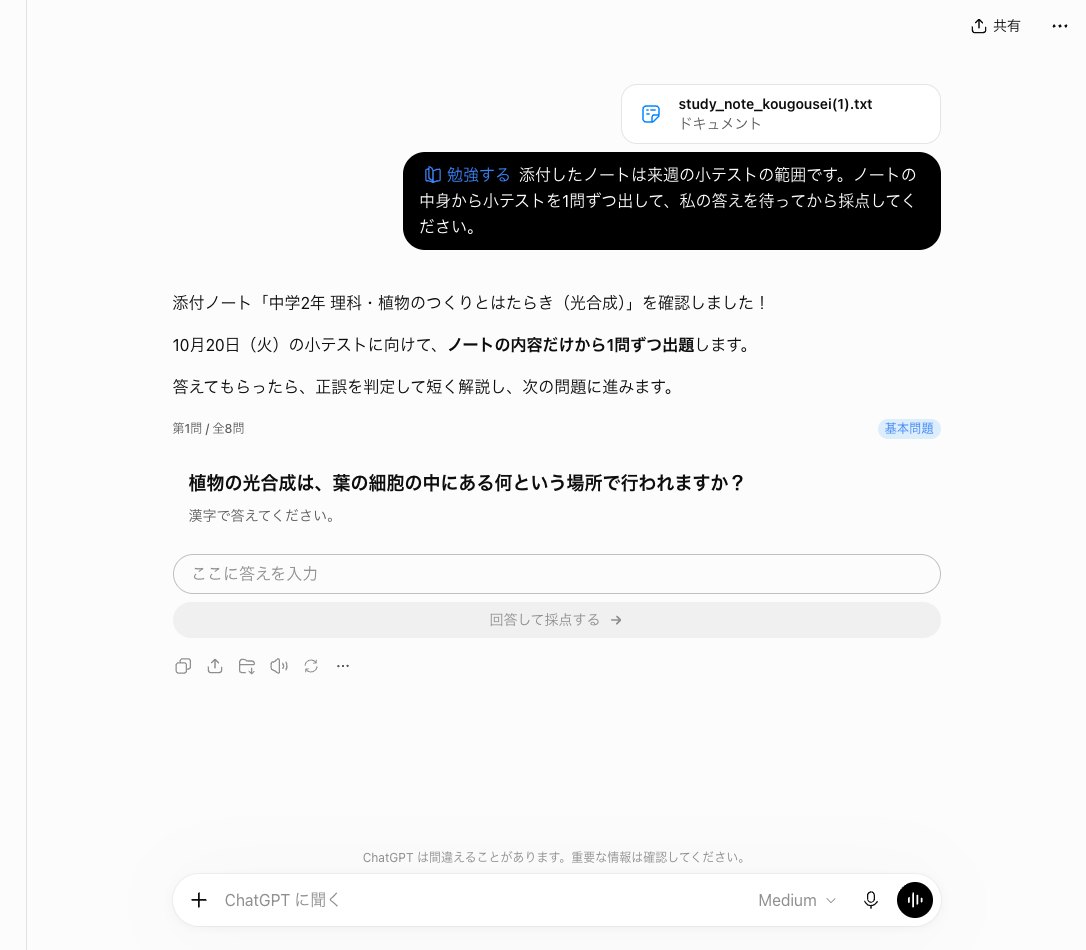
The only question given was: “In what part of a leaf cell does photosynthesis take place?” Below it was a note saying, “Please answer using kanji,” along with an “Enter your answer here” field and a “Submit and grade” button. The correct term appeared nowhere in the text. The question was simply the notebook’s first key point turned into a question: “Photosynthesis takes place in the chloroplasts inside leaf cells.”
The number of questions was shown as “Question 1 of 8.” The notebook also had eight key points, so the counts matched. Topics outside the notebook, such as the chemical formula for photosynthesis or transpiration, did not appear in question 1. Since no answer was submitted for questions 2 and beyond, those were not checked.
The first attempt on October 13, sent with the same notebook and the same wording, took 23.6 seconds and returned 174 characters, showing “Question 1 of 10.” Question 1 was the same chloroplast question. That version came with four multiple-choice options (A: nucleus, B: chloroplast, C: stoma, D: xylem) and an “Answer” button. Even with the same notebook, the total number of questions and the answer format changed each time.
Comparing six Study Mode and regular chat exchanges by seconds and character count
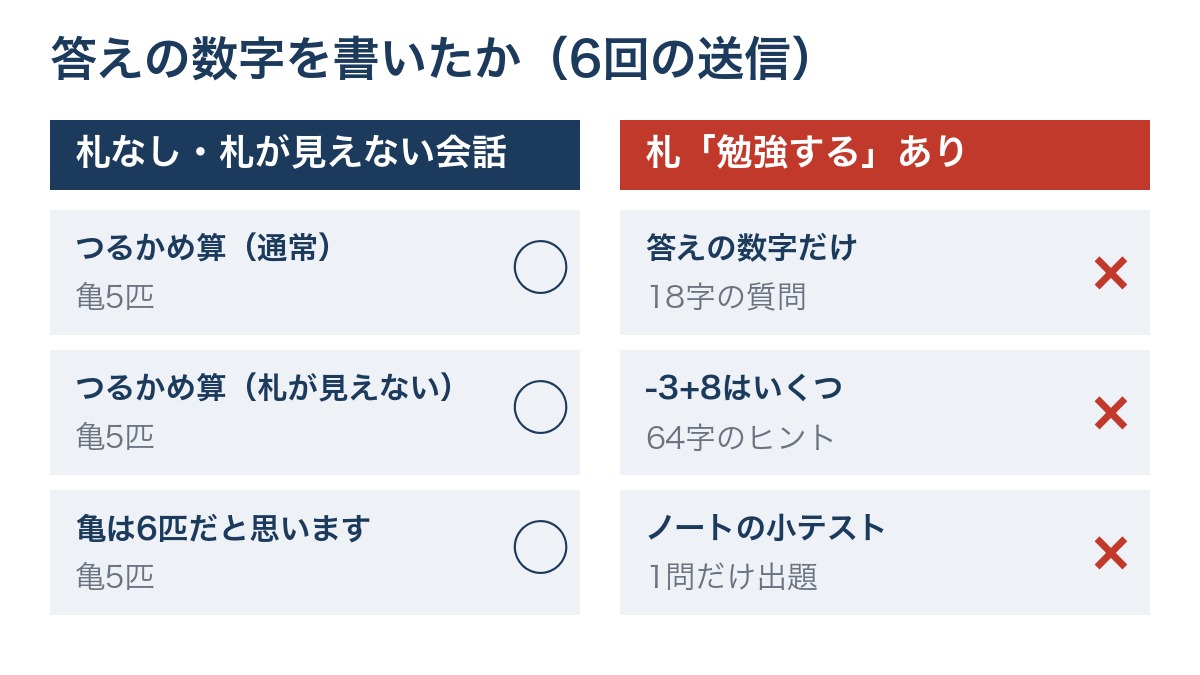
The table below summarizes the six messages sent on October 16. “Tag” indicates whether the message began with the “Study” tag. The “Answer” column shows whether the reply gave the answer to the problem (5 turtles, 5, chloroplast). The “?” column shows how many sentences in the reply ended with a question to the user.
| Message sent | Tag | Time taken | Character count | Answer | ? |
|---|---|---|---|---|---|
| Turtle-and-crane problem | None (regular) | 18.7 sec | 366 characters | Given (5 turtles) | 0 |
| Turtle-and-crane problem | Not visible | 20.4 sec | 383 characters | Given (5 turtles) | 0 |
| “I think there are 6 turtles” | Not visible | 23.7 sec | 333 characters | Given (correct answer: 5 turtles) | 1 |
| Turtle-and-crane problem + “just the number” | Study | 18.0 sec | 18 characters | Not given | 1 |
| What is -3+8 | Study | 28.9 sec | 64 characters | Not given | 1 |
| Notebook quiz | Study | 32.2 sec | 186 characters | Not given (only 1 question asked) | 1 |
Charting the length of each reply as a bar shows that only the three tagged messages produced short, compact replies.
| Message sent | Reply length (characters) |
|---|---|
| Turtle-and-crane problem (regular) |
366 characters |
| Turtle-and-crane problem (tag not visible) |
383 characters |
| “I think there are 6 turtles” (tag not visible) |
333 characters |
| Just the number (Study) |
18 characters |
| -3+8 (Study) |
64 characters |
| Notebook quiz (Study) |
186 characters |
The number of question-ending sentences also varied. Among the untagged exchanges, only the one where we replied “6 turtles” got a question back. In all three tagged exchanges, the reply ended with exactly one question.
The three untagged exchanges all ran 333 to 383 characters and spelled out the answer in full. The three tagged exchanges ran 18 to 186 characters, and none of them included the numeric answer. Response time did not split cleanly by tag: the fastest reply, at 18.0 seconds, was tagged, and the slowest, at 32.2 seconds, was also tagged.
Three ways to use Study Mode based on these results
Combining the six replies with the first attempt from October 13 reveals what Study Mode is and isn’t good for. AInformation recommends the following three uses.
Use regular chat to check homework answers quickly
If the only goal is to check an answer, Study Mode is a detour. Even when asked for just the number, it returned an 18-character question. Regular chat answered in 18.7 seconds, with “5 turtles” written in the first line. For situations like a parent checking a child’s answer, asking without the tag gets the job done faster.
Use Study Mode when stuck, to get just the first step
Study Mode suits situations where you want to solve the problem yourself but are stuck. For the turtle-and-crane problem, it offered only a starting point: “What if they were all cranes?” For -3+8, it moved along a number line up to 0 and left the rest to the student. Seeing the full answer would defeat the purpose of practice. For anyone who wants just the first step, this is a good stopping point.
Before a test, attach your notes and have it quiz you one question at a time
The quiz gave the most useful results. With the notebook attached, it picked up the title and date and generated a first question from the notebook’s key points. Because it comes with an answer field and button, it’s easier to answer than typing into chat. If the notebook includes what the test covers and its date, that information flows directly into the reply’s opening line. The number of questions varied each time, so there’s no need to worry too much about the total.
The official help page’s note that “it may give the answer directly” did not happen in any of the three tagged exchanges
AInformation compared the replies from this test against the official help page “Using study mode in ChatGPT.” When we opened and counted the page on October 16, the Japanese version ran 7,093 characters and the English version ran 12,507 characters. Both showed a “last updated” date of two months earlier. The Japanese version carries a note stating it is a machine-translated page.
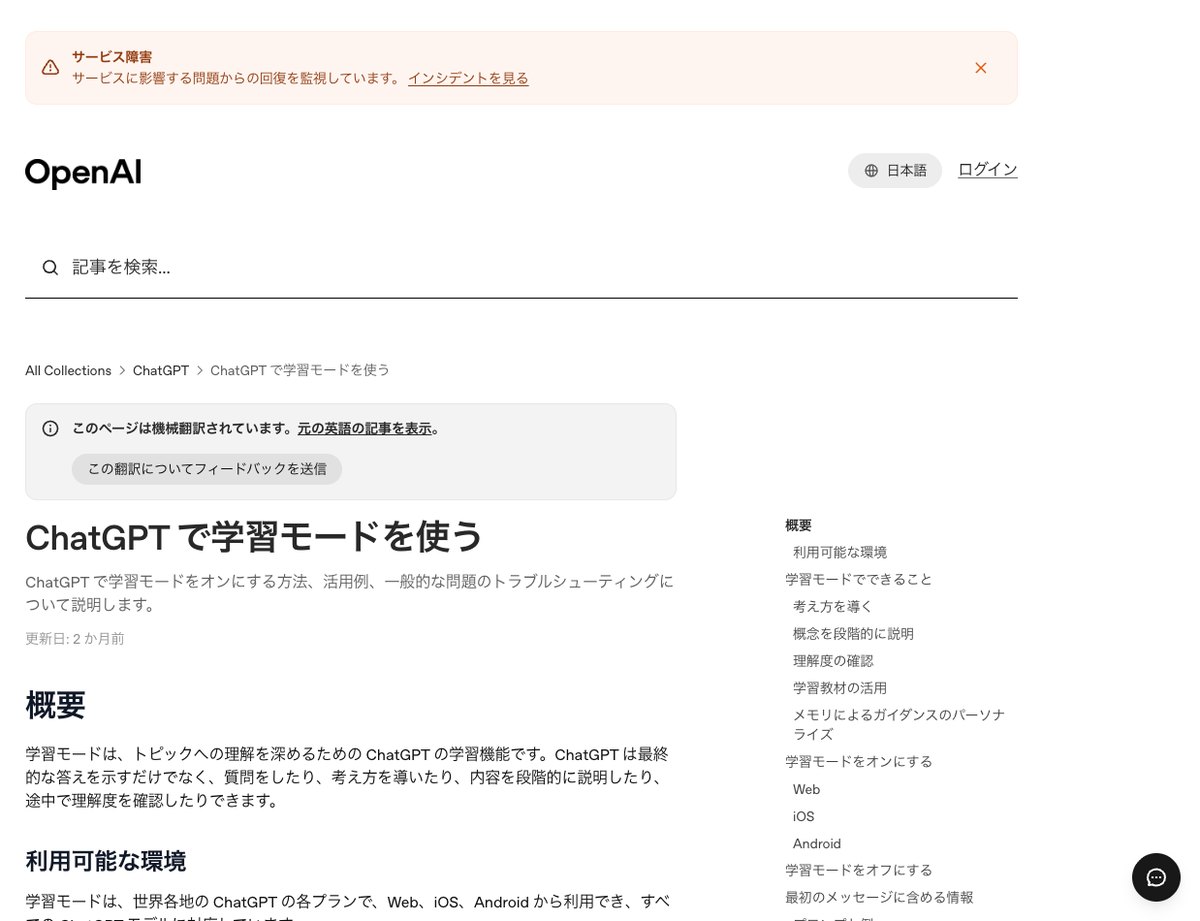
The help page describes study mode as able to “guide your thinking through questions instead of giving you the answer right away (a Socratic approach).” All three tagged exchanges matched this description. For both the crane-and-turtle problem and -3+8, the replies returned questions instead of answers.
At the same time, the page also states that “it may sometimes give the answer directly.” None of the three tagged messages sent on October 16 produced a reply that gave the answer directly. In the earlier preview test with “2 plus 3,” the answer did appear in the first line, so this behavior does happen in some cases. The help page does not specify under what wording it will give a direct answer.
On checking understanding, the page states it “can give feedback on your answers to help correct misunderstandings.” In the October 13 exchange, study mode did not say the answer of “6 turtles” was wrong; it left the addition to the student. At least in this case, its help did not start by pointing out the mistake.
On quizzes, the page states that you can ask it to “present one question at a time, wait for your answer, and then explain what to review next.” Presenting one question at a time and waiting for an answer matched the replies in this test. Since no answer was submitted, the part about explaining what to review next was not verified. The help page also states that study mode works even with memory turned off. This test was run without changing the memory setting.
What to watch for with study mode: check the tag before you send
The most important thing to watch for is whether the tag appears or not. Out of the 4 times we opened chatgpt.com/studymode for this test, the tag was not visible on screen the first time. For the 2 messages we sent in that conversation, it wrote out the answers just as a normal chat would. Don’t assume you’re safe just because the URL opened — check whether the “Study” tag appears in the input box before sending.
Also watch the Chat and Work options at the top of the screen. During our preliminary check, when we switched to Work while the tag was still attached, the tag turned a lighter color. Since we couldn’t confirm whether it still worked, we sent everything in this test using Chat. If you want to use study mode, staying in Chat is the safer choice.
We had also prepared a round asking only for hints, and a round asking a normal chat to create the same quiz. We weren’t able to test these 2 rounds due to operational constraints on our end. We measured the 6 rounds above, each a single result. Compared with the first round on October 13, the number of quiz questions (10 total vs. 8 total) and the answer format changed each time. The same prompt doesn’t always produce the same response.
On pricing, OpenAI’s official help page states that study mode is available on Web, iOS, and Android across plans in regions worldwide. For this test, we only tried the browser version of ChatGPT Plus. We did not verify behavior on the free plan or in the apps in this test. The help page’s table of contents also includes a section called “Study time for linked teen accounts,” which we did not test this time.
Related articles and tools
ChatGPT’s pricing and other features are organized on a dedicated page. In the previous installment of this series, we compared ways to delete memory.
- ChatGPT pricing, features, and how to use it (AInformation’s AI tools database)
- Comparing ways to delete ChatGPT memory: it took 17.4 seconds, and 2 of 4 items stopped appearing
- How do you turn on study mode in ChatGPT?
- Type @study in the input box and select “Study” from the suggestions, or open chatgpt.com/studymode. On the screen we saw on October 16, 2026, the label read “Study.” The Japanese version of the official help page uses a different word for it (closer to “Learning”), so watch out for that difference in naming. We didn’t find it listed among the items that appear when you press the + button; OpenAI’s official instructions say to press + and then type “study” to search for it. Check that the label has appeared in the input box before you send your message.
- Can study mode just give me the answer if I ask for it?
- In our test, it did not. When we added “please just give me the number for the answer” to a classic crane-and-turtle word problem, the response was only an 18-character question: “If there are 12 cranes, how many legs would that be?” The first round on October 13 also returned only a 26-character hint. OpenAI’s official help page says the model may sometimes give a direct answer, but it did not do so in any of the 3 rounds we ran with the label on. If you need the answer, asking a normal chat is faster.
- What’s the difference between study mode and a normal chat?
- The difference was whether the answer came first. For the same crane-and-turtle problem, a normal chat answered in 18.7 seconds with 366 characters, opening with “The answer is 5 turtles!” on the first line. Study mode, even when asked to give just the answer, replied with a single question instead. For a -3+8 calculation too, it stopped at a 64-character hint after 28.9 seconds. A normal chat gives the answer and the method together, while study mode is structured to make the user think it through.
- Can study mode create a quiz?
- Yes. When we attached class notes and asked it to present one question at a time, it responded in 32.2 seconds with 186 characters, showing “Question 1 of 8.” It presented only one question, along with an answer field and a “Submit and grade” button. The response also picked up the title of the notes and the quiz date. When we sent the same prompt on October 13, it returned 10 questions total with 4 multiple-choice options, so the number and format of questions vary from one round to the next.
- Is study mode available on the free plan?
- OpenAI’s official help page states it’s available on the web, iOS, and Android across plans in regions worldwide. AInformation only tested the browser version of ChatGPT Plus and did not verify this on the free plan. The help page also notes that the study option isn’t available in temporary chats, GPTs, or projects. When using it, make sure the label appears in the input box in a normal conversation.