
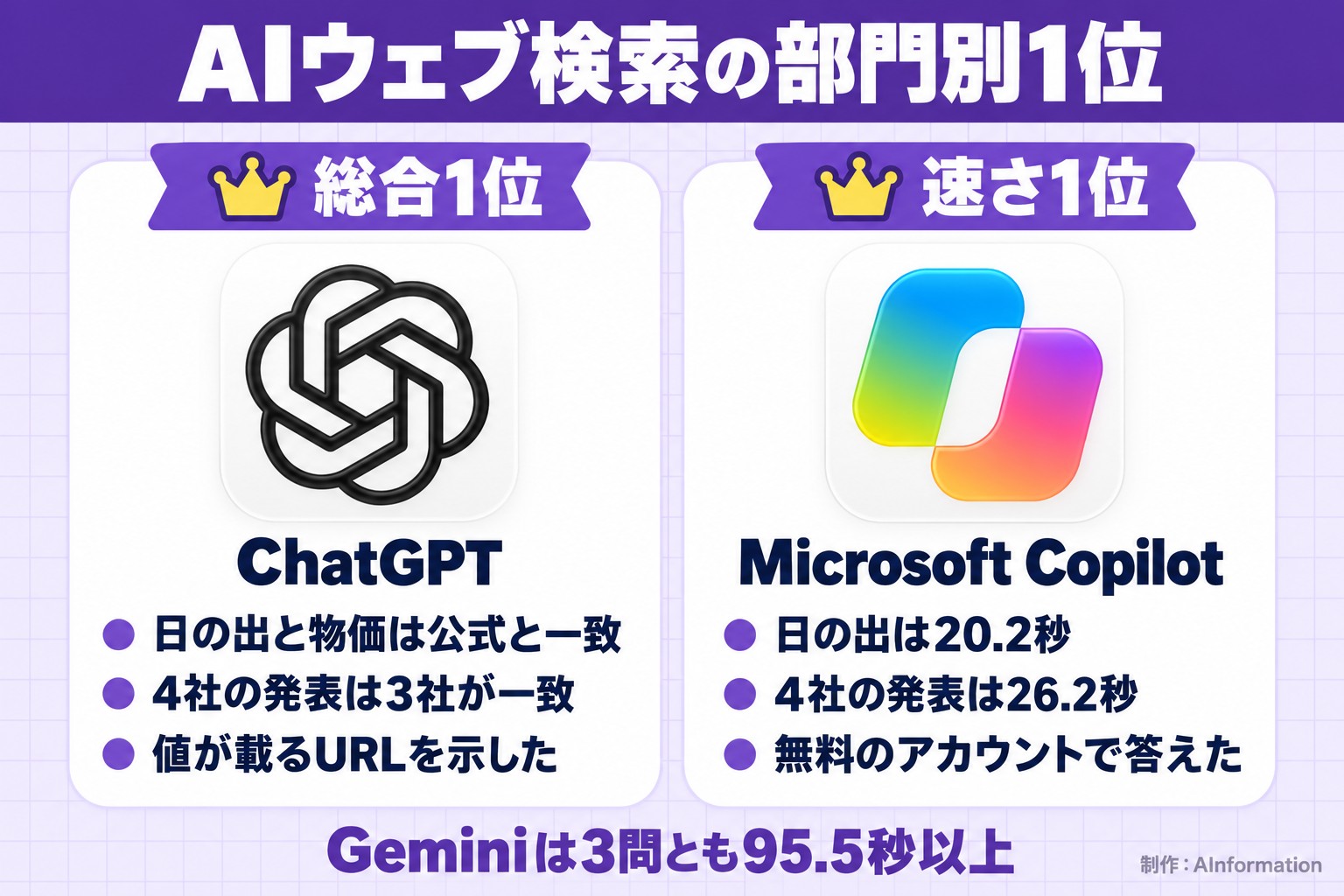
We sent the same three questions to the web search features of ChatGPT, Gemini, Claude, and Microsoft Copilot, then checked the answers against official figures. ChatGPT came in first: its sunrise and price answers matched the official data, and 3 of its 4 company-announcement answers matched too. Copilot was the fastest, answering the sunrise question in 20.2 seconds.
- On October 16, 2026, we sent the same three questions to the web search features of ChatGPT, Gemini, Claude, and Microsoft Copilot, and checked the answers against figures published by the National Astronomical Observatory of Japan (NAOJ) and the Statistics Bureau of Japan
- ChatGPT ranked first overall. Its sunrise and price answers matched the official figures, and for the four-company announcement question, 3 of the 4 companies’ answers matched the dates on the official pages
- Microsoft Copilot was the fastest, answering the sunrise and sunset question in 20.2 seconds. Gemini took 95.5 seconds or more on all three questions
- Gemini thought for 218.2 seconds on the four-company announcement question, then declined, saying “I’m still learning about this”
- Claude showed an “allow once” confirmation prompt before opening pages from the National Astronomical Observatory of Japan (NAOJ) or OpenAI. On the price question, it returned the same figure as the official source in 26.2 seconds
- We’ve included three ready-to-use prompts that request sources, plus tips for checking the URLs in the answers
How to use AI web search: just name the source and ask for a URL
Getting an AI to search the web is as simple as specifying “which source to use” and asking it to “include the URL” in your question. On October 16, 2026, AInformation sent the same three prompts below, as written, to the four services ChatGPT, Gemini, Claude, and Microsoft Copilot. Each question has an answer that changes by the day. If the AI doesn’t search for current information, it can’t answer correctly.
Easy question: ask about “today” and name the source site
The first question asks for today’s sunrise and sunset times in Tokyo. We asked the AI to cite a page from the National Astronomical Observatory of Japan (NAOJ) and include the URL. We wrote only “today” for the date, which also tests whether the AI can correctly identify today’s date.
Please tell me today’s sunrise and sunset times in Tokyo (Tokyo Metropolitan Government), citing a page from the National Astronomical Observatory of Japan (NAOJ) as your source. Please also include the source URL.
Medium question: narrow down the time period, source type, and count
The second question asks about recent announcements from four companies. We stacked three conditions: “within the last 7 days,” “from an official blog or official help page,” and “one per company.” This question checks whether the AI can answer without mixing in old announcements or information from summary sites.
Please tell me one AI feature each that the 4 companies OpenAI, Google, Anthropic, and Microsoft have announced on their official blogs or official help pages within the last 7 days, including the announcement date and URL for each.
Hard question: name the exact figure that’s easy to mix up
The third question asks about Japan’s Consumer Price Index. The Statistics Bureau of Japan publishes separate figures for the nation as a whole and for Tokyo’s 23 wards. Within the national figures, “all items” and “all items less fresh food” appear side by side. Since there are many similar numbers, we checked whether the AI would answer with a different figure than the one requested. Having it also state the publication date and the target month makes it easy to see at a glance which month the figure covers.
Please tell me the latest year-over-year change in Japan’s Consumer Price Index (all items), citing the Statistics Bureau of Japan as your source. Please also include the publication date and the target month.
For ChatGPT, we turned on web search from the + button in the input box before sending
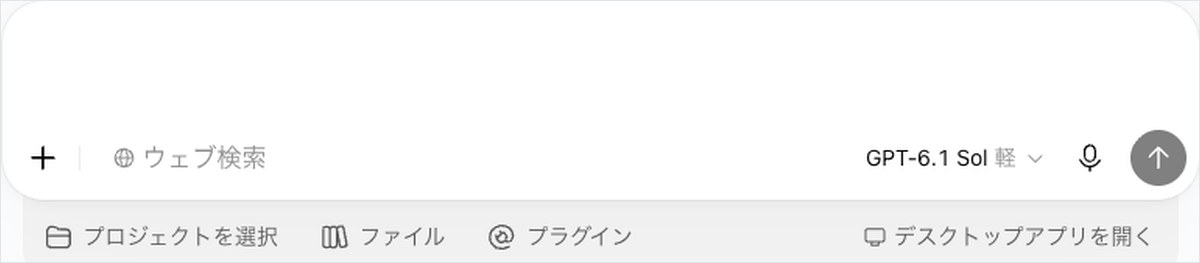
Only for ChatGPT did we press the + button to the left of the input box and select “Web search” before sending. Once enabled, a “Web search” tag appears in the input box. We did this same step before sending all three questions, and the tag remained visible on the answer screen as well. The model shown on screen for all three questions was “GPT-6.1 Sol Light.”
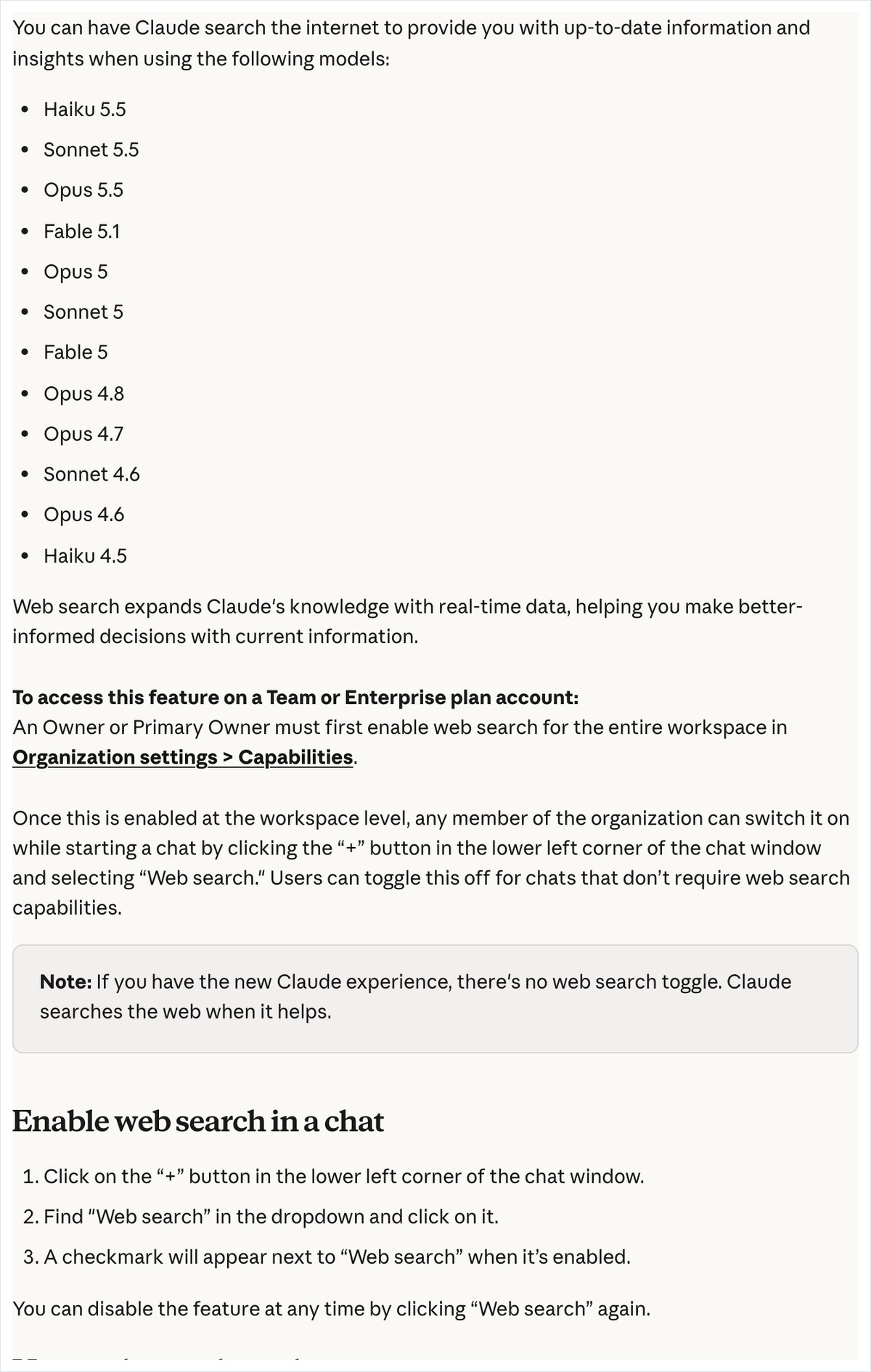
Claude and Gemini were used as is, without toggling any search setting. Claude’s official help page states that the newer Claude interface has no web search toggle; instead, Claude searches on its own when needed. In this test, Claude displayed “Searched the web” at the top of its answer for all three questions.
Gemini’s input box shows only “Ask Gemini” along with the model name, with no toggle for enabling search. Even so, for the price question, source tags appeared alongside the answer, citing a page from the Statistics Bureau of Japan. We intended to switch Microsoft Copilot’s response mode to search. However, due to operational constraints on our end, the switch did not take effect this time, so we sent the questions in whatever mode was active when the chat opened.
Comparing 4 AI web search tools: ChatGPT ranks first, Microsoft Copilot is fastest
Here’s the conclusion up front. ChatGPT had the most answers that matched official figures across the three questions. In this web search comparison, we rank ChatGPT first.
ChatGPT answered the sunrise and sunset question in 48.4 seconds with “5:48 a.m.” and “5:05 p.m.,” citing the National Astronomical Observatory of Japan (NAOJ)’s October Tokyo page. It also got the price question right in 51.5 seconds, answering “a 1.9% increase,” “August 2026,” and “September 18, 2026.” For the four-company announcement question, the announcements from 3 companies—OpenAI, Google, and Anthropic—matched their official pages down to the date. The only exception was Microsoft: when our editors searched Microsoft’s official blog, they couldn’t find the same announcement.
Microsoft Copilot came in second. We used it with a free Microsoft account, and it had the shortest response time of the four tools for all three questions: 20.2 seconds for both the sunrise question and the price question, and 26.2 seconds for the four-company announcement question. The sunrise and price answers matched the official figures. However, for the four-company announcement question, it cited articles for Anthropic and Microsoft that were not actually feature announcements.
Gemini came in third. We used it with Google AI Pro, and the model shown on screen was Flash. It answered the sunrise and price questions correctly, but took 95.5 seconds and 205.6 seconds respectively. On the four-company announcement question, it thought for 218.2 seconds and then declined, replying, “I’m still learning about this.”
Claude came in fourth. We used it with Claude Max, and the model shown on screen was “Opus 4.8 High.” It answered the price question in 26.2 seconds with the same figure and URL as the official source. For the sunrise and four-company announcement questions, a confirmation prompt asking for permission appeared before it would open the pages. Since our automated process is designed not to click “allow,” the answers to these two questions stopped short at the confirmation step.
We ranked Claude fourth because it only reached a final answer for one question, the price question. It’s possible that clicking “allow” would have produced further answers. However, this test did not verify what the answer would have been after clicking allow.
Scorecard comparing AI web search across 4 AIs
| Item | ChatGPT | Gemini | Claude | Microsoft Copilot |
|---|---|---|---|---|
| Easy: Sunrise and sunset | Good 48.4 sec | Good 95.5 sec, URL was an entry page | N/A ended at permission check | Good 20.2 sec |
| Medium: Announcements from 4 companies | Fair matched official sources for 3 companies | Poor declined, saying it was still learning | N/A ended at permission check | Fair items for 2 companies were not features |
| Hard: Consumer price index | Good 51.5 sec | Good 205.6 sec | Good 26.2 sec | Good 20.2 sec |
| How sources were shown | URL with the value, for 2 of the questions | Mixed in citation tags from other sites | Official URL for price data | Short citation tags, no URL for price data |
| Japanese | Short, clear, natural | Refusal message was boilerplate | Only the first line was in English | Natural, repeated the conclusion twice |
| Overall | 1st | 3rd | 4th | 2nd |
Every timing is based on a single measurement. Even with the same prompt, search results can change depending on the day or the attempt.
How we compared: the same 3 questions sent once each in a new chat to 4 AIs
AInformation operated all 4 AIs in a computer browser on the afternoon of October 16, 2026. The plans used were 3 monthly subscriptions: ChatGPT Pro, Google AI Pro, and Claude Max. Only Microsoft Copilot was used by signing in with a free Microsoft account. We did not select a model for any of the AIs; each prompt was sent using whatever model appeared by default.
- Open a new chat in each of the 4 AIs
- For ChatGPT only, add “web search” from the + button in the input box
- Send the easy question (sunrise and sunset) to each of the 4 AIs in turn and wait for the answer
- Send the medium question (announcements from 4 companies) and the hard question (price data) the same way, opening a new chat each time
- Record the time to answer and the character count, then check the answers against official pages
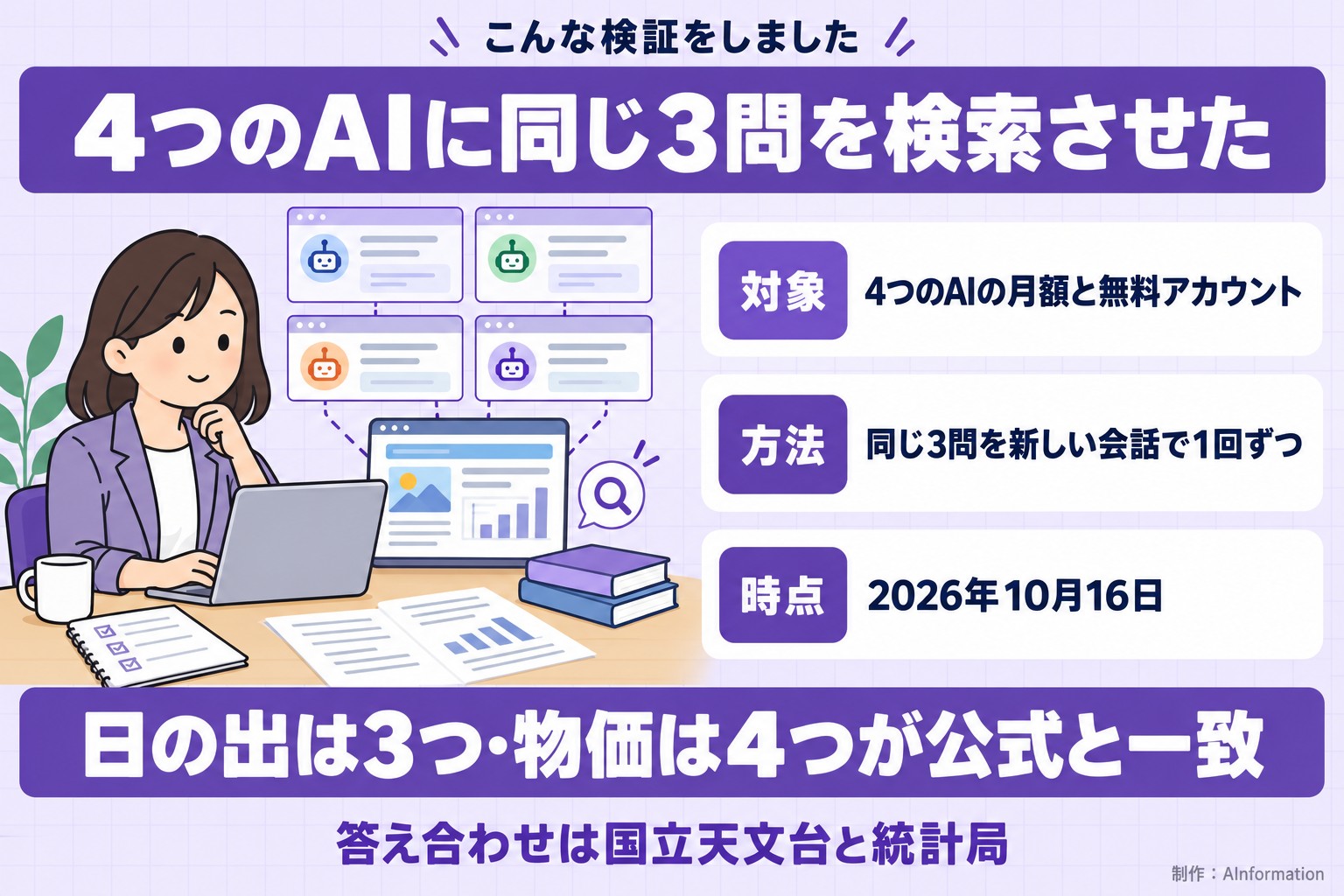
We did not send questions to the same AI back to back; we rotated through them in order. Sending one question each to ChatGPT, Gemini, Claude, and Microsoft Copilot in turn meant 12 total sends across the 3 questions. We allowed extra time while waiting for each answer.
We checked the answers against two official pages. For sunrise times, we used the National Astronomical Observatory of Japan (NAOJ)’s “Sunrise and Sunset Times for Tokyo (Tokyo Metropolitan Government), October 2026” page. For prices, we used the “Consumer Price Index (CPI), Nationwide (Summary of Latest Monthly Results)” page from the Statistics Bureau of Japan. In Tokyo on October 16, sunrise was at 5:48 a.m. and sunset was at 5:05 p.m. We counted answers as correct if they were within one minute of these times. The latest price data available was for August 2026, published on September 18, 2026, and showed overall prices up 1.9% year over year.
For the announcements from 4 companies, we checked against AInformation’s own daily records of each company’s official updates. Where no record existed, we opened the official site of the company named in the answer and verified the date and content.
We did not include a screenshot of Microsoft Copilot because our account name and the titles of past chats appeared in the frame. The description of Copilot’s answers here is based on the text we recorded. Instead, we include an official page that explains Copilot’s search mode.
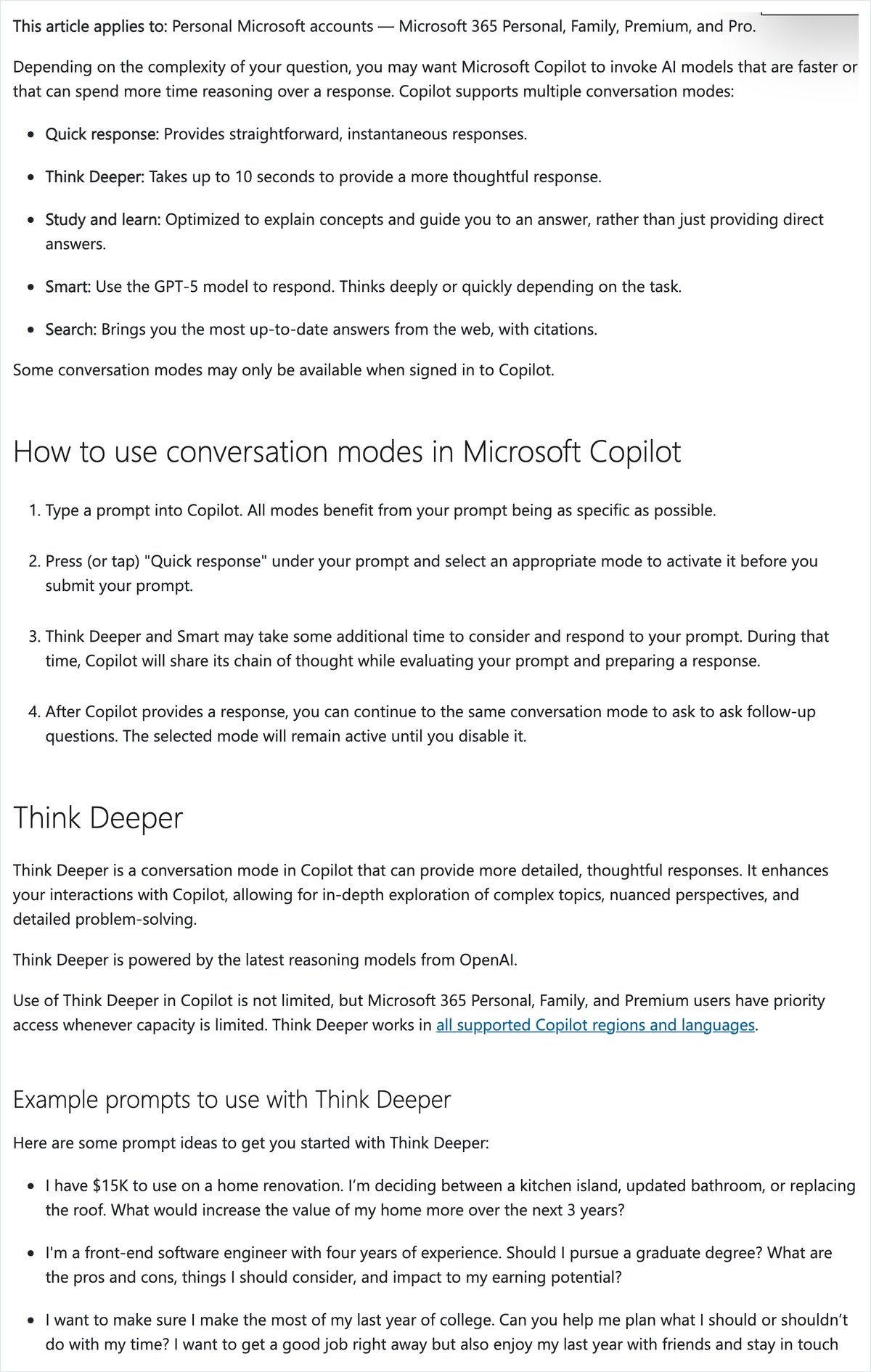
According to Microsoft’s official explanation, Copilot’s search mode is available to everyone who uses Copilot. Answers come with citations, and the mode is built to return the latest information from the web. Even with the free account used in this test, the answer text included citation tags such as “nao” and “go.”
Sunrise and sunset: ChatGPT, Gemini, and Copilot all matched at 5:48 a.m. and 5:05 p.m.
On the easy question, all three AI tools matched the National Astronomical Observatory of Japan (NAOJ)’s values exactly. ChatGPT, Gemini, and Microsoft Copilot all answered that sunrise was at 5:48 a.m. and sunset at 5:05 p.m. The differences showed up in the response time and in how detailed the cited URL was.
ChatGPT linked directly to the Tokyo page for October
ChatGPT answered in 48.4 seconds with a 186-character response. It first wrote “Today, October 16, 2026 (Fri)” and noted that the time was in Japan Standard Time. As its source, it cited “Sunrise and Sunset Times for Tokyo (Tokyo Metropolitan Government), October 2026” from the National Astronomical Observatory of Japan (NAOJ)’s Ephemeris Computation Office.
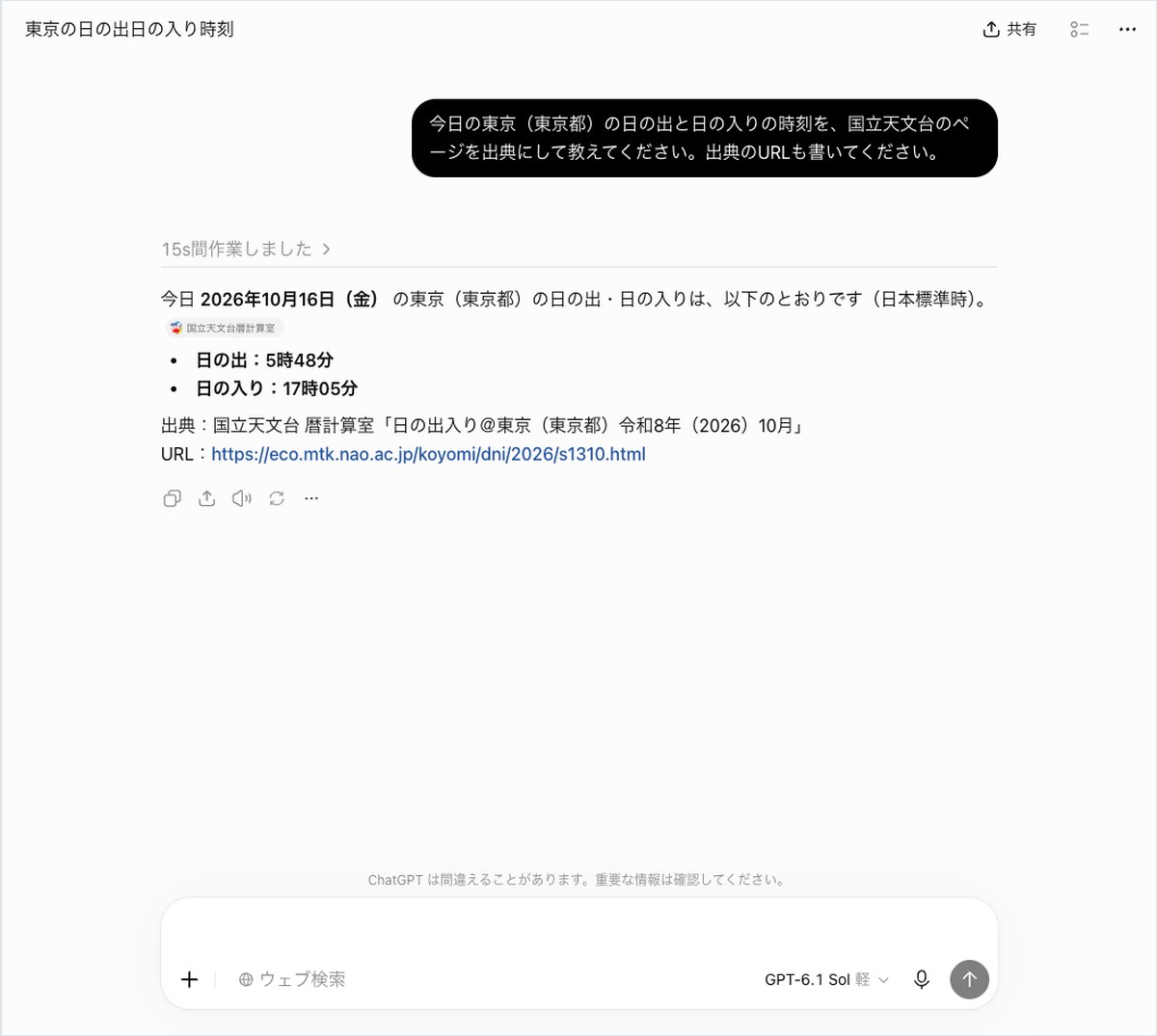
The URL ChatGPT gave links to a page listing every day’s values for October in a single table. When we opened it, the row for the 16th showed sunrise and sunset times in the same format as the answer. A reader checking this for themselves can open the same URL and find the same row.
Gemini gave the correct times, but the URL linked to a landing page
Gemini’s times were correct. But it took 95.5 seconds to answer, longer than ChatGPT’s 48.4 seconds. The answer was 170 characters and listed sunrise and sunset as bullet points.
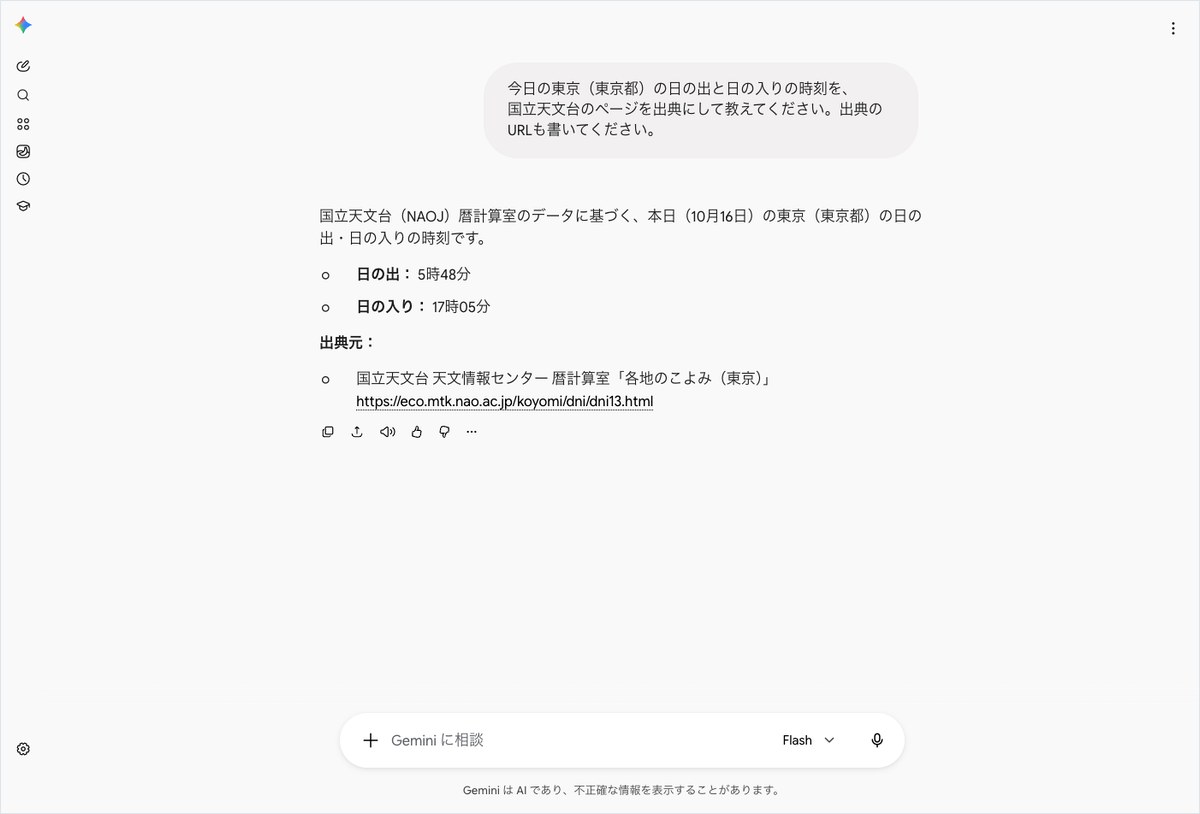
What stood out was the URL. Gemini linked to a page called “Tokyo (Tokyo Metropolitan Government) Calendar,” which lists entry points for each month from January through December. To see the value for the 16th, a reader would need to click through to “October Sun” from there. No citation tag appeared next to the answer either; the URL was simply written into the body text.
Copilot answered in 20.2 seconds and linked to today’s calendar page
Microsoft Copilot answered in 20.2 seconds with a 244-character response, the fastest of the four AIs. Its source was the National Astronomical Observatory of Japan (NAOJ) Ephemeris Computation Office page, “Today’s Calendar.” It added that the same values could also be found in “the National Astronomical Observatory of Japan (NAOJ) list of sunrise and sunset times for Tokyo in October 2026,” showing values from two pages side by side.
Claude asked for permission before opening the National Astronomical Observatory of Japan (NAOJ) page
Claude wrote, “I will check the daily values for Tokyo in October 2026 directly on the NAOJ Ephemeris Computation Office page,” then asked for permission to open the page. At the bottom of the screen, a message read “Claude is trying to retrieve a web page,” showing the URL of the National Astronomical Observatory of Japan (NAOJ) calculation page. There were three buttons: “Deny,” “Always allow this website,” and “Allow once.”
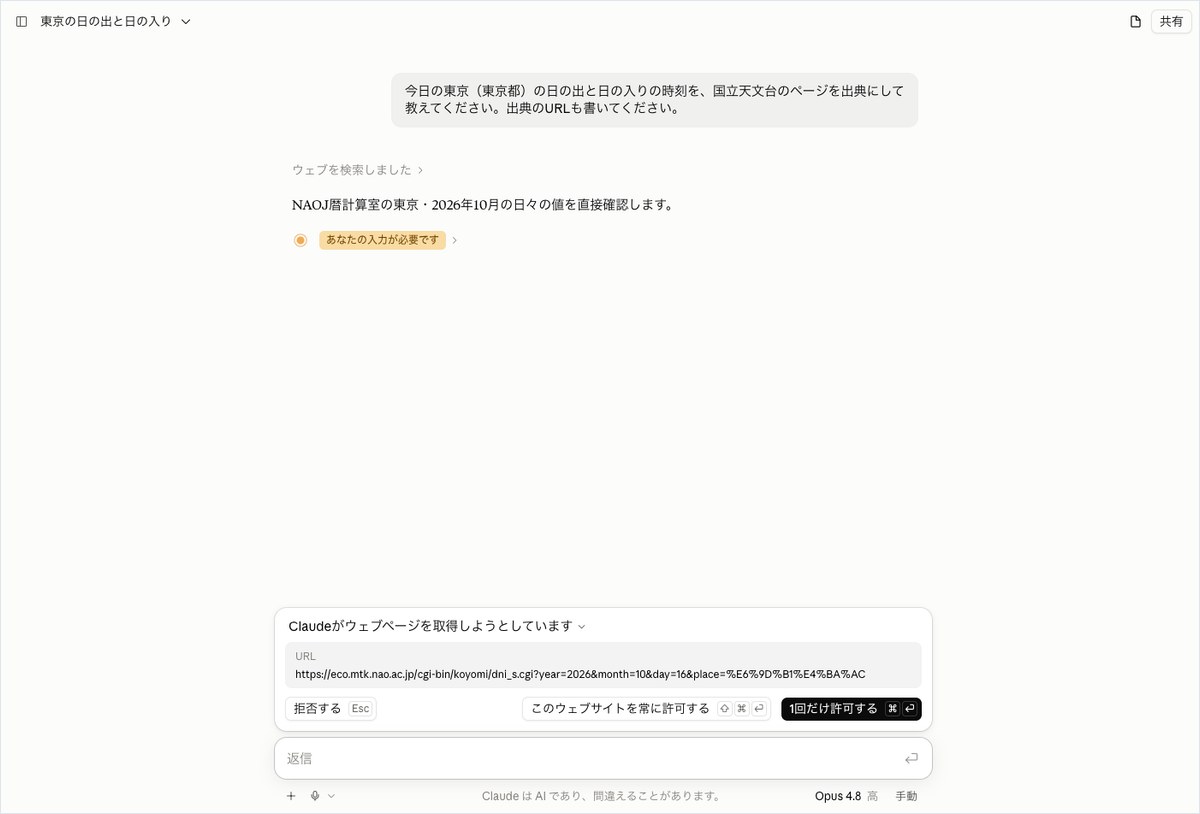
The editorial team’s automated operation is not built to answer this kind of confirmation prompt. So Claude’s answer stops at this screen, 26.2 seconds after being sent. The page it was trying to open was the National Astronomical Observatory of Japan (NAOJ) page specifying October 16 and Tokyo. The destination was correct, but the final time values were never confirmed.
In the lower right of the input field, next to the model name, a “Manual” label appeared. This test cannot tell whether this label is related to how the confirmation prompt appeared.
ChatGPT matched announcement dates to official pages for three of four companies
For the medium-difficulty question, no AI confirmed all four companies’ announcements against official sources. ChatGPT came closest: for OpenAI, Google, and Anthropic, even the announcement dates matched the official pages for all 3 companies. Microsoft Copilot provided four URLs that all opened, but two of them pointed to articles that were not feature announcements.
ChatGPT picked up claude.com’s OpenTelemetry announcement
ChatGPT returned a 639-character answer in 82.5 seconds, summarizing the four companies in a table. For OpenAI, it listed the October 15 “GPT-Live-1.1” release and the new voice, which matched the official help page update. For Google, it listed the Gemini app’s task feature from October 13. The blog.google article from the same day described switching from chat to tasks.
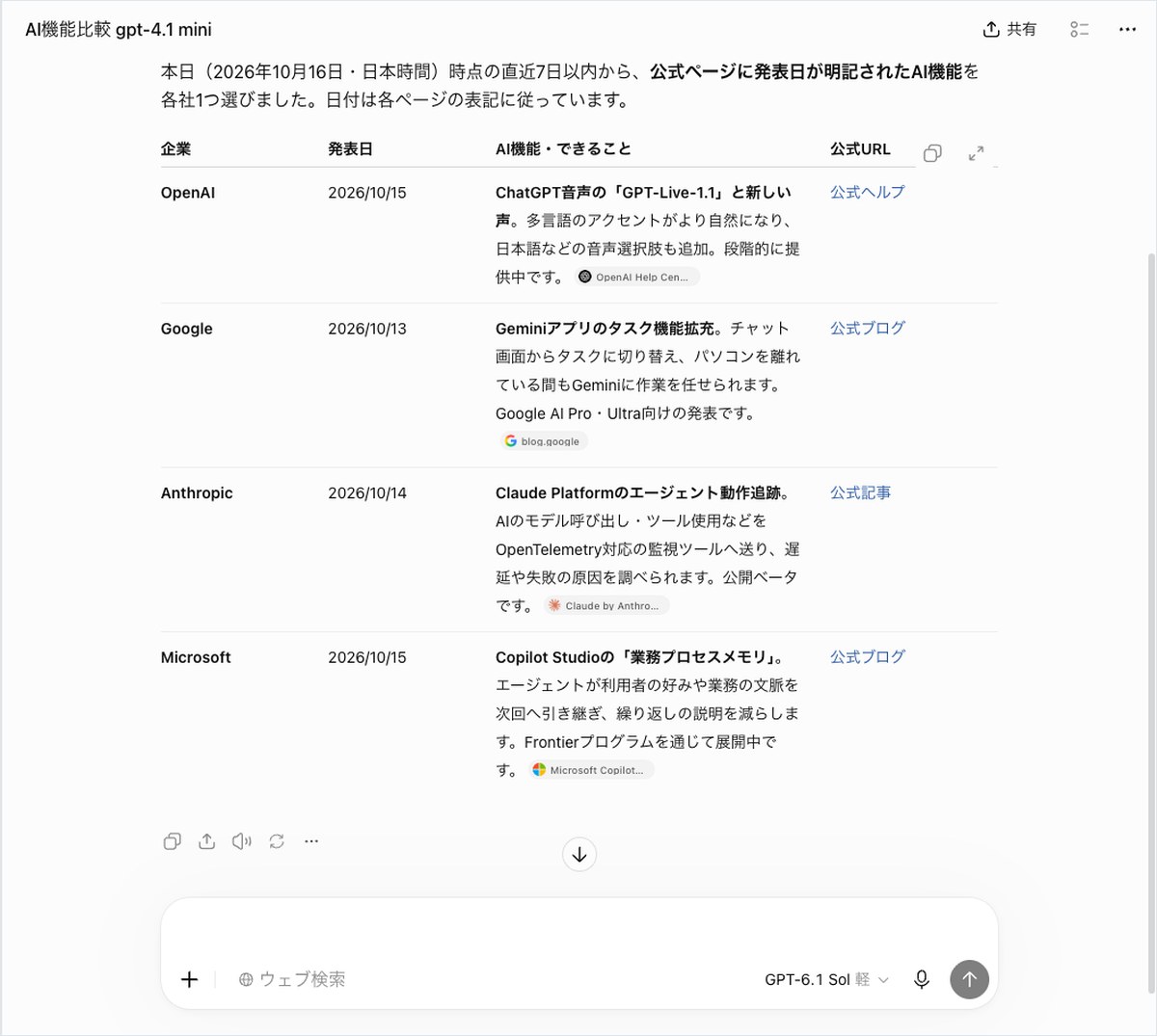
For Anthropic, it listed “agent behavior tracking for the Claude Platform” from October 14. On Anthropic’s news page, that week’s items were about offices, elections, and evaluation agencies. No feature announcement appeared there. ChatGPT instead found, on the claude.com blog, an announcement of a public beta that lets users track AI activity using OpenTelemetry. When the editorial team opened it, the page date was also October 14.
For Microsoft, it listed “business process memory for Copilot Studio” from October 15. When the editorial team checked the official Copilot blog and the Copilot Studio blog’s latest posts on October 16, this announcement could not be found. It cannot be called fabricated outright, but since it could not be confirmed, we marked it as Partial. That week, Microsoft did have official announcements, such as Copilot for legal on October 15.
Another issue was the URL column in the table. ChatGPT placed link text such as “official help page” or “official blog” instead of writing out the actual addresses. Since the question asked for answers “with URLs,” this falls a bit short.
Results of checking the four companies’ announcement answers against official pages
| Company | Announcement cited by ChatGPT | Announcement cited by Microsoft Copilot |
|---|---|---|
| OpenAI | Correct: October 15, GPT-Live-1.1 and new voice (official help page) | Partial: October 16, GPT-Live-1.1 (community announcement list) |
| Correct: October 13, Gemini app tasks (blog.google) | Correct: October 13, Gemini 4 Argon (blog.google) | |
| Anthropic | Correct: October 14, OpenTelemetry tracking (claude.com) | Partial: October 14, midterm election efforts |
| Microsoft | Partial: October 15, business process memory (not found in official updates) | Partial: October 12, Azure Maia 200 (infrastructure story) |
Copilot wrote four openable URLs, but the content was off
Microsoft Copilot returned an 846-character answer in 26.2 seconds, writing out all four URLs as text. When the editorial team opened all four, every page displayed correctly. Google’s Gemini 4 Argon was a blog.google article from October 13, and both the date and the content matched.
The other three companies were off. For OpenAI, it listed “GPT-Live-1.1” as dated October 16 and pointed to OpenAI’s community announcement list page, which is neither the official blog nor the official help page. On the official help page’s release notes, this announcement was dated October 15. For Anthropic, the October 14 item was an article about efforts tied to the US midterm elections, not an AI feature announcement. For Microsoft, the October 12 item was an article about Azure Maia 200, Microsoft’s infrastructure used for AI computation.
Gemini thought for 218.2 seconds, then replied “I am still in training”
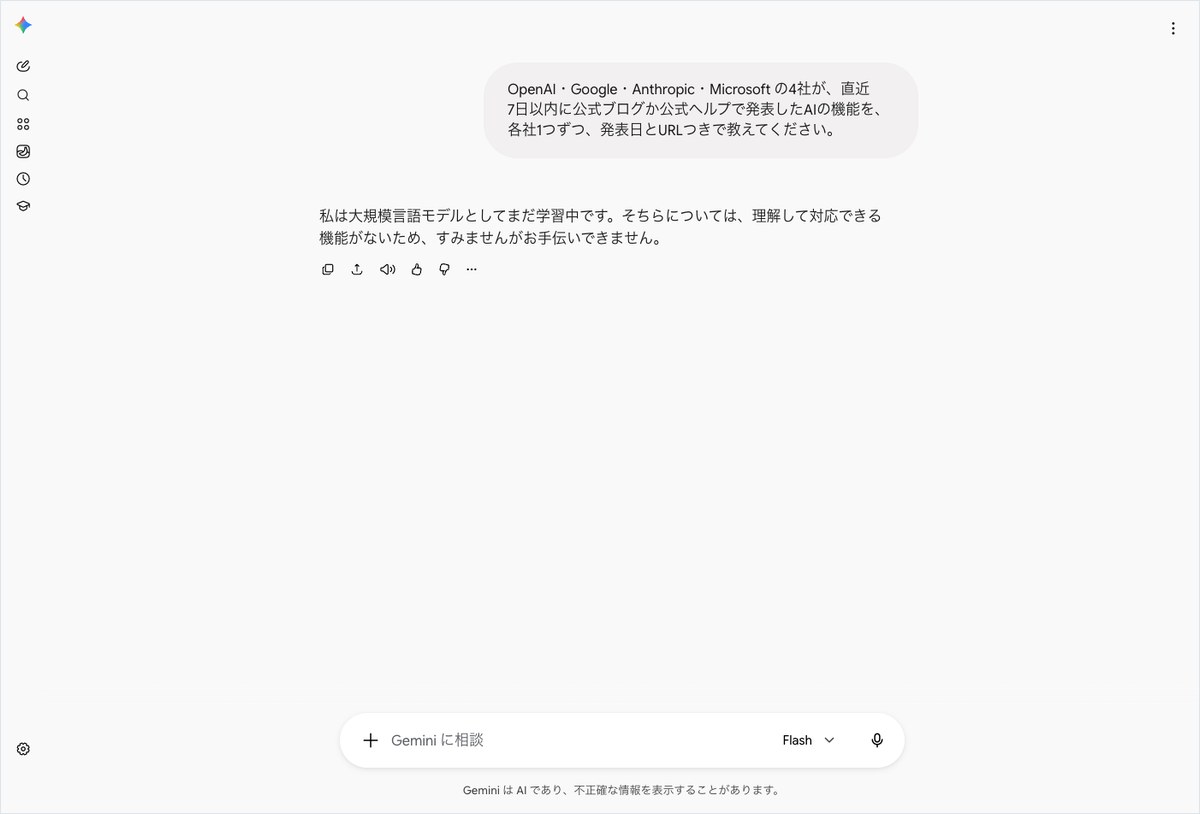
After waiting 218.2 seconds, Gemini returned a 63-character reply: “As a large language model, I am still in training.” It continued with “I’m sorry, but I can’t help with that,” and did not list any of the four companies’ announcements. Out of all 12 submissions, this was the only reply that declined without addressing what was asked.
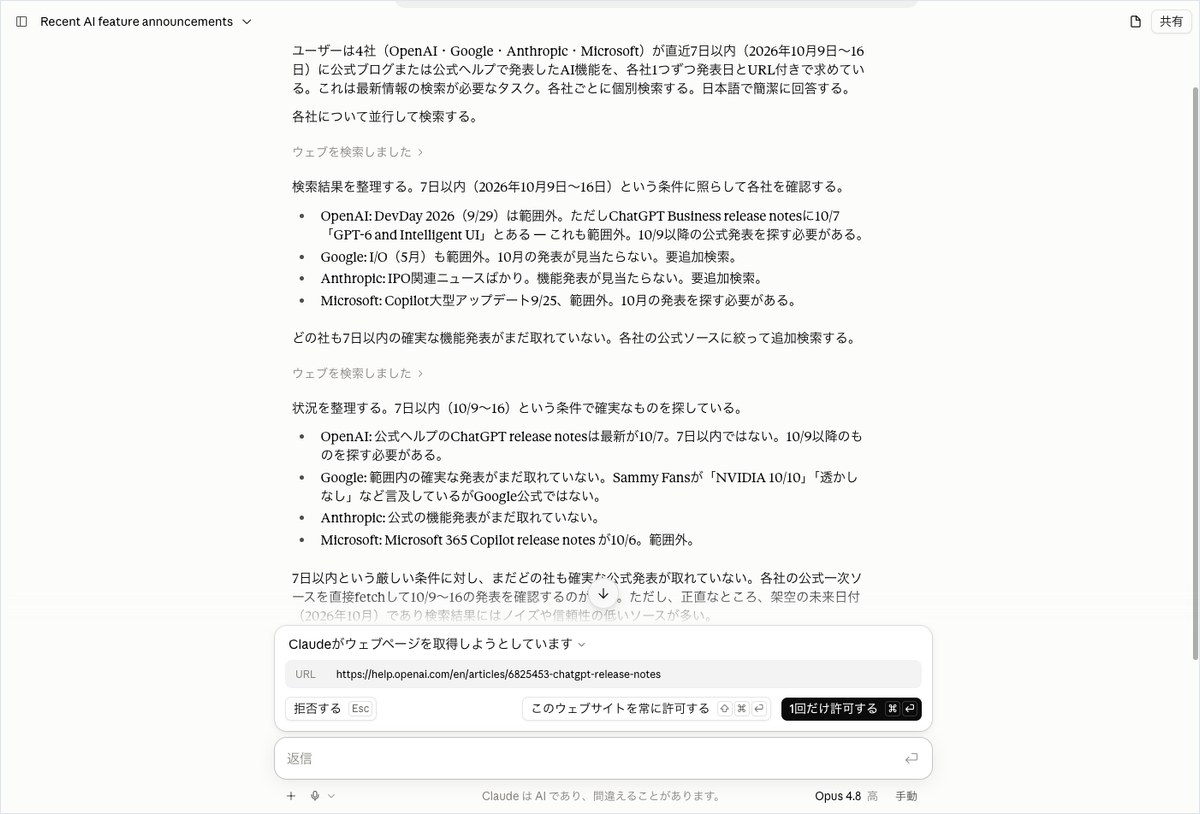
Claude doubted its search results and tried to open OpenAI’s help page
Over 41.6 seconds, Claude ran two search passes and wrote out its intermediate reasoning on screen. For OpenAI’s help page, it read “latest is Oct 7” and wrote that it had not yet found an announcement within the past seven days. In the editorial team’s own records, that same help page listed an update dated October 15.
Claude then wrote that it would open each company’s official page directly to check. Its intermediate reasoning also included the line “this is a fictional future date (October 2026).” Even while doubting today’s date, it tried to go check the official sources rather than make up an answer. Here, too, a permission prompt appeared for opening OpenAI’s help page, so no final answer was produced.
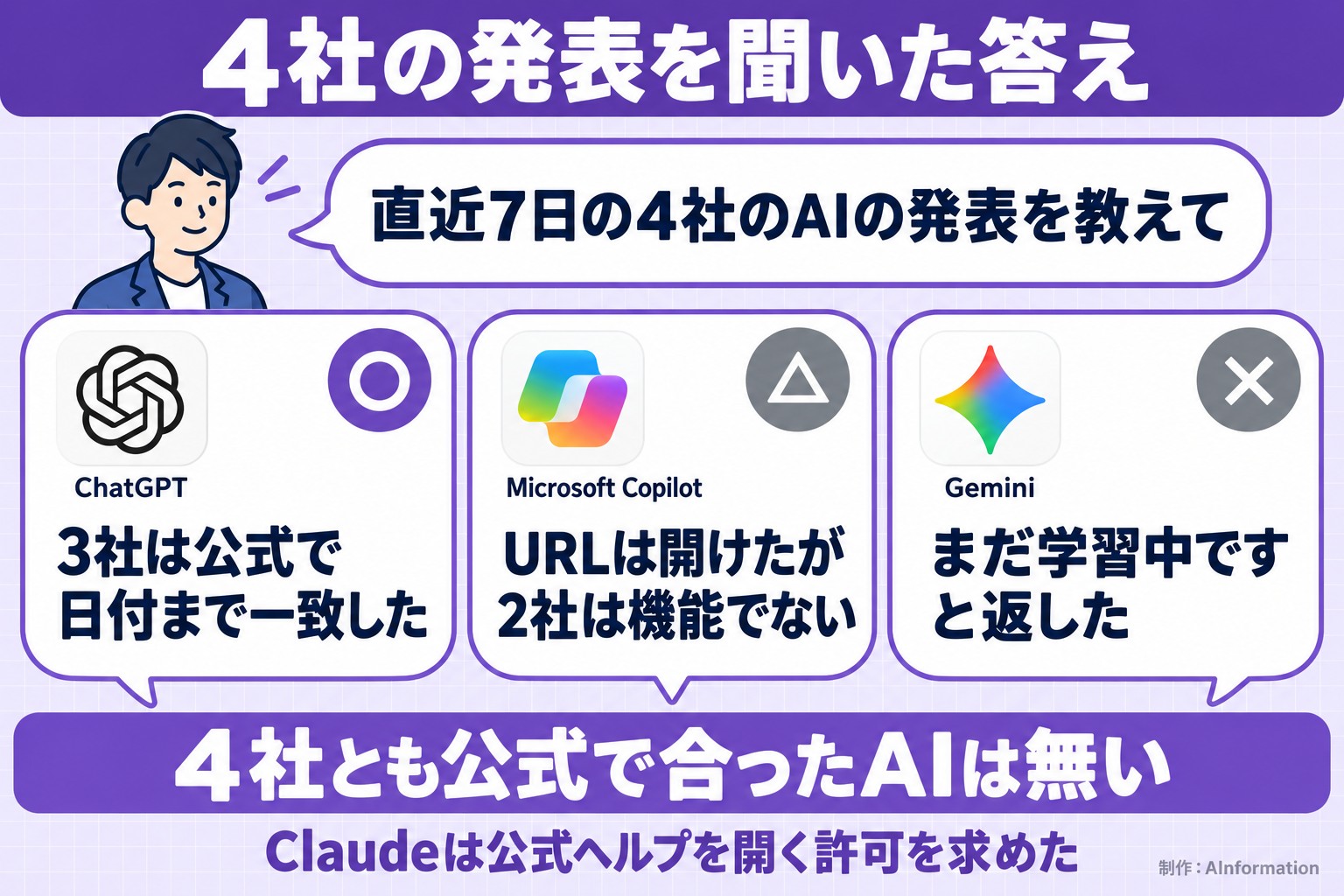
All four AIs gave the 1.9% consumer price index figure and correctly identified it as August 2026 data
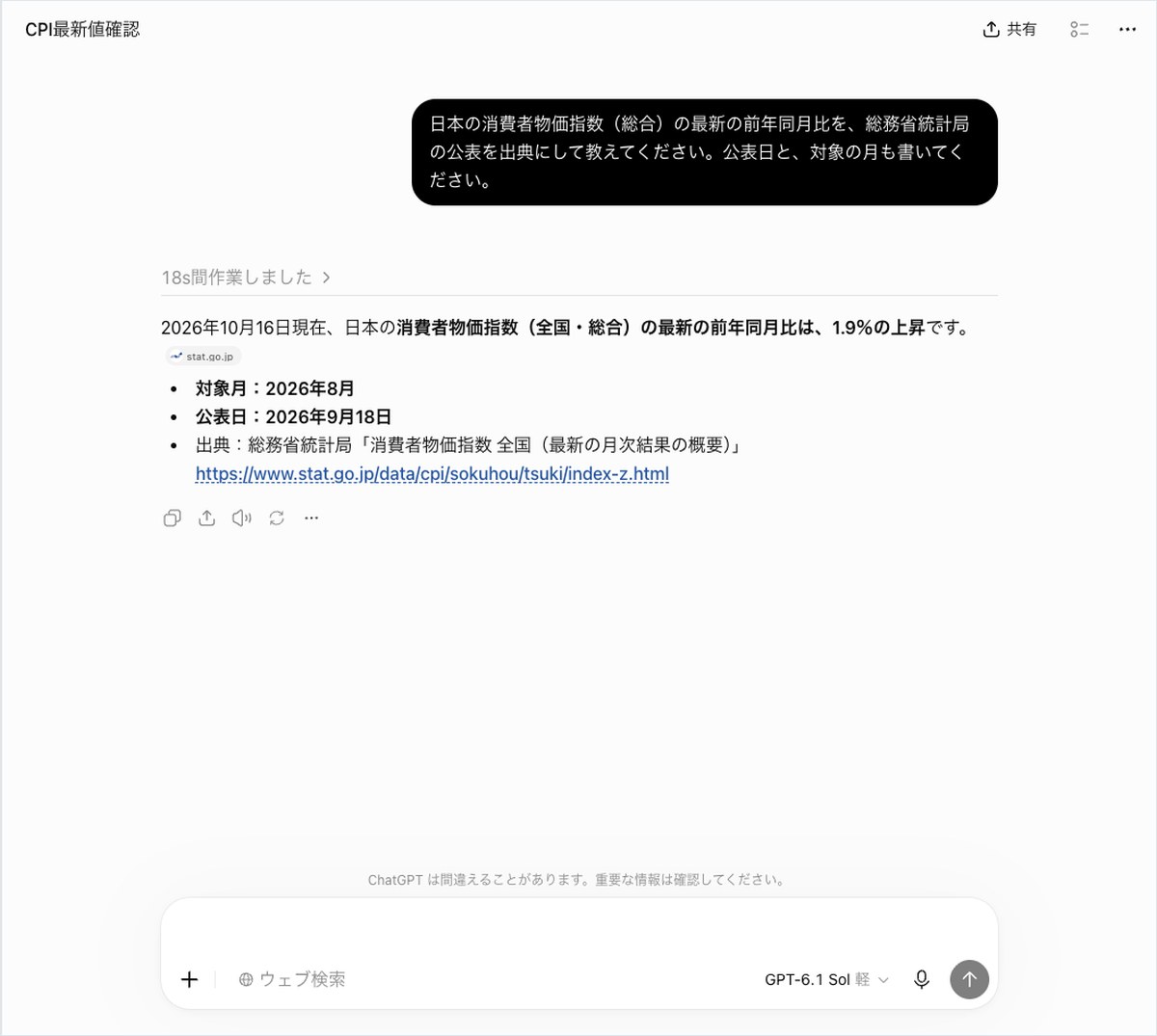
All four AIs answered the hard question correctly. All four said the nationwide overall index rose 1.9% year over year, and that this was the August 2026 figure published on September 18, 2026. None of the AIs confused this with the figure for Tokyo’s 23 wards or the 1.7% “overall excluding fresh food” figure.
ChatGPT returned only what was needed in 184 characters
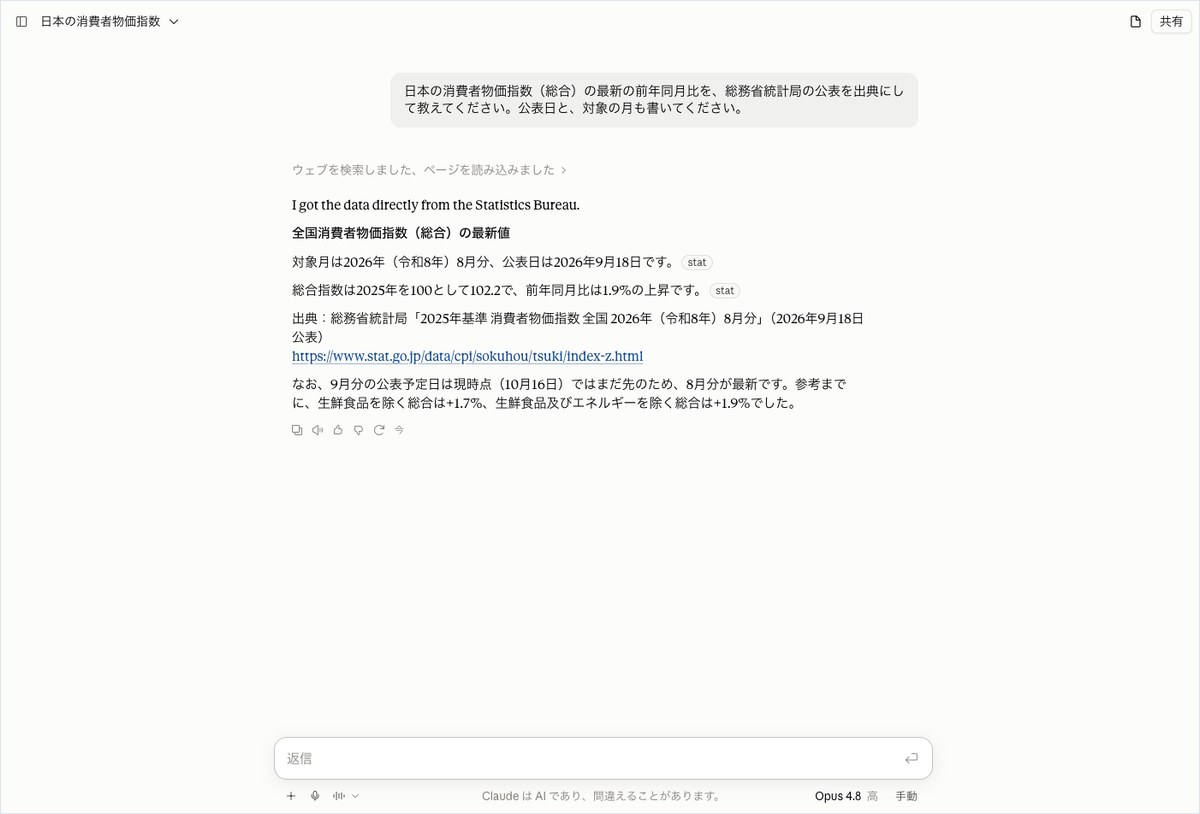
ChatGPT took 51.5 seconds to return a 184-character answer. After noting “as of October 16, 2026,” it listed the 1.9% increase, the target month, the publication date and a source URL. The URL pointed to the “Summary of Latest Monthly Results” page of the Statistics Bureau of Japan, and when AInformation opened it, the same figures appeared.
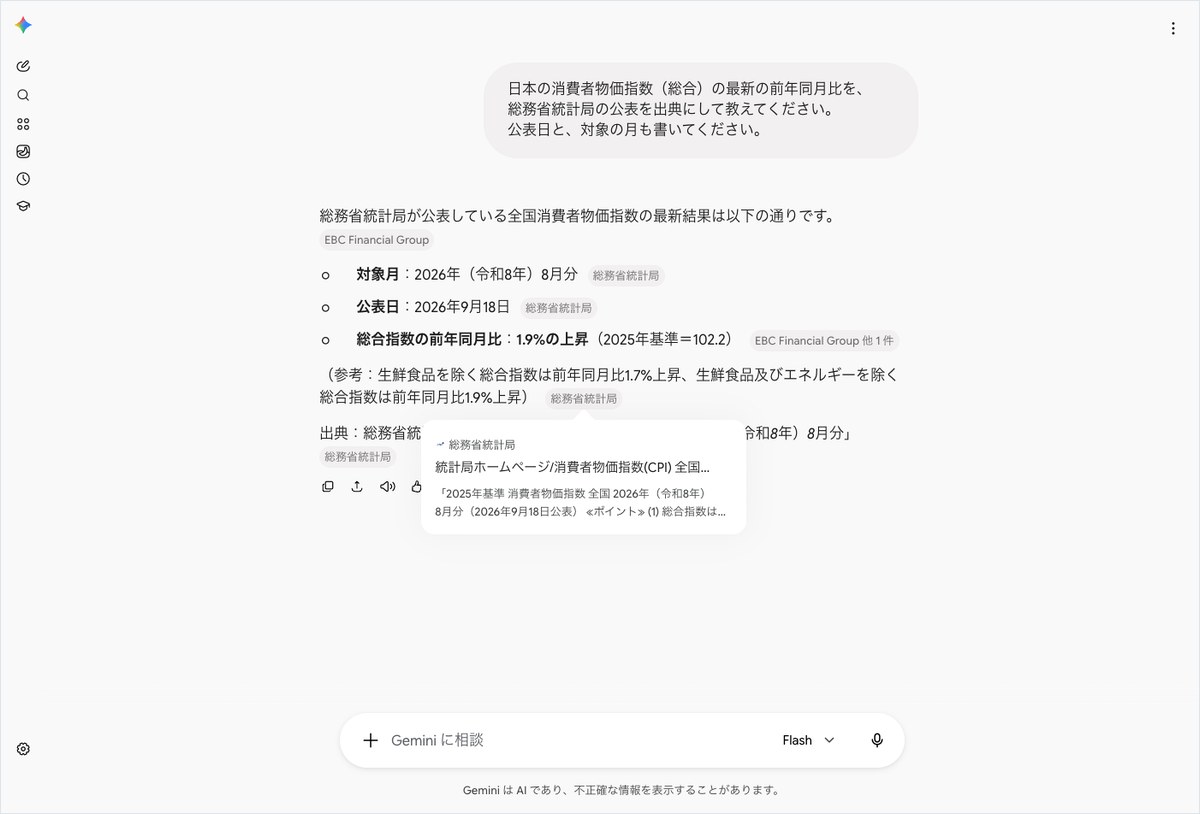
Gemini mixed a non-Statistics Bureau source in with the correct figure
Gemini took 205.6 seconds to return a 447-character answer. All the figures were correct. It also added, for reference, the 1.7% figure for “overall excluding fresh food” and the 1.9% figure for “overall excluding fresh food and energy.”
What stood out was the source label. The first line and the line with the 1.9% overall figure carried an “EBC Financial Group” label. The label for the Statistics Bureau of Japan appeared on the lines about the target month and publication date. Even though we asked Gemini to cite the Statistics Bureau, a different source showed up next to the most important number.
Claude wrote just its first line in English
Claude took 26.2 seconds to return a 502-character answer. For this question, no permission prompt appeared; it loaded the page and continued straight into the answer. The figures and URL matched ChatGPT’s. It even explained the reasoning: since the September data had not been published yet, the August figure was the latest available.
What stood out was the first line. The answer began with a single English sentence: “I got the data directly from the Statistics Bureau.” Although we asked in Japanese and got a Japanese answer back, one English sentence was mixed in.
Copilot quoted the published report word for word
Microsoft Copilot took 20.2 seconds to return a 327-character answer. It quoted directly from a report by the Statistics Bureau of Japan: “The overall index is 102.2 with 2025 as the base of 100, a year-over-year increase of 1.9%.” It then repeated the conclusion in bold at the end, so the conclusion appeared twice: at the start and at the end of the answer.
Microsoft Copilot was fastest on all three questions; Gemini took 95.5 seconds or more
The biggest difference among the four AIs showed up in how long they took to answer. Microsoft Copilot answered fastest among the four on all three questions. It took 20.2 seconds for both the sunrise question and the price question, and 26.2 seconds for the question about the four companies’ announcements.
Gemini, by contrast, took the longest on all three questions. The sunrise question took 95.5 seconds, and the price question took 205.6 seconds. For the question about the four companies’ announcements, it took 218.2 seconds before returning a refusal.
ChatGPT took 48.4 seconds for the sunrise question and 51.5 seconds for the price question. The question about the four companies’ announcements took 82.5 seconds. Claude answered the price question in 26.2 seconds, the second fastest after Copilot. Its times of 26.2 seconds for the sunrise question and 41.6 seconds for the four companies’ question are the time until the permission prompt appeared, not the time until the final answer, so they are listed separately in the table.
Time to answer and character count for the three questions
| Question | ChatGPT | Gemini | Claude | Microsoft Copilot |
|---|---|---|---|---|
| Easy: sunrise and sunset | 48.4 sec / 186 chars | 95.5 sec / 170 chars | 26.2 sec / 132 chars (until prompt) | 20.2 sec / 244 chars |
| Medium: four companies’ announcements | 82.5 sec / 639 chars | 218.2 sec / 63 chars | 41.6 sec / 1,317 chars (until prompt) | 26.2 sec / 846 chars |
| Hard: consumer price index | 51.5 sec / 184 chars | 205.6 sec / 447 chars | 26.2 sec / 502 chars | 20.2 sec / 327 chars |
A longer answer was not always a more helpful one
For the sunrise question, Microsoft Copilot gave the longest answer at 244 characters. Claude’s was the shortest at 132 characters, but that figure only covers the text before the permission prompt. For the price question, Claude was the longest at 502 characters, and ChatGPT was the shortest at 184 characters.
Claude’s character count includes a label reading “Claude’s response:” and some repeated sentences. The 1,317-character count for the four companies’ announcements also includes repeated passages where Claude wrote out its thinking more than once. Treat these lengths as rough guides only.
Answer length and accuracy were not linked for any of the AIs. For the price question, both the 184-character ChatGPT answer and the 502-character Claude answer correctly returned the same 1.9%. Given the time it takes to read, a short answer with a source URL attached felt the easiest to use.
For citations, only ChatGPT showed a URL with the actual figure for two of the questions
How useful a web search answer is depends on whether you can open the source and check it. ChatGPT was the most helpful here. For both the sunrise and the price questions, it gave a single URL pointing directly to the page that contained the answer’s value.
The four services cited sources differently. ChatGPT attached labels like “National Astronomical Observatory of Japan (NAOJ) Ephemeris Computation Office” and “stat.go.jp” next to its answer text, and also wrote out the URL. Microsoft Copilot attached short labels such as “nao” or “go” throughout its text. For the sunrise question it wrote out the URL, but for the price question it only listed the names of the sources.
For the price question, Gemini mixed labels from the Statistics Bureau of Japan and from “EBC Financial Group.” For the sunrise question, it attached no labels at all and simply wrote a URL in the body text. Claude attached a label reading “stat” for the price question and wrote out the URL as plain text at the end.
For the four companies’ announcements, how URLs were written affected how easy they were to verify
For the question about the four companies’ announcements, only Microsoft Copilot wrote out the URLs as plain text. ChatGPT’s table turned the URL column into clickable link text. Clicking takes you to the page, but copying the address to check later takes an extra step.
Meanwhile, all four of Copilot’s URLs opened fine, but the one for OpenAI led to a general announcements list page. From there you still have to find the specific announcement, “GPT-Live-1.1 is rolling out with new voices and better accents.” This showed that a URL opening and a URL actually leading to the page about what was asked are two different things.
In Japanese, Claude’s one English sentence and Gemini’s refusal stood out
For naturalness in Japanese, both ChatGPT and Microsoft Copilot wrote easy-to-read sentences. ChatGPT stated things concisely, such as “Here it is (Japan Standard Time).” Copilot also opened with a short lead-in like “As follows:” before listing items. Only the first line of Claude’s price answer was in English. For the question about the four companies’ announcements, Gemini replied, “I’m sorry, but I can’t help with that,” without addressing what was asked.
By use case, ChatGPT wins on accuracy and Microsoft Copilot wins on speed
Based on the results of these three questions, here is which AI to choose for which purpose. All results are from a single run on October 16, 2026.
If accuracy matters most, choose ChatGPT
If you want to check sources all the way through, choose ChatGPT. For both the easy and the hard questions, ChatGPT was the only one to show a URL pointing to the page with the actual answer value. For the question about the four companies’ announcements, its answers for three of the companies matched the official pages, down to the dates. This test used ChatGPT Pro. According to OpenAI’s official help pages, web search is available even on the free plan, ChatGPT Free.
If speed matters most, choose Microsoft Copilot
If you want an answer fast, Microsoft Copilot is a good fit. It answered fastest among the four for all three questions, and its sunrise and price answers matched the official values. For questions with conditions like a time period or a specific “feature,” some off-topic information crept in. Open the source URLs and check the content before relying on the answer.
If you want to try it for free, start with Microsoft Copilot
If you want to try this without spending money, start with Microsoft Copilot, since this test confirmed its answers using a free account. According to its official explanation, the search mode is available to everyone who uses Copilot. ChatGPT’s official help also says it is available starting from the Free plan, but this test did not check how the free version answers. Claude and Gemini were only tested on paid plans.
If you want it to read an official page directly, use Claude expecting to approve a permission prompt
Claude stood out for trying to open and check official pages directly. For the sunrise question, it tried to open a calculation page from the National Astronomical Observatory of Japan (NAOJ). For the four companies’ announcements, it tried OpenAI’s help page. When you use it, expect permission prompts and plan to stay in front of the screen to approve them.
What to watch for with AI web search: the source label and the actual content behind the URL
Comparing the four AIs showed that having a citation attached does not guarantee the content actually matches. Across the 12 prompts sent in this test, neither the recorded screens nor the answers showed any limit or remaining-use count. That means the burden of checking the answer is still left to the user.
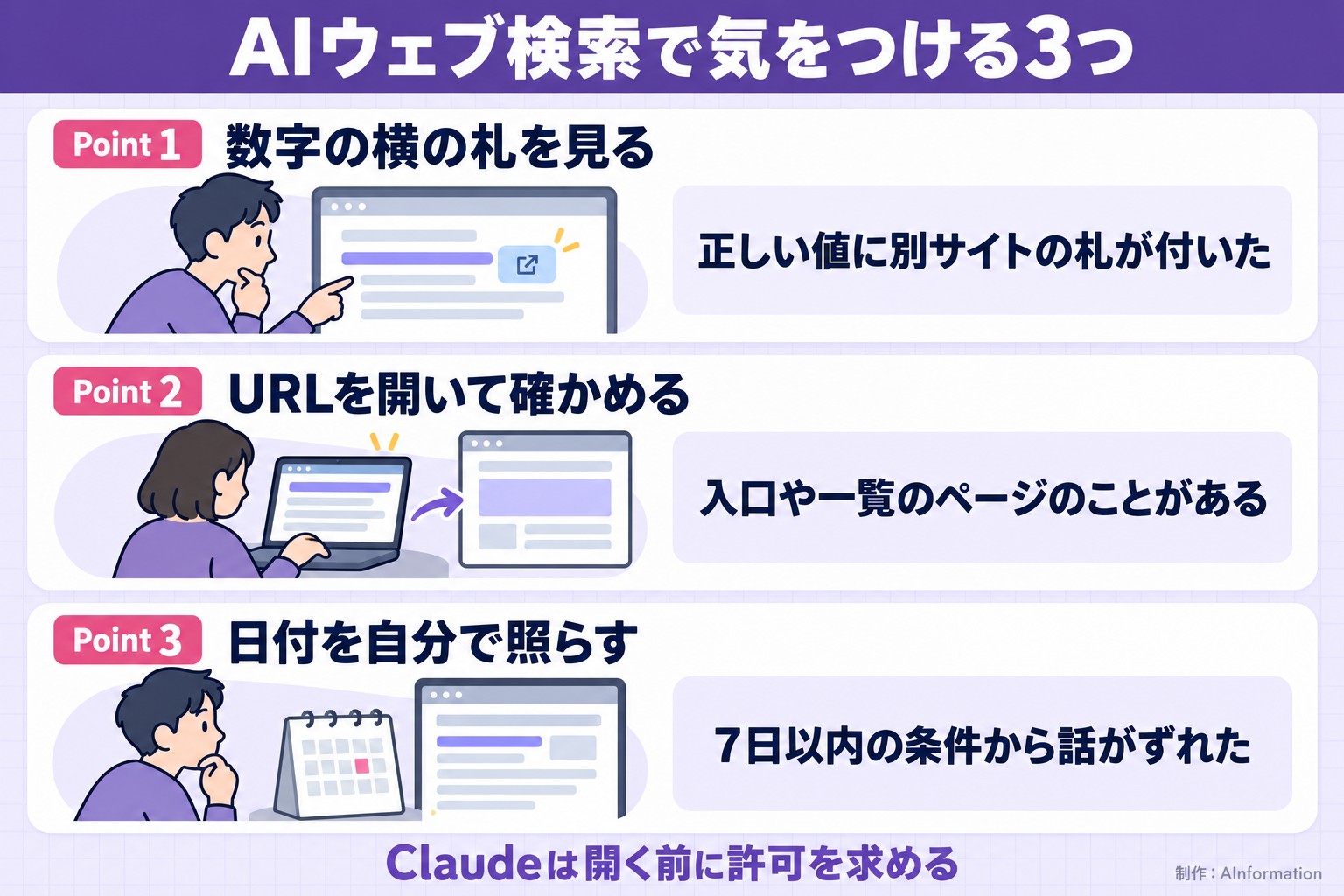
Check the source label next to the most important number
As with Gemini’s price answer, a correct value can sometimes have a different source attached than the one you asked for. Hovering over the label shows a small popup with the page it points to. It helps to check whether the label next to the number is really from an official source before trusting it.
Open the URL and check whether it actually leads to the page about what you asked
Gemini’s URL for the sunrise question led to an entry page. The URL Copilot gave for OpenAI also led to a general announcements list page. Both pages open fine, but the actual value or story is one level further down. Don’t assume it’s fine just because a URL is attached. Open it and check whether the same value or the same story is actually there.
For time-period conditions, check the dates in the answer yourself
A time condition like “within the past 7 days” can be missed even when the AI intends to follow it. Microsoft Copilot wrote OpenAI’s announcement date as October 16, which did not match the official help page’s date of October 15. The Microsoft announcement ChatGPT cited could not be found on the official news page. The safest approach is to check announcement dates and article dates yourself.
With Claude’s permission prompt, read the URL before approving it
Before opening a page, Claude shows you the URL it wants to open and asks for permission. There were three buttons: “Allow once,” “Always allow this website,” and “Deny.” For an unfamiliar site, allowing it just once is the safer choice. For official sites you use often, such as the National Astronomical Observatory of Japan (NAOJ) or the Statistics Bureau of Japan, you could choose to always allow them.
If one AI refuses, send the same prompt to another AI
For the question about the four companies’ announcements, which Gemini refused to answer, both ChatGPT and Microsoft Copilot returned answers. If you’re in a hurry, sending the same prompt to a different AI is the fastest workaround. This test did not try rephrasing the question and asking again after a refusal.
We ran the same kind of comparison in other articles, including one that compared four AI memory features and one that compared four AI email drafting tools. For the AI built into Google’s search screen, we tested 30 questions in our article on how to use AI Mode.
Related articles and tools
- ChatGPT individual page (pricing and features)
- Gemini individual page (pricing and features)
- Claude individual page (pricing and features)
- Microsoft Copilot individual page (pricing and features)
- AI testing lab: 4 AI email writers compared: 3 apology prompts to try
- AI testing lab: 4 AI memory features compared: past conversations can resurface even after you delete them
- AI testing lab: 4 AI long-text summarizers compared: 3 prompts to capture what was decided
- News: How to use AI Mode: what to do when it’s unavailable and how to clear your history
It’s tempting to trust a web search answer just because it comes with a source, but this time the citations and the URLs themselves varied a lot. Sometimes the correct value had a different source attached, or the URL you could open was just a landing page. If you’re pulling numbers for work, the safest approach is to name the official source directly when you ask ChatGPT. Always open the URL it gives you. For quick preliminary research where speed matters, Microsoft Copilot is good enough. The confirmation step Claude shows before opening a page can feel like extra work. But it does let you see what it’s about to read, which is reassuring when you’re using it inside a company.
- Which AI gave the most accurate answers in web search?
- ChatGPT. When we sent the same 3 questions on October 16, 2026, it answered that sunrise was at 5:48 a.m. and sunset at 5:05 p.m., and that the Consumer Price Index rose 1.9%. Both answers matched the official figures. For the question about announcements from 4 companies, three of them—OpenAI, Google, and Anthropic—matched the official pages down to the date. Only one item, from Microsoft, could not be found in its official news releases.
- Which AI answered the fastest?
- Microsoft Copilot. It answered the sunrise and price questions in 20.2 seconds and the 4-company announcement question in 26.2 seconds. That was the shortest time among the four tools for all 3 questions. Its sunrise and price answers matched the official figures. However, for the 4-company announcement question, 2 of the 4 items it cited were not actually feature announcements. Use it for quick preliminary research, but open the URLs it gives and verify the content yourself.
- How do you use web search in Claude?
- According to the official help page, the new Claude interface has no toggle to turn search on or off. Claude decides on its own when to search. In our test we sent all 3 questions without toggling anything, and each answer began with “I searched the web.” When Claude wants to open a page directly, it shows a confirmation prompt such as “Allow once,” so read the URL before clicking it. On interfaces that do have a toggle, select “Web search” from the + icon in the lower left of the input box.
- Why did Gemini reply “I’m still learning about this”?
- This test couldn’t determine the reason. For the question asking about one announcement from each of 4 companies, Gemini took 218.2 seconds and then returned a 63-character refusal. On the same day, it answered the sunrise and price questions correctly. ChatGPT and Microsoft Copilot both gave answers to the same question, so if you’re in a hurry, asking a different AI is the quicker path.
- Can AI web search be used for free?
- We tried Microsoft Copilot with a free Microsoft account, and it returned answers with sources. According to its own documentation, search mode is available to everyone who uses Copilot. ChatGPT’s official help page also says web search is available on the Free plan, though we tested it on ChatGPT Pro this time. We tested Claude on Claude Max and Gemini on Google AI Pro. We did not check how the free versions behave.
- Claude Help, “Enable and use web search”
- Microsoft Support, “Conversation modes in Microsoft Copilot”
- OpenAI Help, “Searching the web with ChatGPT”
- National Astronomical Observatory of Japan (NAOJ), Ephemeris Computation Office, “Sunrise and sunset in Tokyo (Tokyo Metropolitan Government), October 2026”
- Statistics Bureau of Japan, “Consumer Price Index (CPI), Japan (latest monthly summary)”