
Claude Skills is a system for writing down the steps you want an AI to remember in a single SKILL.md file. AInformation runs 48 scheduled jobs every day with Claude Code and has 295 skills. This time, we built one practice skill, had both Claude Code 2.1.316 and Antigravity read it, and tested how to share it.
Making Claude Skills is as simple as placing a single SKILL.md file in a folder named after the skill. On October 31, 2026, AInformation wrote a 19-line practice skill that turns daily reports into a weekly report. In Claude Code 2.1.316, the skill was called automatically all three times, right after being placed. A request that took 34.7 to 39.3 seconds without the skill produced a weekly report of the same format in 13.7 to 16.4 seconds with it.
AInformation normally runs 48 scheduled systems every day, built with Claude Code. We turn any task with a fixed procedure into a skill, and as of October 31, 2026, we had 295 of them. In this article, we walk through what we learned from using them: how to write a SKILL.md file, where to place it, and how to share it, with an actual practice skill and screenshots. For how to install Claude Code itself, see our article on how to use Claude Code.
- The minimal form of a SKILL.md file (19 lines), and the steps from placing it to having it called
- Adding the skill cut the response time for the same request from 34.7–39.3 seconds to 13.7–16.4 seconds, with the same format produced all three times
- The same SKILL.md file, placed in Antigravity’s .agents/skills folder, was also read all three times
- We tried 8 ways of writing that don’t match the official spec. Claude Code called all of them, while Antigravity didn’t read one of them
- Of AInformation’s 295 skills, only 18 had a description shown in the list
- We were able to distribute the skill from a single repository to both Claude Code and Antigravity using a plugin
What is Claude Skills? A manual the AI reads only when needed
Claude Skills (Agent Skills) bundles the steps and rules you want an AI to remember into a single folder. At its center is a file called SKILL.md. You write a name and description at the top, with the steps below. You can also put any programs or sample files used in those steps in the same folder.

The order in which things are loaded matters most. Normally, the AI only keeps a list of names and descriptions for every skill. It opens the contents of SKILL.md only when a request matches the description, and runs the programs in scripts only if needed. Since the contents aren’t read every time, writing long, detailed steps doesn’t add overhead to each turn.
This is also where the difference from CLAUDE.md lies. CLAUDE.md is read in full every time, so it’s the place to write rules you always want followed. Procedures for fixed tasks become skills instead, and are read only in the situations where they’re used. Tools that connect to outside services or databases are added through a separate system called MCP — see our article on how to use MCP.
This format isn’t unique to Claude Code. There’s a published specification called Agent Skills, and Google’s Antigravity also reads the same SKILL.md files. This time, we also checked whether the same file works in another app.
The minimal form of SKILL.md (a practice version written by AInformation)
Below is the full text of the SKILL.md file we wrote this time. It’s 19 lines, and the header contains only name and description, which the spec requires. The section surrounded by — is the header settings (frontmatter), and everything below it is ordinary Markdown instructions.
---
name: shuho-matome
description: Builds a weekly report from daily log notes (md files in the memo folder) covering one week. Use this when asked for a “weekly report,” “this week's summary,” or “a review of the past week.”
---

# How to build the weekly report

1. Run scripts/jikan.py, located in the same folder as this SKILL.md, passing it the memo folder. Use this script's table for the time spent on each category; do not add up the numbers yourself.
2. Write the report in the following format.

## Weekly report (period)
### What was done this week
- Up to 3 major items from the notes
### Time breakdown
(Paste the table from jikan.py as is)
### What's planned for next week
- Pull from lines starting with “Note:” in the memos

On the last line, write “(Created using weekly report template v1)”.
In the description, write both what the skill does and what kind of wording should trigger its use. The AI decides whether to call it based on this one line, so the trick is to include words a real user is likely to say. This time we included three: “weekly report,” “this week’s summary,” and “a review of the past week.”
The steps don’t have the AI do the addition itself — that’s left to scripts/jikan.py. Having a program count the time for each category keeps the result consistent every time. The folder structure looks like this.
shuho-matome/
├── SKILL.md          (19 lines: description and steps)
└── scripts/
    └── jikan.py      (20 lines: adds up time per category)
jikan.py is a 20-line script that reads lines like “- 09:00-10:30 content (category)” from the daily logs and simply tabulates the time for each category. With five days of practice daily logs, the total comes to exactly 40 hours.
#!/usr/bin/env python3
"""Reads daily log notes (- HH:MM-HH:MM content (category)) and tabulates the time spent on each category.
Usage: python3 jikan.py <memo folder>"""
import re, sys, pathlib
d = pathlib.Path(sys.argv[1] if len(sys.argv) > 1 else "memo")
tot, days = {}, []
for f in sorted(d.glob("*.md")):
    days.append(f.stem)
    for m in re.finditer(r"- (\d\d):(\d\d)-(\d\d):(\d\d) .*\((.+?)\)", f.read_text(encoding="utf-8")):
        h1, m1, h2, m2, k = m.groups()
        tot[k] = tot.get(k, 0) + (int(h2) * 60 + int(m2)) - (int(h1) * 60 + int(m1))
if not days:
    sys.exit(f"No memos found: {d}")
print(f"Period: {days[0]}–{days[-1]} ({len(days)} days)")
print("| Category | Time |")
print("|---|---|")
for k, v in sorted(tot.items(), key=lambda x: -x[1]):
    print(f"| {k} | {v // 60}h {v % 60:02d}m |")
s = sum(tot.values())
print(f"| Total | {s // 60}h {s % 60:02d}m |")
Steps to build and run one skill with Claude Code
There are four steps. AInformation used a practice folder (containing only five days of daily logs) with Claude Code 2.1.316 (Opus 5.5). Version 2.1.316 was released on October 31, 2026, and we tested it the same day it came out.
mkdir -p .claude/skills/shuho-matome/scripts
The folder name becomes the /shuho-matome command name as is.
Second, save the SKILL.md and jikan.py above into this folder. Third, start claude in that folder. Since it’s the first time using this folder, a prompt asking whether to trust it appears — select Yes.
Please create this week’s weekly report from the daily logs in the memo folder.
We didn’t include the skill’s name. The AI decides whether it matches the description.
As soon as we asked, “Skill(shuho-matome)” and “Successfully loaded skill” appeared. It then asked for permission to run jikan.py. Since we started it with –permission-mode default, it asks every time before running a program.
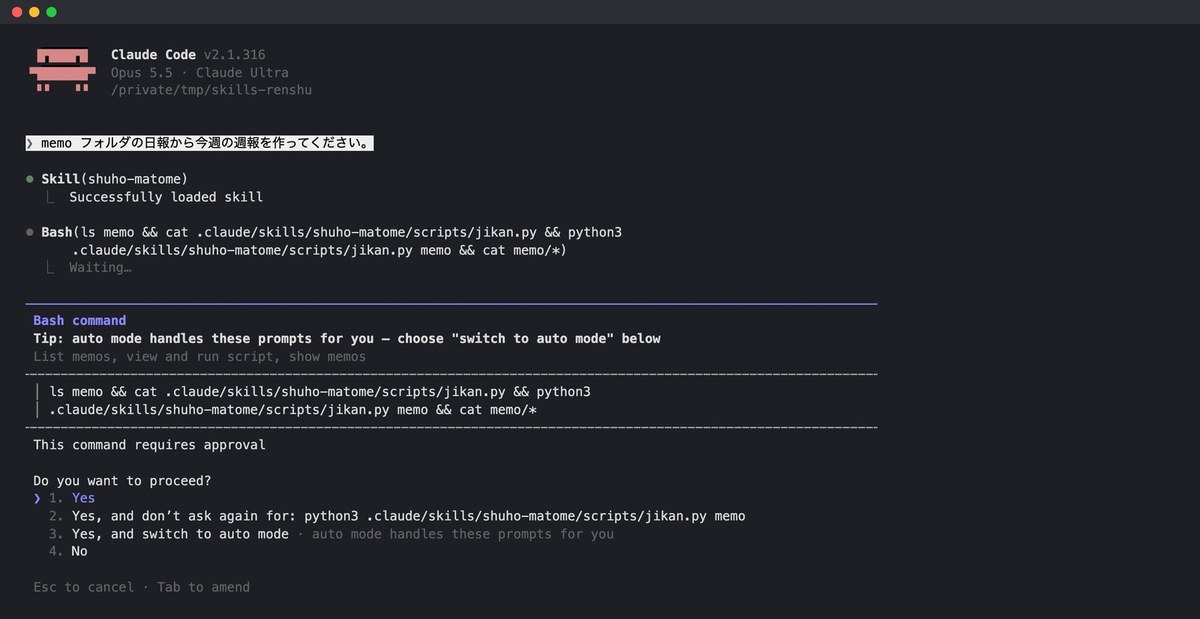
After granting permission, the weekly report came out in the order of the three headings written in SKILL.md. The breakdown of hours matched the table from jikan.py exactly, and the last line read “(Created using weekly report template v1).” This line was deliberately added to the procedure so we could tell whether the skill had actually been read.
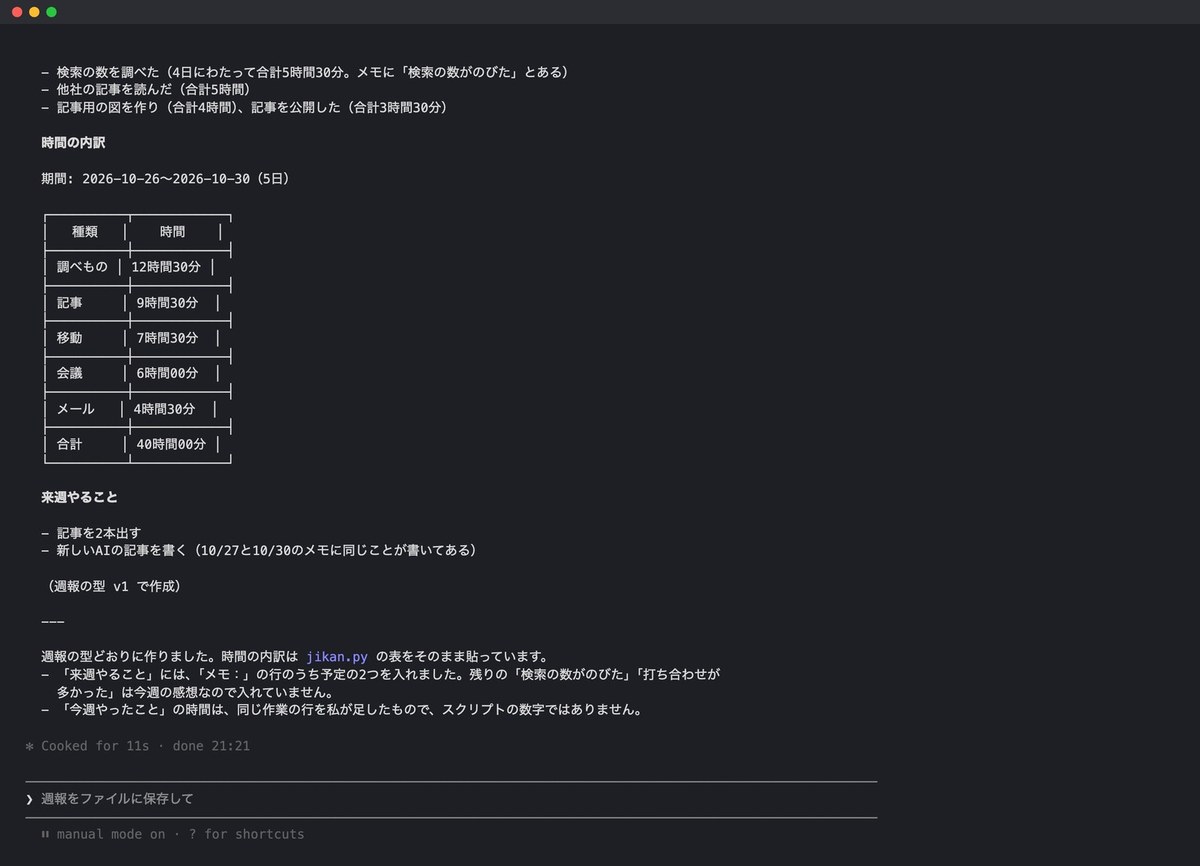
We also tried calling it directly by typing /shuho-matome. With -p, it took 15.3 seconds and produced a weekly report in the same format as when it was called automatically.
Running the same request three times with and without the skill
To see what the skill actually changes, we ran the same request three times without the skill as well. We made one mistake here: when we ran it in a folder where the skill had been deleted, Claude Code pulled the deleted SKILL.md from the git history and used it anyway. This happened both times. For the comparison runs, we started over in a separate folder that had no skill in its history either.
Results of running the same request three times each (no skill, with skill, plugin)
| Method | Seconds to response | Output tokens | Matched weekly report template |
|---|---|---|---|
| Claude Code, no skill | 34.7–39.3 seconds | 3,615–4,385 | 0 times |
| Claude Code, with skill | 13.7–16.4 seconds | 1,116–1,470 | 3 times |
| Claude Code, plugin | 19.8–26.7 seconds | 1,303–1,650 | 3 times |
| Antigravity, no skill | 82–134 seconds | 4,636–6,547 | 0 times |
| Antigravity, with skill | 39–52 seconds | 1,886–2,017 | 3 times |
| Antigravity, plugin | 27–40 seconds | 1,583–2,113 | 3 times |
Even without the skill, the total of 40 hours was correct all three times. What differed was the format and the speed. The headings were structured differently each time, and the way hours were written varied too, between “40.0 hours” and “40 hours.” All three runs also tried to save the result to a file, but were refused because there was no write permission. In the runs with the skill, no unrequested saving happened, and the response came back in 13.7–16.4 seconds. Output tokens also dropped from 3,615–4,385 to 1,116–1,470.
The more fixed the format of a task, the bigger the benefit of turning it into a skill. On the other hand, for tasks where you want the AI to think through the content itself, locking it into a procedure narrows the response. At AInformation, we only make skills for two kinds of work: things we want in the same format every time, and things that always use the same tool.
The same SKILL.md also worked in Antigravity
We also placed the same folder, as is, in Antigravity (2.28.2, Gemini 3.8 Flash), which we covered in our article on how to use Antigravity. Antigravity stores skills in .agents/skills. The official documentation states: “Antigravity defaults to .agents/skills, but still maintains backward compatibility for .agent/skills.”
Where skills are stored (official documentation and our measurements)
| Scope of use | Claude Code | Antigravity |
|---|---|---|
| This folder only | .claude/skills/name/ | .agents/skills/name/ |
| All of your folders | ~/.claude/skills/name/ | ~/.gemini/config/skills/name/ |
| Distributed via a plugin | plugin’s skills/ | plugin’s skills/ |
| Does it read the other app’s location? | Did not read it | Did not read it |
We ran the same request three times. In all three, it first opened SKILL.md, ran jikan.py, and then wrote the weekly report. The final line, “(Created using weekly report template v1),” appeared all three times as well. The path to jikan.py was still written relative to SKILL.md, but Antigravity converted it to the folder’s absolute path before running it.
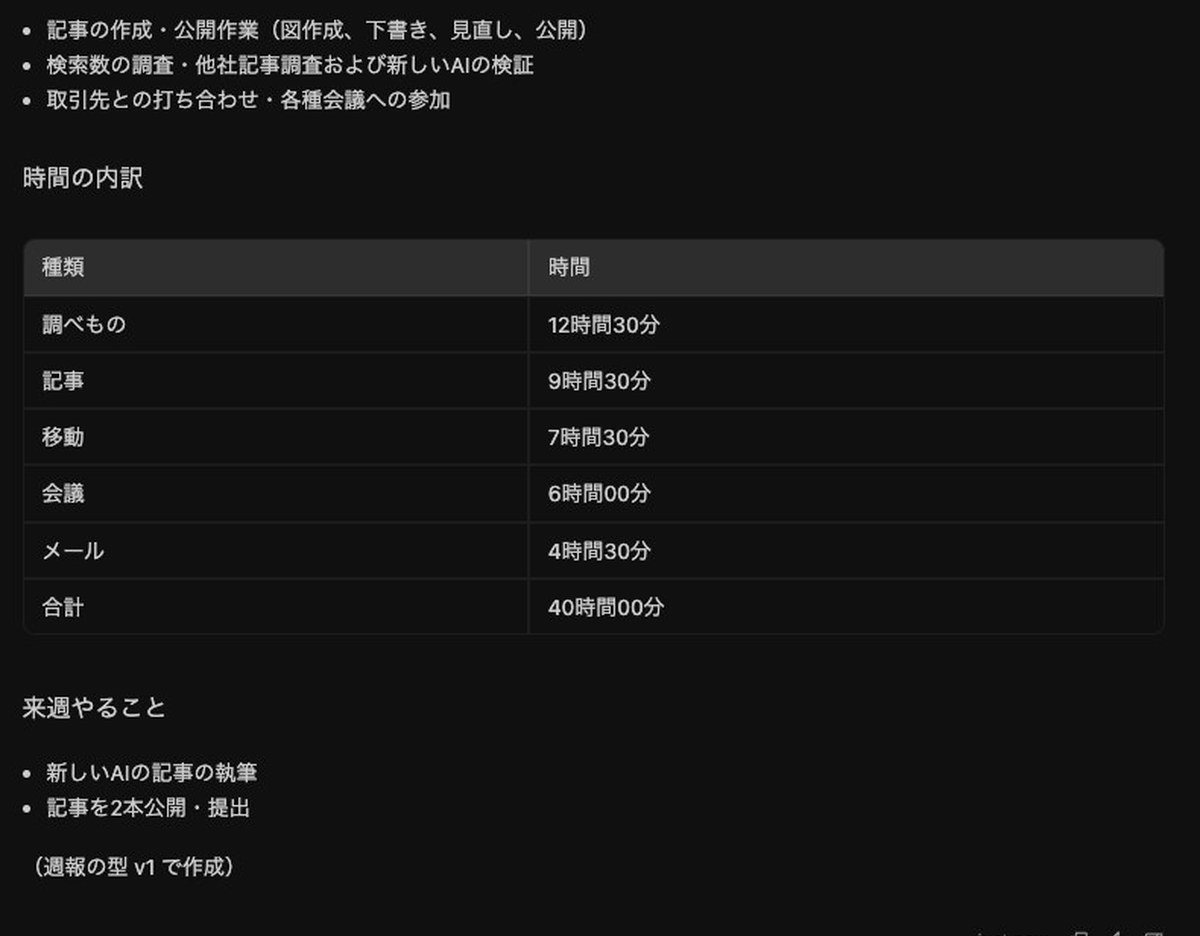
We also checked how much extra data simply placing a skill adds. The amount Antigravity sent to the AI at the start was only about 78 tokens more than in the runs without the skill. Since the listing only includes the name and description, the load per skill is about that small.
Without the skill, Antigravity wrote the weekly report file to the memo folder all three times without asking. This is because, at the default permission level (Default), it does not ask before writing inside the folder. In the runs with the skill, since SKILL.md had no save step, it only displayed the result on screen.
Storage locations differ by app, and neither app reads the other’s location. A skill placed only in .claude/skills did not appear in Antigravity’s / listing. To use a skill in both, you either place the same folder in two locations, or distribute it as a plugin, which we cover later.
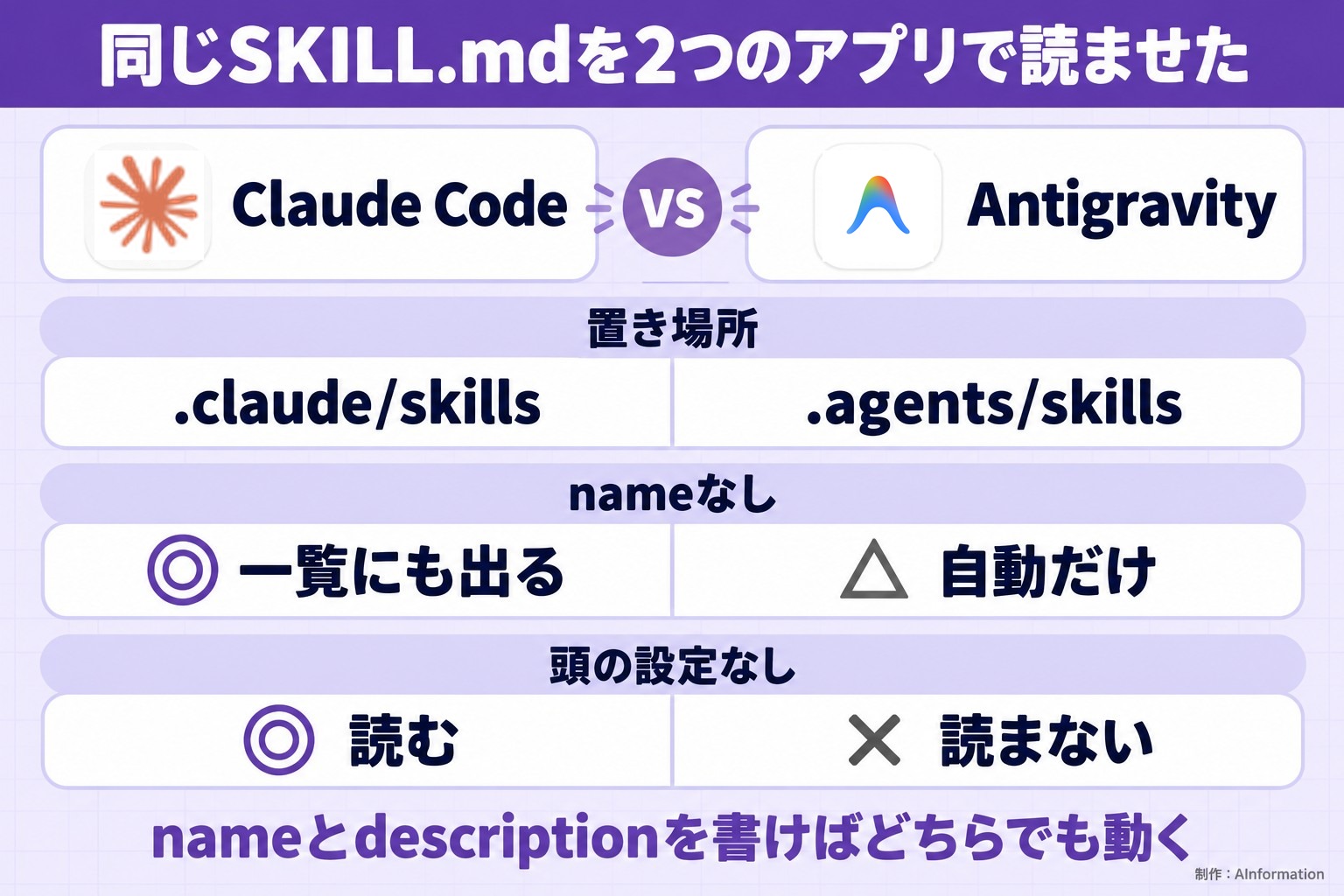
Where it differed from the official spec (tested with 9 versions of SKILL.md)
The rules for SKILL.md differ slightly across three official documents. The Agent Skills spec requires both name and description, and says the name “Must match the parent directory name.” The Claude Code docs say “All fields are optional. Only description is recommended,” while the Antigravity docs require only description.
So we created 8 versions that don’t match the spec, plus the original version, for 9 total, and placed them in both apps. For Claude Code, we put each version in a separate folder and ran the same request without naming the skill. The “spec” column reflects what AInformation counted based on the rules written on the spec page.
How SKILL.md files that don’t match the spec were handled (9 versions)
| Format | Spec rule | Claude Code | Antigravity |
|---|---|---|---|
| Only name and description | Matches | Yes, called automatically | Yes, read automatically |
| No frontmatter header (—) | No, required | Yes, used the first line as the description and called it | No, load error |
| No name field | No, required | Yes, called it using the folder name | Partial, read automatically but doesn’t show in the / list |
| No description field | No, required | Yes, used the heading as the description and called it | Partial, searched around before reading it |
| Name with uppercase letters and _ | No, lowercase only | Yes, appeared as /V5_Oomoji | OK, appeared in the list |
| Name differs from folder name | No, must match | Yes, appeared under both names | OK, appeared under the name field only |
| Description of 1,100 characters | No, limit is 1,024 characters | Yes, called automatically | OK, the full text appeared in the list |
| Description contains “: ” and breaks YAML | No, unreadable | Yes, read including the description | OK, appeared with its description |
| Setting to disable automatic invocation | (Claude Code-only field) | No, wasn’t called; the AI opened the file itself | No, excluded from the list; found by searching and then read |
Claude Code called all 8 versions except the one with the setting that disables automatic invocation. It’s more lenient than the spec: even without a frontmatter header, it uses the first line of text as the description. When the name differed from the folder name, the /skills list showed the folder name. The / menu showed the name field instead. The official docs state that a skill can also be called by its folder name.
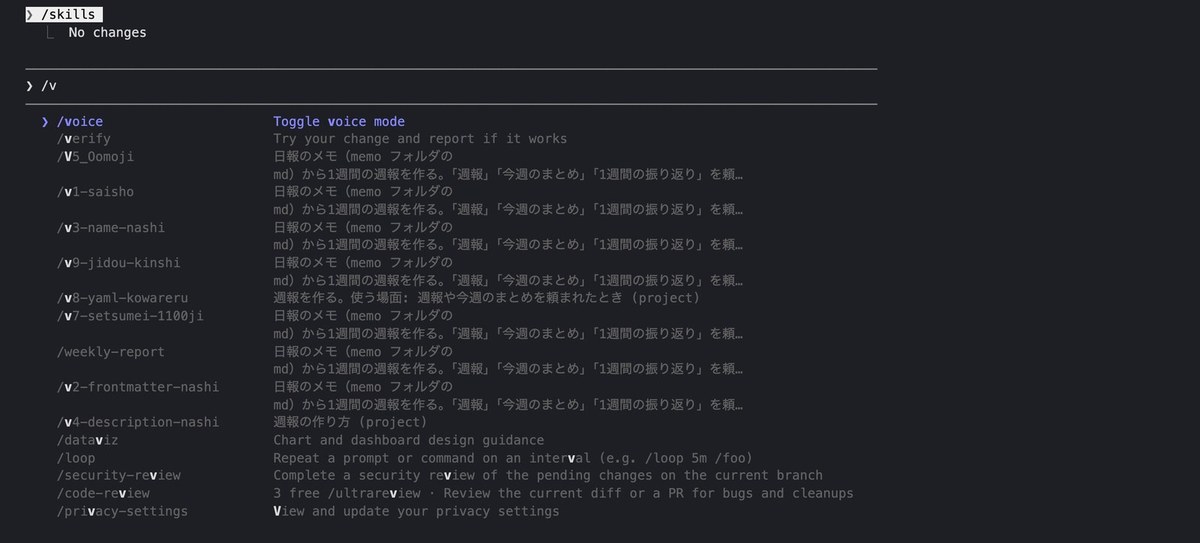
How broken YAML was handled differed from the official docs. The docs state, “If the frontmatter YAML is malformed, Claude Code loads the skill body with empty metadata.” We created a SKILL.md with a plain ASCII “: ” (colon and space) inside the description text, a format that Python’s YAML parser (PyYAML) can’t read. Even so, Claude Code read the description and showed it in the / menu. The claude plugin validate command also gave no warning for this format.
Antigravity is a bit stricter. For the SKILL.md without a frontmatter header, it showed “A customization failed to load” and “invalid frontmatter format” and didn’t read it. For the version with no name field, even though its own docs say it “Defaults to the folder name if not provided,” the skill didn’t appear in the / list. Still, it was read automatically when we made a request without naming the skill.
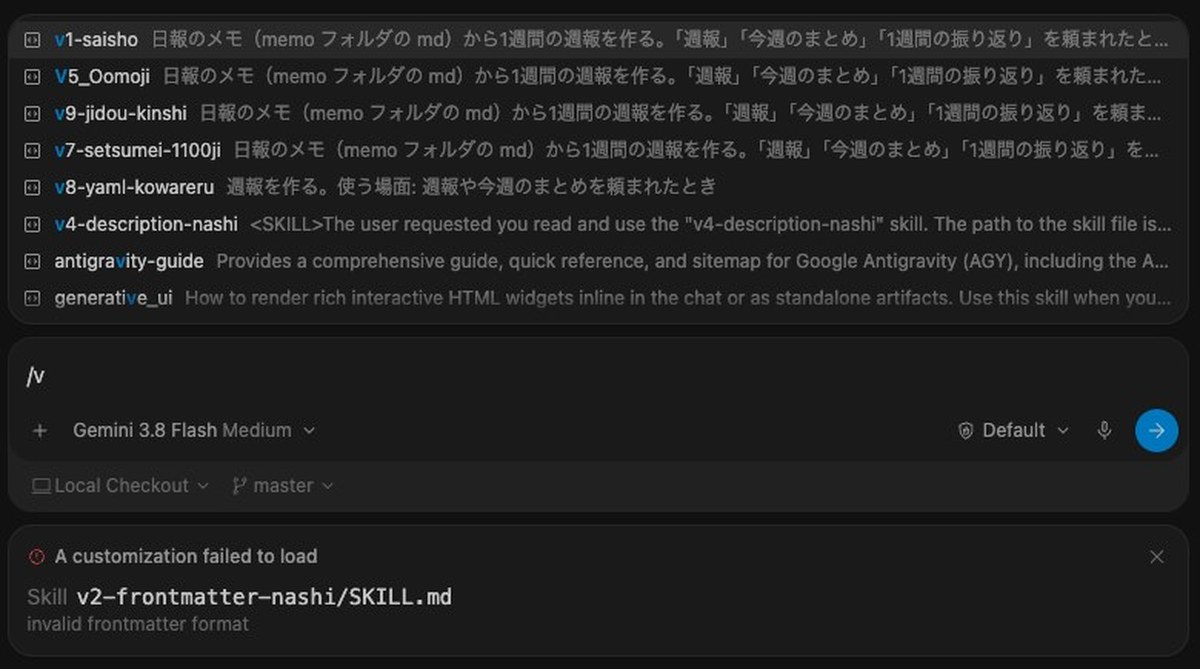
There was also a difference with the Claude Code-only setting (disable-model-invocation). Antigravity recognized this setting too and excluded the skill from its automatic list. In both apps, even though the skill wasn’t in the list, the app searched through folders, found the SKILL.md, read its contents, and used it. “Won’t call automatically” doesn’t mean the AI never reads that file.
The conclusion is simple. If you set the name to lowercase letters matching the folder name and write a description, it works in both apps. Even if it works in Claude Code, a format that doesn’t match the spec can fail in other apps. The spec also says, “Keep your main SKILL.md under 500 lines,” so split long procedures into separate files.
With too many skills, descriptions drop off the list (AInformation’s 295 skills)
AInformation has 295 of its own skills. Running /skill-doctor with -p in Claude Code shows which skills were used and when. We kept the names hidden since they relate to our business, and broke down only the counts.
Skills owned by AInformation (295 total, as of October 31, 2026, via /skill-doctor)
| Category | Count | Used within 7 days | Never used |
|---|---|---|---|
| Site articles and data | 154 | 43 | 40 |
| Sales and admin | 48 | 14 | 13 |
| Work environment and tools | 33 | 17 | 10 |
| Training and materials | 31 | 12 | 10 |
| Video, social media, ads | 29 | 7 | 6 |
| Total | 295 | 93 | 79 |
Of these, 49 skills had been used today or yesterday, and 93 had been used within the past 7 days. Another 79 had never been called. The most-used skill had been called 218 times, and the top 10 accounted for 36.7% of all calls.
What stood out was the content of the listing. In the /skill-doctor table, only 18 skills had their descriptions included in the listing. The remaining 277 were under 20 tokens, showing only the name. The official documentation states, “The budget scales at 1% of the model’s context window,” and adds that when it overflows, “Claude Code drops descriptions starting with the skills you invoke least.” Skills whose descriptions get dropped end up being called based on their name alone.
The cause was not the number of skills but the length of the descriptions. AInformation’s skill descriptions totaled 179,040 characters, with a median of 550 characters per skill. Twenty-seven of them exceeded the spec’s limit of 1,024 characters. When we lined up 300 dummy skills with descriptions of about 55 characters each in a test folder, the total came to 16,745 characters, and every description stayed in the listing. The weekly-report skill was also called all three times, with response times of 14.7 to 22.9 seconds.
Keep descriptions short, and put the most common use case and the words people use to ask for it at the front. The official documentation also notes that descriptions are “truncated at 1,536 characters in the skill listing.” Anything written beyond that point won’t be used. You can check whether a description has been dropped using /skill-doctor or /context. Disabling skills you don’t use is another option.
We tested distribution: one repository feeding both Claude Code and Antigravity
There are three ways to share a skill you’ve built with others. AInformation tested a plugin that also works across other repositories.
Three ways to distribute skills (per the official documentation and what we tested)
| Distribution method | Best suited for | This time |
|---|---|---|
| Put .claude/skills in the repository | Teammates working in the same repository | Ran it in a test folder |
| Distribute as a plugin | People who also use other repositories | Tested on both Claude Code and Antigravity |
| Upload a zip to claude.ai | People who use the chat interface | Not tested (usable fields drop to six) |
Antigravity’s documentation states that you can place both a plugin.json for Claude Code and one for Antigravity in the same repository. The original text reads, “for multi-provider repositories that also ship .claude-plugin/plugin.json.” So we built a repository holding just one skill, in the following layout.
skills-haifu/                         (Git repository)
├── .claude-plugin/marketplace.json   (catalog for Claude Code)
└── plugins/shuho/
    ├── .claude-plugin/plugin.json    (for Claude Code)
    ├── .antigravity-plugin/plugin.json(for Antigravity)
    └── skills/shuho-matome/          (the same single skill as above)
The catalog for Claude Code (marketplace.json) is about 10 lines, as shown below. The source field gives the plugin’s location relative to the catalog’s folder.
{
  "name": "renshu-market",
  "description": "A marketplace for distributing test skills",
  "owner": { "name": "AInformation" },
  "plugins": [
    { "name": "shuho", "source": "./plugins/shuho", "description": "A skill that builds a weekly report from daily reports" }
  ]
}
After building it, we checked it with claude plugin validate. Both the catalog and the plugin passed. There’s a note, though, that if you plan to publish it to Anthropic’s plugin directory, you need a README and a LICENSE. If you’re only sharing it with teammates, it works as-is.
claude plugin marketplace add /tmp/skills-haifu –scope project
In production, you can write it in the GitHub owner/repo format. With –scope project, it’s written only into that folder’s settings.
claude plugin install shuho@renshu-market –scope project
The format is name@catalog-name.
Both commands finished in under a second (0.66 seconds and 0.69 seconds). The folder’s .claude/settings.json gets written as shown below. According to the official documentation, if you commit this file to the repository, the same catalog gets added to your teammates’ environments too. However, it notes, “The extraKnownMarketplaces entries apply only in a folder the contributor has trusted,” so it takes effect only after a teammate has trusted that folder.
{
  "extraKnownMarketplaces": {
    "renshu-market": {
      "source": {
        "source": "directory",
        "path": "/tmp/skills-haifu"
      }
    }
  },
  "enabledPlugins": {
    "shuho@renshu-market": true
  }
}
Running the same request three times called the skill all three times as “shuho:shuho-matome,” with the plugin name attached. Response times ran from 19.8 to 26.7 seconds, a bit slower than when the skill was placed directly in the folder. jikan.py runs from the plugin’s storage location, outside the project.
In Antigravity, we cloned the same repository and placed the plugins/shuho folder into .agents/plugins. The official documentation states, “Workspace level: Place your plugin folder in .agents/plugins/.” After restarting the app, it showed up in the / listing tagged “shuho.”
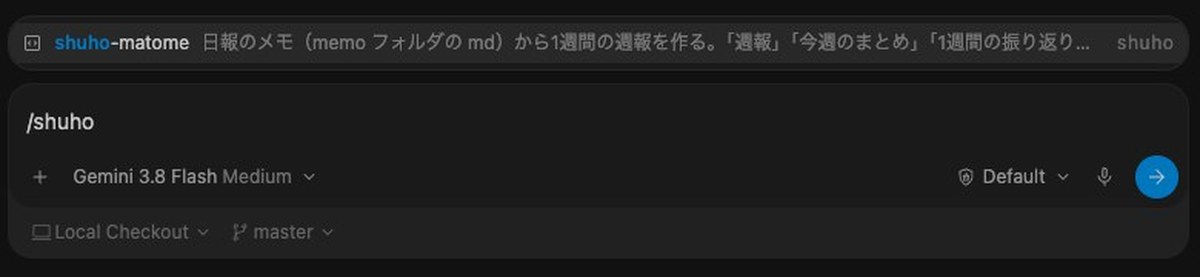
Across three runs, the agent read SKILL.md every time and returned a weekly report in the set format in 27 to 40 seconds. That means we distributed the same skill from one repository to two different apps.
We did not test uploading a zip to claude.ai this time. According to Claude Code’s documentation, only six fields work with claude.ai or the API: name, description, license, compatibility, metadata, and allowed-tools. Writing other fields causes an error when uploading. For skills used in the chat screen as well, write only these six fields.
How to fix a skill that doesn’t get called
Here is a quick-reference table of the problems we ran into this time and the fixes from the official documentation.
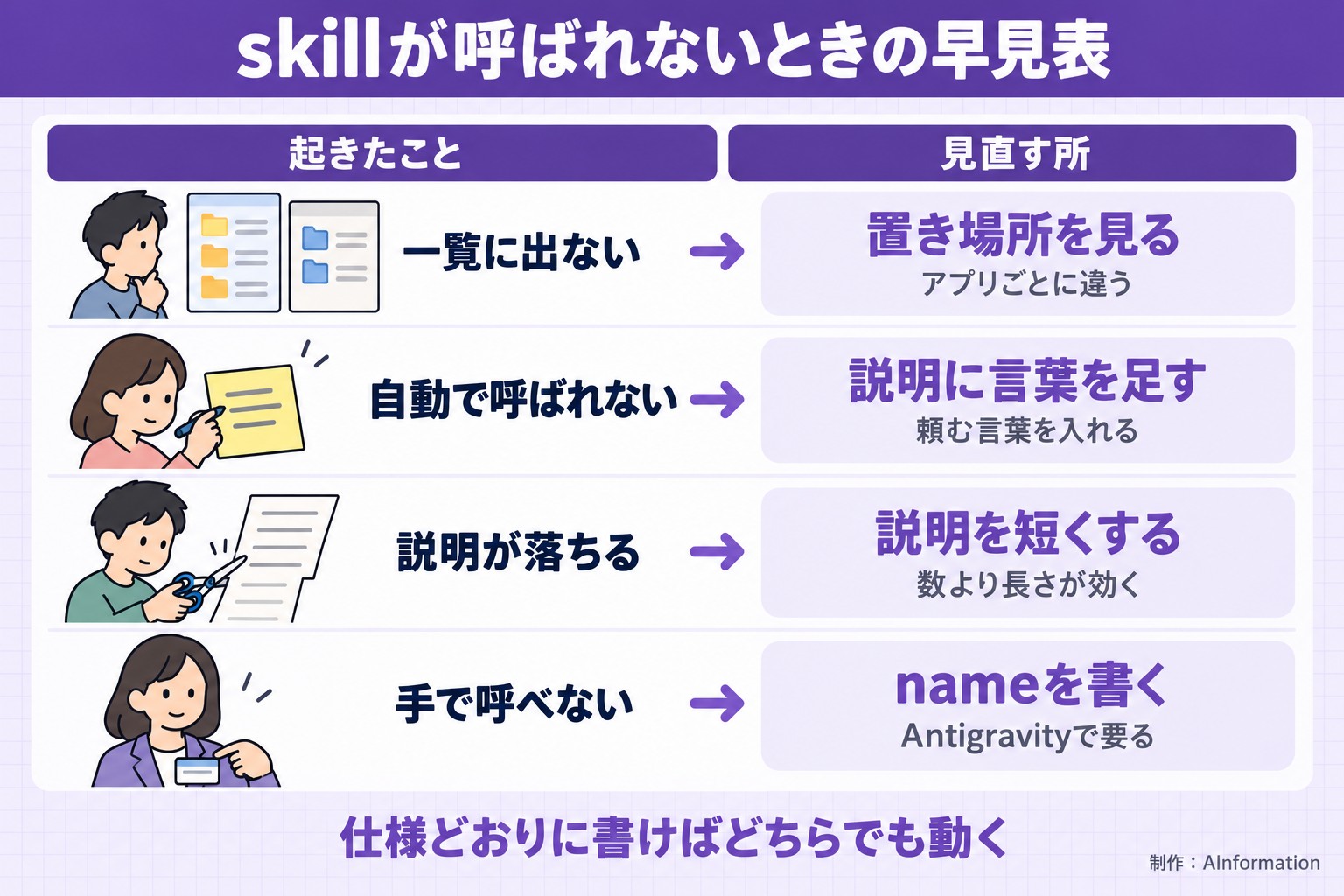
If a skill doesn’t show up in the list, check the file location first. Claude Code uses .claude/skills, and Antigravity uses .agents/skills. Neither app reads the other’s location. When a skill disappears in Antigravity, check the “A customization failed to load” message at the bottom of the screen for the reason.
If a skill shows up in the list but isn’t called automatically, check whether the description includes the wording you actually use when making a request. If you have many skills, use /skill-doctor to check whether the description has been dropped from the list. If it still isn’t called, call it directly with /name, and it will always be read. We cover how errors appear in our article on Claude Code errors and limits, and the commands you can type with / in our list of Claude Code commands.
Be careful with skills you get from other people. Writing allowed-tools grants tool permissions in advance for as long as that skill is in use. The official documentation states, “Claude Code applies a project skill’s allowed-tools even in a -p run in a folder you’ve never trusted.” In an unfamiliar repository, read the contents of .claude/skills before starting Claude Code.
When comparing skills, also check whether a skill you thought you deleted is still around. In this case, a comparison run was ruined because the agent read a deleted SKILL.md back out of the git history. Run comparisons in a folder that has never had a skill in it.
We compared AI coding tools that support skills using the same task, and summarized the results in the AI coding tools comparison table.
Summary
You can create Claude Skills by placing a single SKILL.md file in a folder named after the skill. AInformation’s practice skill is 19 lines long. In Claude Code, it was called automatically all three times, and the same request’s response time dropped from 34.7–39.3 seconds to 13.7–16.4 seconds. The same SKILL.md was also read all three times in Antigravity. Claude Code worked even with files that didn’t follow the spec, but some of those formats stopped Antigravity. To distribute a skill, place two plugin.json files side by side in one repository so it works in both apps. As the number of skills grows, shorten the descriptions so they don’t get dropped from the list.
Frequently asked questions
- What are Claude Skills?
- They are the procedures and rules you want an AI to remember, packaged into a folder containing a file called SKILL.md along with programs and other files. The contents are read only when a request matches the description.
- What’s the simplest way to create a skill in Claude Code?
- Create .claude/skills/name/SKILL.md, write name and description at the top, and write the procedure below that. Once saved, you can use it the next time you start Claude Code.
- Which fields must SKILL.md include?
- The spec requires only two: name and description. Claude Code works without them, but if you plan to use the skill in other apps too, write both. Make name lowercase and match it to the folder name.
- Where do you place skills?
- For Claude Code, use .claude/skills in that folder, or ~/.claude/skills if you want it available in every folder. For Antigravity, use .agents/skills or ~/.gemini/config/skills.
- Can the same skill be used in Antigravity too?
- Yes. When AInformation placed the same SKILL.md in .agents/skills, it was read all three times and produced answers in the same format. Be sure to include the front matter settings (the part enclosed in —).
- My skill isn’t being called automatically. What should I check?
- Check whether the description includes the wording you actually use in your request. If you have many skills, also use /skill-doctor to check whether the description has been dropped from the list. You can also call it directly with /name.
- How many characters can the description be?
- The spec’s limit is 1,024 characters. Claude Code uses up to 1,536 characters in the list. Writing the most important use case first and keeping it short makes it less likely to get dropped from the list.
- How should I decide between a skill and CLAUDE.md?
- Write rules you want followed every time in CLAUDE.md, and write procedures for set tasks in a skill. A skill’s contents are read only when it’s used, so even a long procedure doesn’t add overhead.
- How do you share a skill with teammates?
- If you’re working in the same repository, add .claude/skills to Git. If you want to use it across other repositories too, turn it into a plugin and have teammates install it with claude plugin marketplace add and claude plugin install.
- What’s the difference between a skill and MCP?
- A skill teaches procedures and rules, while MCP adds tools that connect to outside services or databases. You can also combine them by writing how to use a tool added through MCP inside a skill.