

A face photo you upload to Gemini stays on Google’s servers for 72 hours even if you turn off activity saving. If a human reviewer looks at your conversation, it can stay for up to 3 years. We copied the official help pages and put together a 10-point check before you upload and a 5-step guide to delete it. When we asked Claude the same question, it got the effect of turning the setting off wrong.
- A 10-item yes/no checklist to run through before uploading a face photo to Gemini (marked where items stay on even with training turned off)
- 5 steps to delete a face photo you already uploaded, and where to click
- Whether your face photo stays for 18 months, 72 hours, or up to 3 years
- 5 gaps that turning off training does not close, and 3 situations where a human can see your photo
- A table comparing how the 4 services Gemini, ChatGPT, Claude, and Copilot handle training by default
- Where Claude’s answer to the same question did not match the official help pages (checked on November 6, 2026)
More people are uploading photos of themselves or their children to Gemini to change a hairstyle or turn the photo into an illustration. What matters is how much of that photo stays with Google, and who can see it. The common answer is “just turn the setting off and you’re fine.” But Google’s own help pages list several things that stay even after you turn that setting off.
AInformation copied four official Google help pages, including the Gemini privacy hub, on November 2, 2026. On October 19 we also opened the Gemini settings screen on our own account. Around 7 a.m. on November 6, we sent Claude the same two questions and checked its answers against the official text. This article is built on those three sources: a 10-point checklist for before you upload, and a 5-step guide for after.
A 10-point check before you upload a face photo to Gemini
Here is the short version. The risk with uploading a face photo to Gemini is not just that it gets used for training. Three things overlap: a human may review it, it stays for a few days even after you turn saving off, and a share link can stay around even after you delete the chat. The table below lists 10 items to check before you upload anything. The 5 rows marked with a ● in the right-hand column stay even if you turn off the training switch.
We built this table from Google’s official help text, copied on November 2, 2026. Rows marked ● are not covered just by turning the setting off. Read the right-hand column once before you start using the feature.
10 things to check before uploading a face photo to Gemini
| What to check | Yes/no guide | Stays even with training off? |
|---|---|---|
| Activity saving | Good: turn it off or use a Temporary Chat before uploading | ● Stays for 72 hours |
| Auto-delete period | Good: shorten it from 18 months to 3 months | ― |
| Consent from the person in the photo | Bad: don’t upload it without their consent | ― |
| Children’s faces | Bad: swap it for a photo where the face isn’t identifiable | ― |
| Name tags, uniforms, or homes in the background | Bad: crop them out if they appear | ― |
| Thumbs-up/thumbs-down buttons | Bad: don’t press them on a conversation with a face photo | ● Pressing one keeps the attachment for up to 3 years |
| Share links | Bad: don’t create one | ● Stays even after you delete the chat |
| Whether you connect Google Photos | Bad: don’t link it; hand over a single photo instead | ● The original photo stays in Photos |
| Personal account or work account | Good: a company Workspace account has no human review | ― |
| Watermark on generated images | Good: assume SynthID is embedded | ● The watermark stays in the image |
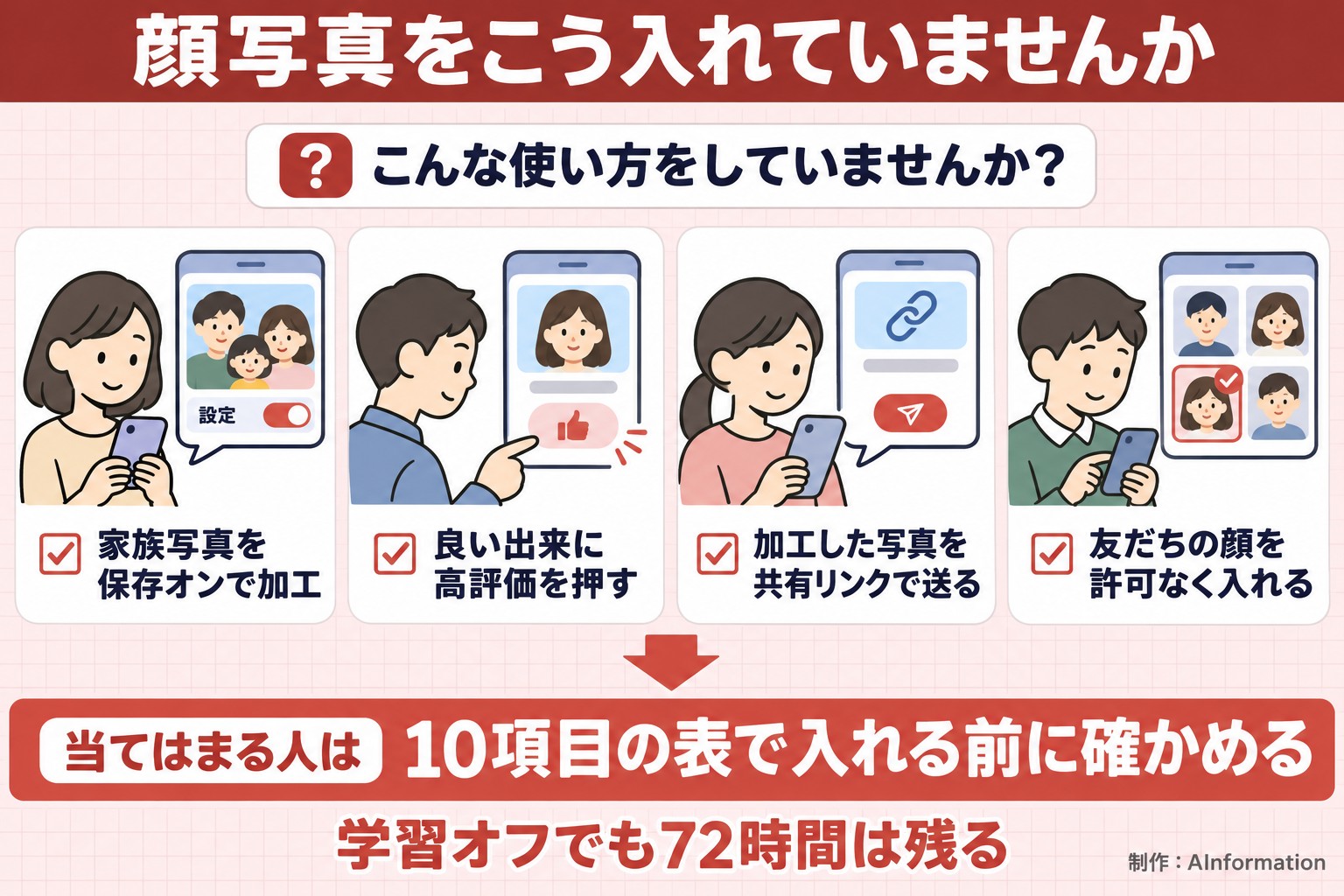
Check activity saving first
The first item is the foundation. Google’s official Gemini help pages say that for users 18 or older, Activity saving is turned on by default. With it on, your chats and uploaded photos are stored in your account. They’re also used to improve Google’s services, which includes training generative AI models. Anyone who starts using Gemini without changing any settings is uploading face photos under these conditions.
If you plan to upload a face photo, turn saving off or use a Temporary Chat first. The official help pages say a Temporary Chat is not seen by human reviewers and is not used to improve the AI. Still, as the ● in the table shows, either option keeps the data in your account for 72 hours.
Easy to miss: thumbs-up ratings and share links
Items 6 and 7 are the ones people who turned saving off tend to miss. Pressing thumbs-up or thumbs-down on a response sends the chat from the previous 24 hours, along with any uploaded files, together with your feedback — even if saving is off. The same applies if you create a share link to show an edited photo to a friend. Deleting the chat does not delete that link. We cover both in more detail later.
5 steps to delete a face photo you already uploaded to Gemini
If you’ve already uploaded a face photo, work through the 5 steps in this section in order. These steps are copied from Google’s official help page, “Manage and delete your Gemini Apps activity,” as it read on November 2, 2026. We describe the desktop screen, but the mobile app has menus with the same names.
5 steps to delete a face photo you uploaded to Gemini
| Step | What to do | Where to click | What to watch for |
|---|---|---|---|
| 1 | Open your activity | gemini.google.com → Settings and help → Activity | You can also open it at myactivity.google.com/product/gemini |
| 2 | Delete the conversation with the photo | Delete → choose a range, or the delete icon next to the conversation | A conversation a human has reviewed does not get deleted and can stay for up to 3 years |
| 3 | Delete any public links | Public link settings | The link stays even after you delete the chat |
| 4 | Stop future saving | Switch the toggle at the top from on to off, then delete activity | Even with it off, data stays for 72 hours |
| 5 | Delete the original photo | Google Photos or your device’s photo app | Deleting it in Gemini does not delete it from other services |
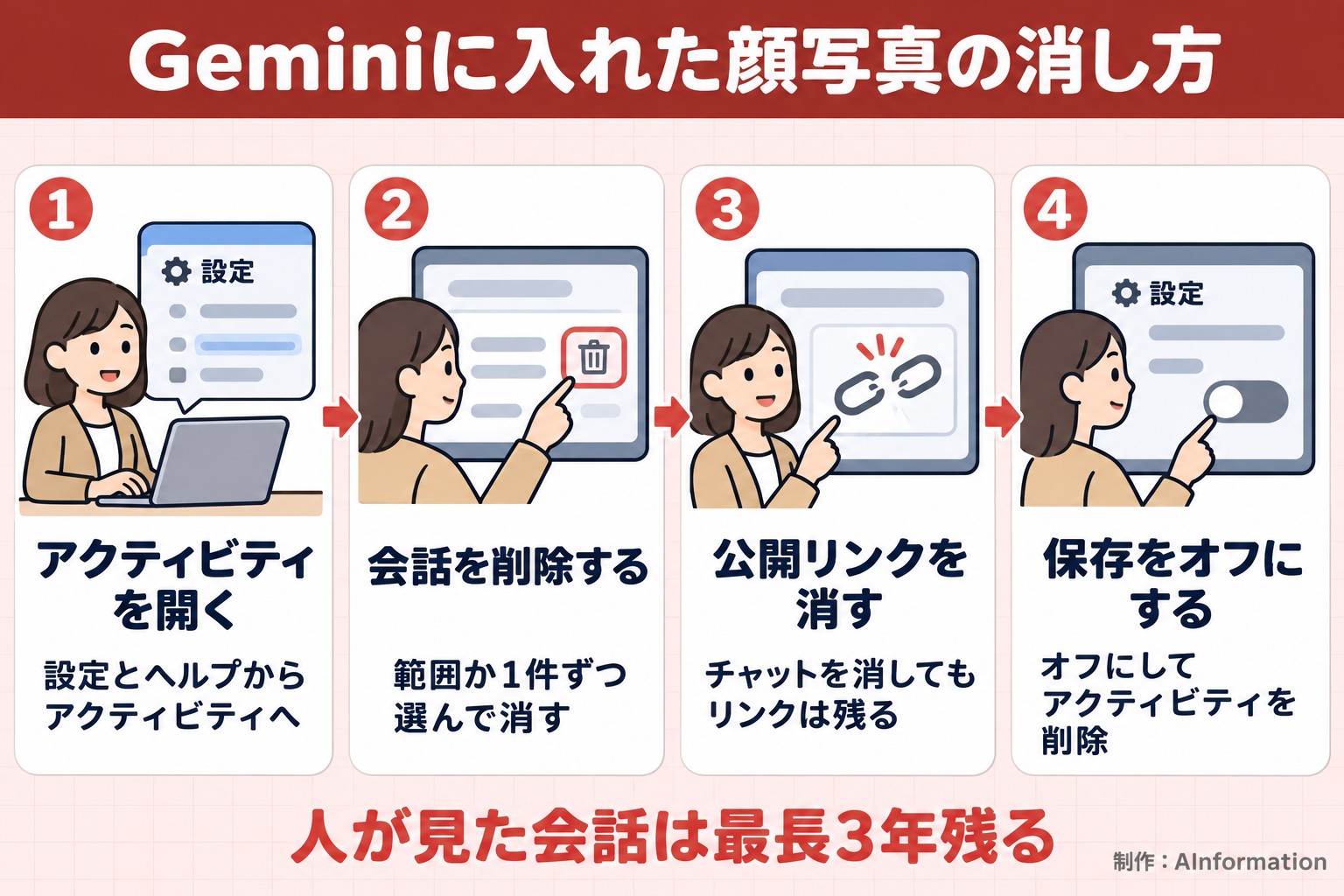
Steps 1 and 2: Delete from your activity
On a computer, open gemini.google.com and go to Settings and help, then click Activity. Opening myactivity.google.com/product/gemini directly takes you to the same screen. Click Delete at the top and choose from four ranges: the last hour, the last day, a custom range, or all time. If you only want to remove a conversation that contains a photo, click the delete icon next to that conversation. According to Google, once you choose to delete, the process to remove the data from the service and its systems starts right away.
Step 3: Delete the public link separately
This is the step people tend to miss. Google’s official help page states clearly that deleting a shared chat does not delete its associated public link. If you sent someone an edited photo through a link, deleting it from your activity alone won’t stop that link from still showing the photo. Use the “Public link settings” in the Privacy Hub to delete the link itself.
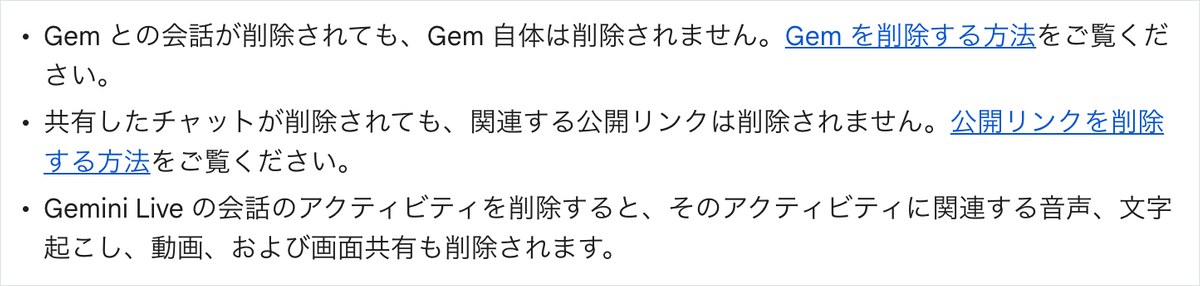
Steps 4 and 5: Stop future saves and the original photo
If you plan to keep using face photos, select ‘Turn off and delete activity’ from the Activity menu, which currently shows ‘On’. Even after doing this, the original photo saved in Google Photos or on your device won’t be deleted. The official help page also notes that deleting Gemini activity does not delete data in other Google services. You need to delete the original photo separately in each service.
There’s one more thing worth knowing: some data simply can’t be deleted. Conversations already seen by a human reviewer are disconnected from your account and kept for up to three years. Deleting your activity does not remove this. This is exactly why the 10 checks you make before sending a photo matter more than anything you do afterward.
Does a Gemini face photo get deleted in 18 months, 72 hours, or 3 years?
When a face photo you’ve sent to Gemini gets deleted depends on your settings and how you used it, and falls into four patterns. The table below lists the retention periods based on the Privacy Hub and Activity help pages, captured on November 2, 2026. The Privacy Hub’s Q&A section had been updated on October 26.
How long a face photo sent to Gemini stays on file
| Usage | Retention period | Can it be deleted? |
|---|---|---|
| Activity saving left on (default) | Auto-deleted after 18 months | Yes — can be changed to 3 months, 36 months, or never auto-delete |
| Activity saving off / temporary chat | 72 hours | No — kept for responses and protection |
| Conversations seen by a human reviewer | Up to 3 years | No — not deleted even if you delete the chat |
| Conversations where you sent feedback | Up to 3 years | No — stored disconnected from your account |
| Avatar records (face and voice) | Auto-deleted after 3 years of non-use | Yes — can be deleted from Data and privacy |
| Company Workspace accounts | Set by the administrator (default 18 months) | Partial — can be deleted unless the administrator blocks it |
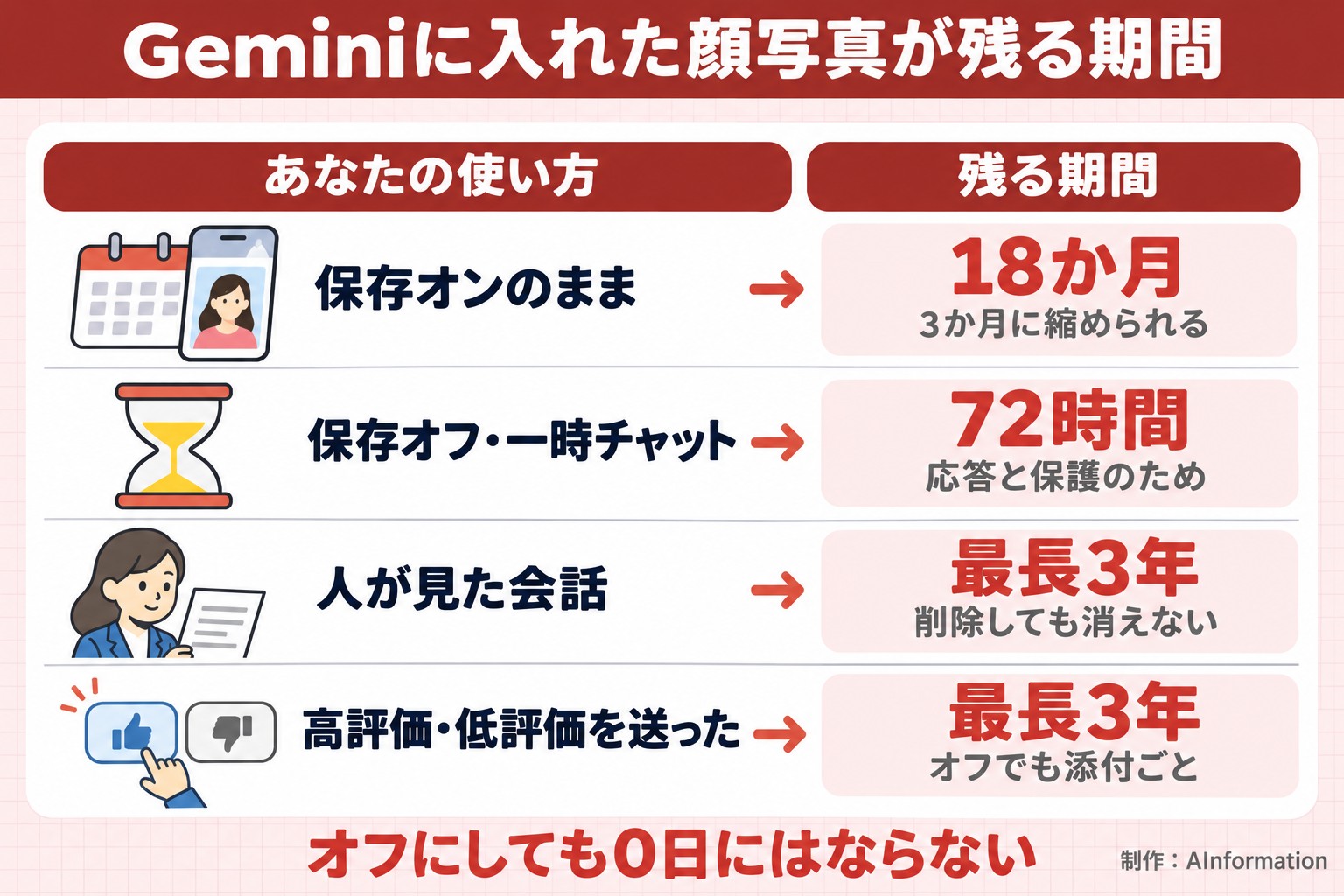
If you haven’t changed anything, you’re in the first row. Activity is auto-deleted after 18 months. You can change this period to 3 months, 36 months, or set it to never auto-delete. If you send face photos, shortening it to 3 months gives you more peace of mind.
Those who turned off saving or used temporary chat fall into the second row: 72 hours. Google explains this 72-hour window exists to generate responses and to protect Google, users, and the public. It also mentioned keeping data on the account as a safeguard in case of a system failure.
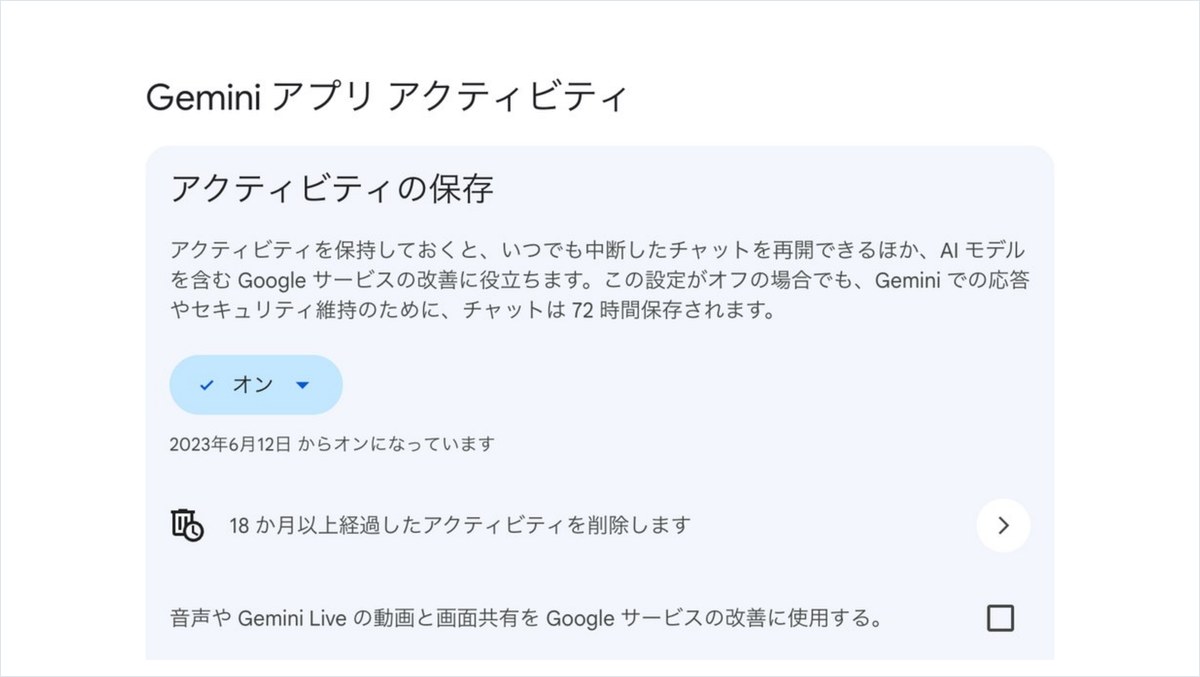
Rows three and four are kept the longest. Conversations seen by a human reviewer and conversations where you sent feedback are both kept for up to three years. In both cases, the data is stored disconnected from your account. The screenshot below shows the settings page the editorial team opened on their own account on October 19. Below ‘On’ it shows the 18-month auto-delete setting. The description also stated, “Even when this setting is off, chats are saved for 72 hours.”
5 gaps where a Gemini face photo survives even with training turned off
When you turn off activity saving, future chats stop being used to train the AI model. This part is well known. What this article wants to point out goes further. Reading the official help pages line by line reveals at least five things that turning this off does not prevent.
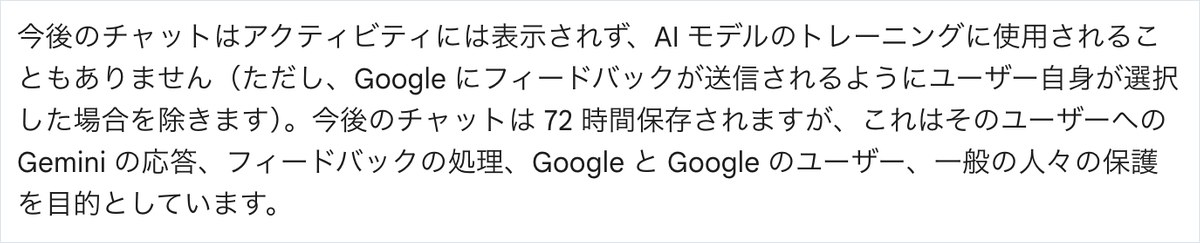
Gaps 1 and 2: the 72-hour window and protection reviews
The first gap is the 72-hour retention. Whether you turn saving off or use temporary chat, the conversation still stays on your account for 72 hours. The second gap is protection-related review. The Privacy Hub states that even with saving off or in temporary chat, Google uses chats to generate responses and for protection purposes, which includes review by human reviewers. This means turning it off does not guarantee complete removal from human view.
Gaps 3 and 4: feedback and conversations from before you turned it off
The third gap is feedback. Even with saving off, if you send a thumbs up or thumbs down, Google collects that feedback along with the chat from the preceding 24 hours and any uploaded files. A dedicated team reviews this data, and it’s kept for up to three years. The fourth gap covers conversations from before you turned saving off. If a reviewer had already seen a conversation at the time you turned the setting off, deleting your activity won’t remove it.
Gap 5: shared links and other services
The fifth gap concerns data that has already left Gemini. A public link you shared stays active even after you delete the chat. Photos stored in other services, such as Google Photos, also aren’t deleted through Gemini’s settings. The Privacy Hub also notes that your Gemini settings don’t apply to the processing used to create anonymized data, which Google uses to improve its services.
In short, turning the setting off only stops future training, it isn’t a switch that erases the face photo itself. It protects what comes after, but it has no effect on what has already gone out.
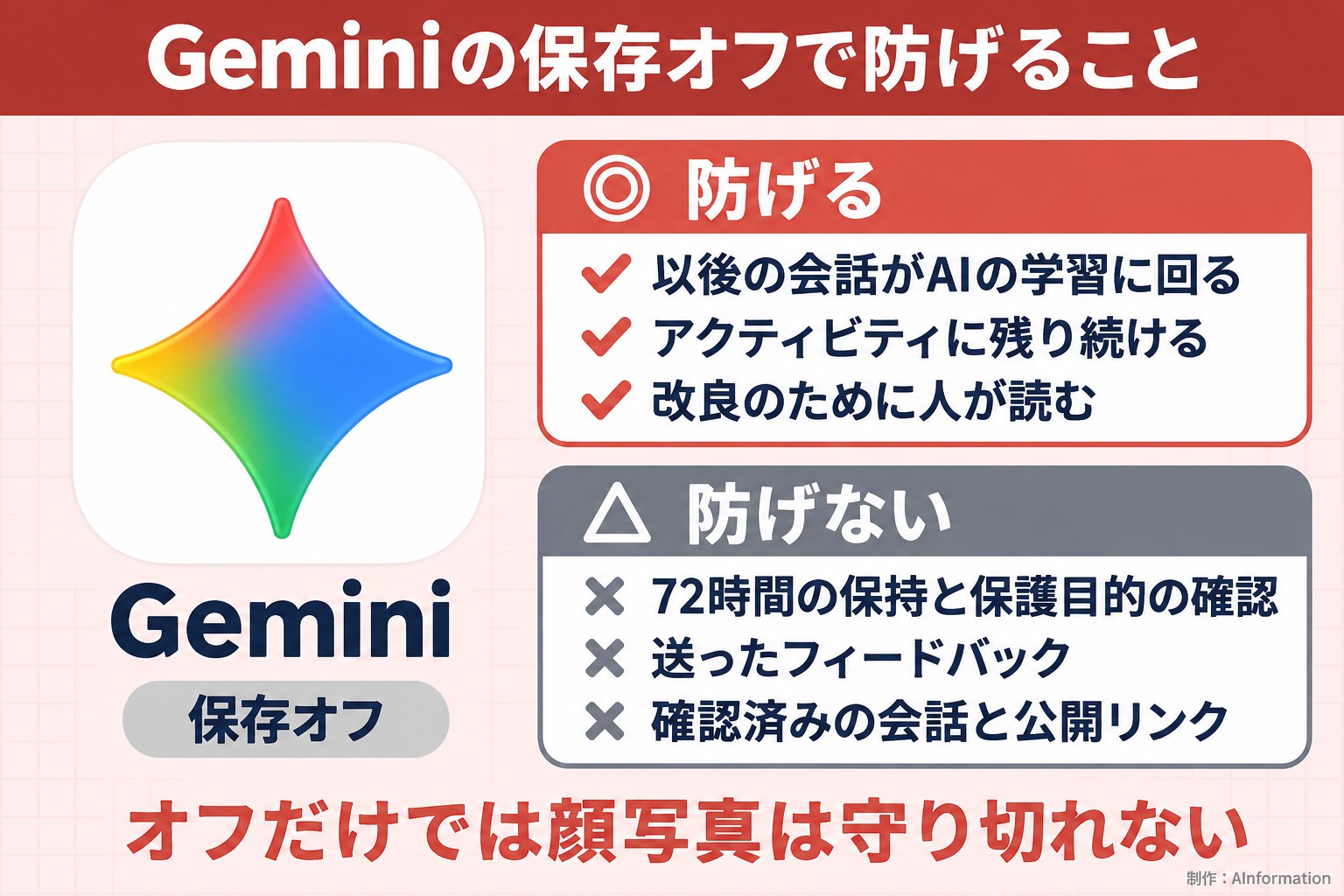
Three situations where people see your face photo in Gemini
Whether a person actually sees your photo is probably the biggest worry for anyone searching this topic. Reading Google’s official help pages, there are clearly three distinct situations where a human reviews it.
Situation 1: improvement work while storage is on
When storage is on, Google shows part of your chats to reviewers for service improvement. These reviewers include trained outside contractors. Their job is to judge whether an answer is low quality, inaccurate or harmful, and to help write better answers. Reviewed conversations are disconnected from your account and kept for up to 3 years. If you send a photo from Google Photos, the help page states that it can also go through human reviewers for improvement purposes when storage is on.
Situation 2: protection checks that happen even when storage is off
The second situation is the protection check described in the previous section. The Privacy Hub states that human review can occur even with storage off or in a temporary chat, when it is needed to protect Google, users or the public. This also covers cases where Google investigates exchanges suspected of violating its policies.
Situation 3: when you send feedback
The third situation is when you send feedback yourself. Even with storage off, doing so sends the conversation, including any attached photo, to a dedicated review team. This applies even if you just tap a thumbs-up because you liked how an edit turned out. For conversations that include a face photo, the safest approach is to avoid tapping either thumbs-up or thumbs-down at all.
The Privacy Hub states outright: “Don’t enter confidential information that you don’t want a reviewer to see.” Since Google itself says this, the sensible rule is to only upload a face photo you would be fine with someone else seeing.
Compared with ChatGPT, Claude and Copilot, Gemini feeds training by default
A natural question is whether other AI tools are any safer. We copied the official help pages for all 4 tools, Gemini, ChatGPT, Claude and Copilot, on November 2, 2026, and compared whether images uploaded to a personal account feed training by default.
Do uploaded images feed training by default? (4 AI tools)
| Item | Gemini | ChatGPT | Claude | Copilot |
|---|---|---|---|---|
| Feeds training by default | Yes (storage is on by default for ages 18 or older) | Yes (data sharing is on by default) | Partial — you choose when you first start using it | No (the new app is not used to train the base model) |
| What remains after you turn training off | 72 hours; reviewed conversations up to 3 years | Saved chats are not deleted | Conversations flagged by safety classification | Not confirmed in this research |
| Retention for temporary chats, etc. | 72 hours | Up to 30 days | 30 days | Not confirmed in this research |
| Disclosure of when a human reviews your data | Excellent — 3 situations with timeframes | Good — discloses when staff review chats | Partial — not confirmed in this research | Partial — not confirmed in this research |
Gemini and ChatGPT were the two tools that fed training by default. Gemini has storage turned on from the start for anyone age 18 or older. OpenAI’s help page also states that data sharing is on by default for personal workspaces on the free plan, Plus and Pro. If you upload a face photo without changing any settings, both of these tools will use it for training.
Claude lets you choose when you first start using it. Anthropic announced it would require everyone to make this choice by October 8, 2025. Conversations from users who allow training are kept for 5 years; for those who don’t, it’s 30 days. For the new app released on August 18, 2026, Microsoft states that Copilot does not use prompts, responses or files to train the base model. Comparing default settings, Copilot offers the strongest protection.
At the same time, Gemini’s explanation of when humans review your data was the most detailed of the four. It discloses the 72-hour period, the 3-year retention, feedback handling and public links, all with specific timeframes. The information is there if you read it — the real problem is that many people start using it without reading it. We’ve compiled how to turn off training across all four companies in our quick-reference guide to disabling AI training.
Claude gave a wrong answer about human review when asked the same question
Some readers may think it’s simpler to just ask an AI directly. So around 7 a.m. on November 6, 2026, we sent the same two questions to both Claude and ChatGPT through a browser. The first was: “If I upload a photo of my own face to Gemini and have it generate an image, will that photo be stored by Google? Will it be used for training or seen by a human? How many days until it’s deleted?” The second asked for 5 precautions to take when editing photos of children or friends’ faces, plus the steps to delete them.
ChatGPT’s browser session stalled both times and never returned an answer, so only Claude’s answers could be compared. Claude answered the first question in 42.3 seconds with 1,421 characters, and the second in 47.5 seconds with 1,267 characters.
Checking Claude’s answers against Google’s official help pages
| What the official help page says | Claude, answer 1 | Claude, answer 2 |
|---|---|---|
| Default storage is 18 months, can be shortened to 3 months | Correct | — |
| Even when off, data remains for 72 hours | Correct | — |
| Reviewed conversations are kept up to 3 years even if deleted | Correct | Correct — stated it remains in a separate category |
| Even when off, humans may review data for protection purposes | Incorrect — said human review stops entirely | — |
| Even when off, sending feedback sends the attachment too | Incorrect — not mentioned | Incorrect — not mentioned |
| Public links remain even after you delete the chat | Incorrect — not mentioned | Incorrect — not mentioned |
| Deletion path is Settings & Help → Activity | — | Partial — said to use the menu in the top-left corner |
| Did sources include an official Google page | No — 0 of 5 sources | Yes — 1 of 2 sources |
The timeframes were accurate; the effect of turning storage off was not
The timeframes were largely accurate. All four of these points matched the official wording: the 18-month default, the ability to shorten it to 3 months, the 72-hour retention even when storage is off, and the fact that reviewed conversations are kept for up to 3 years even after deletion. Where Claude got it wrong was the effect of turning storage off. Claude said that turning storage off stops future conversations from being sent for human review, and that this would stop both training and human review. But the Privacy Hub states that even with storage off, human review — including for protection purposes — can still occur. This is a direct contradiction.
What was missing: feedback and public links
Neither answer mentioned that sending a thumbs-up or thumbs-down, even with storage off, still causes the attachment to be used as well. Neither mentioned that public links remain even after you delete the chat. In the deletion steps for the second question, Claude described the entry point as “the menu in the top-left corner.” The official help page’s entry point is Settings & Help → Activity.
There were differences in sources too. None of the five answers listed in the first response came from an official Google page. In the second response, one of the two sources was a Google support page. The AI’s answer is useful as a starting point for checking the number of days. But it was wrong on the most important point — that turning the setting off keeps the data from being seen by a human reviewer — so check the official help page at the end. General cautions for entering other information into Gemini are covered in 12 steps to prevent information leaks on Gemini.
Even the ¥2,900-a-month Google AI Pro plan has no statement about treating face photos differently
We also checked whether paying protects face photos. On Google’s pricing page, checked on November 2, 2026, the personal plan Google AI Plus was ¥725 a month. Google AI Pro was ¥2,900 a month, and Google AI Ultra started at ¥14,500 a month. But as far as the privacy hub goes, there is no statement that paid plans change how storage or human review are handled. The only thing added for paid plans, as far as data collected goes, is subscription-related information.
Does Gemini treat face photos differently on paid plans?
| Plan | Monthly price | Human review and training |
|---|---|---|
| Gemini (free) | ¥0 | Yes — storage is on by default and data goes to training and human review |
| Google AI Plus | ¥725 | Yes — no statement that paid plans change this |
| Google AI Pro | ¥2,900 | Yes — no statement that paid plans change this |
| Google AI Ultra | From ¥14,500 | Yes — no statement that paid plans change this |
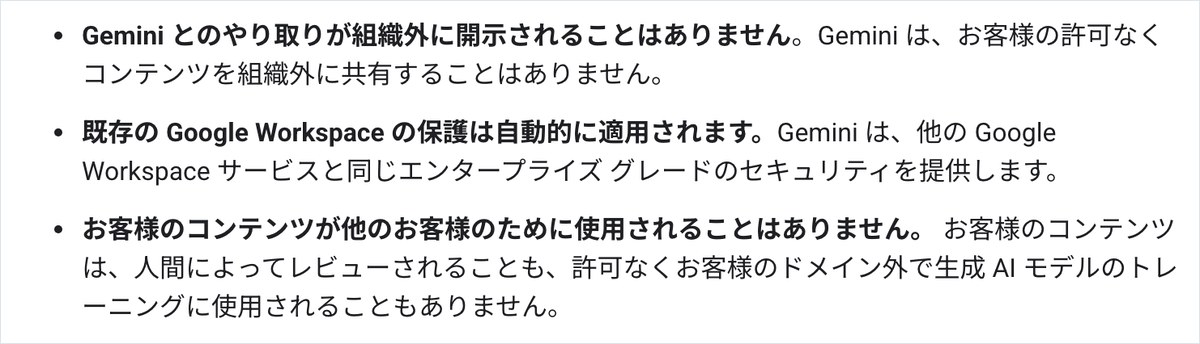
| Google Workspace Starter | ¥800 (annual contract, per person) | No — no human review and no training without permission |
| Google Workspace Standard | ¥1,600 (annual contract, per person) | No — no human review and no training without permission |
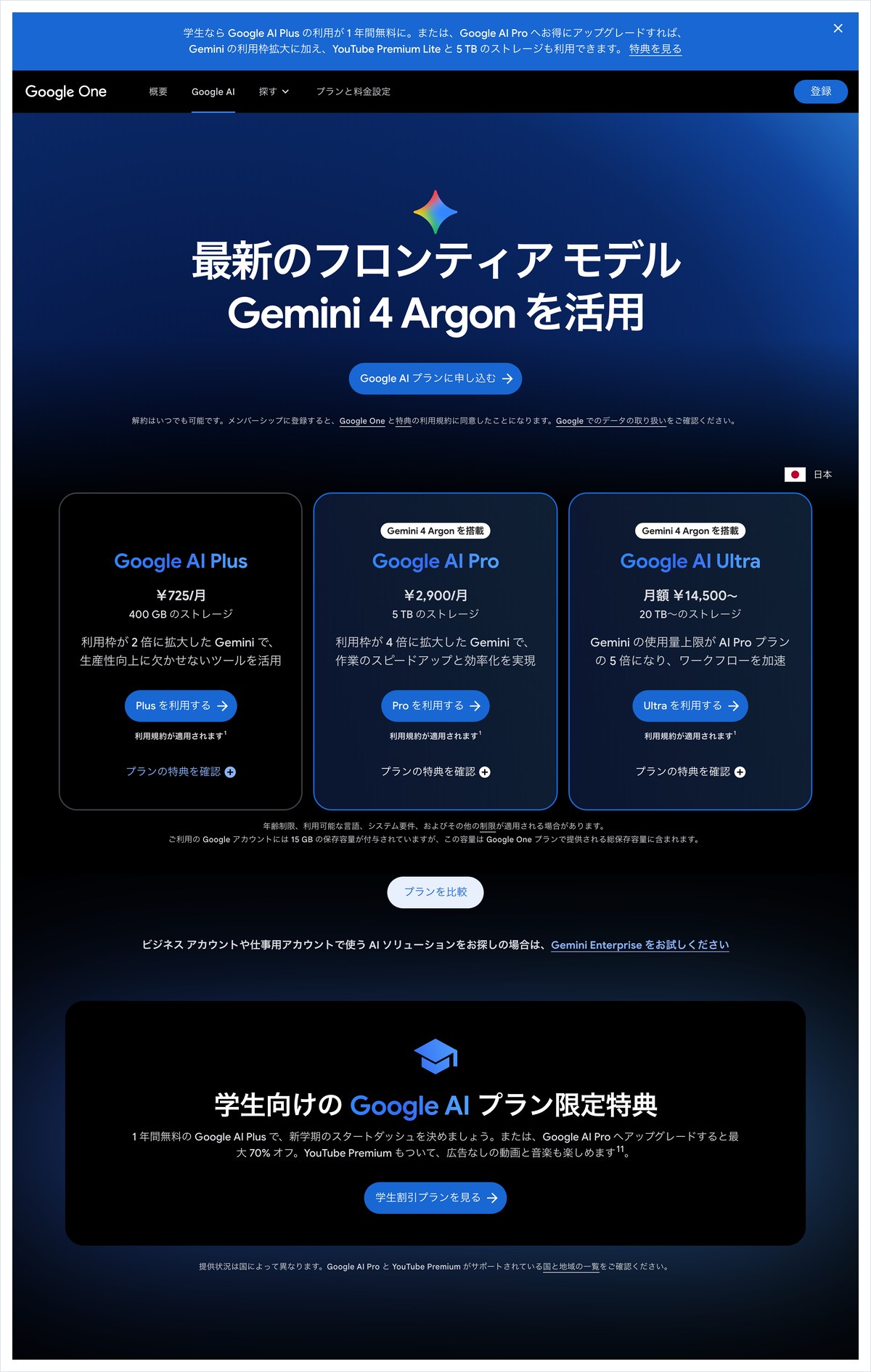
The treatment changes for the business plan, Google Workspace. On the pricing page, the lowest tier is Starter, at ¥800 a month per person on an annual contract. Above it are Standard at ¥1,600 a month and Plus at ¥2,500 a month. Starter also includes chat with Gemini AI. Workspace’s privacy hub states that customer content is not reviewed by humans. It also says content is not used to train generative AI models outside the domain without permission. Administrators choose how long conversations are kept — 3 months, 18 months or 36 months — and if chat history is off, the limit is 72 hours.
Lined up in yen, the difference is clear. Google AI Pro, at ¥2,900 a month, is a personal plan, so if you leave the settings untouched, your data still goes toward training. Workspace, at ¥800 a month, offers stronger protection on both human review and training. Other AI tools follow the same pattern — ChatGPT’s Go plan, at ¥1,400 a month, is also treated as a personal plan. Of the 79 image-generating AI tools listed in AInformation’s AI Tools Directory, only 23 can be paid for in Japanese yen. Before thinking about how you pay, check which account you’re using.
Images made with Nano Banana 2.1 or later, released October 6, carry a SynthID watermark
The image model used for editing face photos in Gemini is Nano Banana. Google announced the updated Nano Banana 2.1 on October 6, 2026 (local time). It became available in the Gemini app and elsewhere starting the same day. Face photo editing is increasingly running on this newer version.
On the same day, October 6, Google released the SynthID Detector, a tool for checking whether an image was made by AI, for anyone to use. Images made with Nano Banana carry an invisible watermark called SynthID. The same is true for images made with Gemini. That means images made from face photos can later be confirmed by anyone as AI-generated.
The watermark has both a protective side and a lingering side
This cuts two ways. On the good side, if someone finds an image made from your face by someone else, the watermark gives a clue that it was made by AI. On the other hand, generated images keep that watermark as they spread. The SynthID Detector’s terms ban using the tool to search for ways to break the watermark. Detection only works for images made by four companies’ AI tools, including Google and OpenAI, and you had to log in before you could even run a check.
This check could not confirm whether a visible watermark is also added. The same goes for whether any new restriction has been placed on generating images of people. Gemini’s privacy explanation was updated on October 13, and the privacy FAQ section was updated on October 26. Since these pages keep being updated, it’s a good habit to check the date before entering anything.
Get permission first before putting a child’s or a friend’s face into Gemini
Last is faces other than your own. Gemini’s privacy notice states, “Before using someone else’s face or voice with Gemini, be sure to get that person’s permission.” It goes on to say that you should only upload or edit content you have the rights to. Putting a friend’s face in without asking, just to make a fun image, goes against Google’s own rules.
Turn children’s photos into a form where the face can’t be identified
Photos of children can reveal where they live, through a name tag in the background, a school uniform, or the outside of a house. Claude also warned, in its second answer, that the original photo may contain information about where it was taken. If you still want to edit the photo, use one where the face isn’t shown straight on. Cropping out a visible name tag before uploading is another option.
Making an avatar follows different rules than photos
Gemini also has a feature for making avatars, and this one records your face and voice. According to the privacy hub, these recordings are saved to your account. They’re automatically deleted if unused for 3 years. It also states that the data is not used to train generative AI models, except to deal with fraud or harm. Because these rules are more clearly defined than those for photos entered in chat, putting a photo into chat is actually the more loosely handled option.
In case you discover that someone else has used your face, Google’s help pages also include an article titled “Report a violation of Google AI’s likeness policy.” Along with the 10 checks before uploading and the 5 steps for deleting, it’s worth remembering the name of this reporting channel too.
What’s scary about face photos isn’t training itself — it’s the assumption that turning a setting off makes everything safe. The official help page itself states that data stays for 72 hours even when the setting is off, and that an attachment can still be seen by a reviewer if you tap a thumbs-up. In our training sessions, we tell people to check just two things before uploading a family photo: the storage switch and any shared link. For business use, lean on Workspace rather than a personal account. A difference of just ¥800 a month takes you out of human review, so it’s worth paying for.
- Does Gemini use my face photo for training if I upload it?
- If you have a personal account, are 18 or older, and have not changed the settings, yes, it can be used. Google’s official help page states that activity saving is on by default. When it is on, uploaded photos are used for improvements, including training the generative AI model. If you turn off saving or use a temporary chat, later conversations will not be used for training.
- If I turn off training, will my face photo be deleted right away?
- No, it will not be deleted right away. Whether saving is off or you use a temporary chat, the conversation stays in your account for 72 hours. Conversations that a human reviewer looked at before you turned saving off can be kept for up to 3 years and are not deleted even if you delete them. A public link you shared also stays live even after you delete the chat, so you need to remove it separately from the public link settings.
- Can other people see photos I upload to Gemini?
- Yes, in some cases. When saving is on, reviewers look at some conversations to improve the service. Even when it is off, the privacy hub states that human review can still happen for protection purposes. If you give a thumbs up or thumbs down, the conversation from the previous 24 hours and any attached photos are sent, along with your feedback, for review by a dedicated team.
- Does upgrading to the paid Google AI Pro plan protect my face photo?
- As of the privacy hub page captured on November 2, 2026, there was no mention that Google AI Pro, priced at ¥2,900 a month, changes this handling. The plan that states there is no human review and no training without permission is Google Workspace, a business plan. It is available starting with the Starter plan, which costs ¥800 per person per month on an annual contract.