
There are two places to turn off training on Codex. Even if you turn off “Improve the model for everyone” in ChatGPT, the Include environments setting in Codex still remains. GitHub Copilot will use free and Pro input for training by default starting April 24, 2026.
- Turning off training on Codex requires changing settings in two places — ChatGPT’s settings and Codex’s own settings — and changing only one leaves environment training active
- The exception where conversations get used for training even with the switch off, if you give a thumbs-up or thumbs-down rating
- GitHub Copilot has been using free and Pro/Pro+ input and output for training by default since April 24, 2026
- Default settings and where to turn them off for Claude Code, Cursor, Google Antigravity, JetBrains AI, and Amazon Q Developer
- Among 2,690 AI job listings, Claude Code appears in 472 and Codex appears in 162
- How Claude’s answers about Codex and Claude Code settings scored against the official 7-point criteria
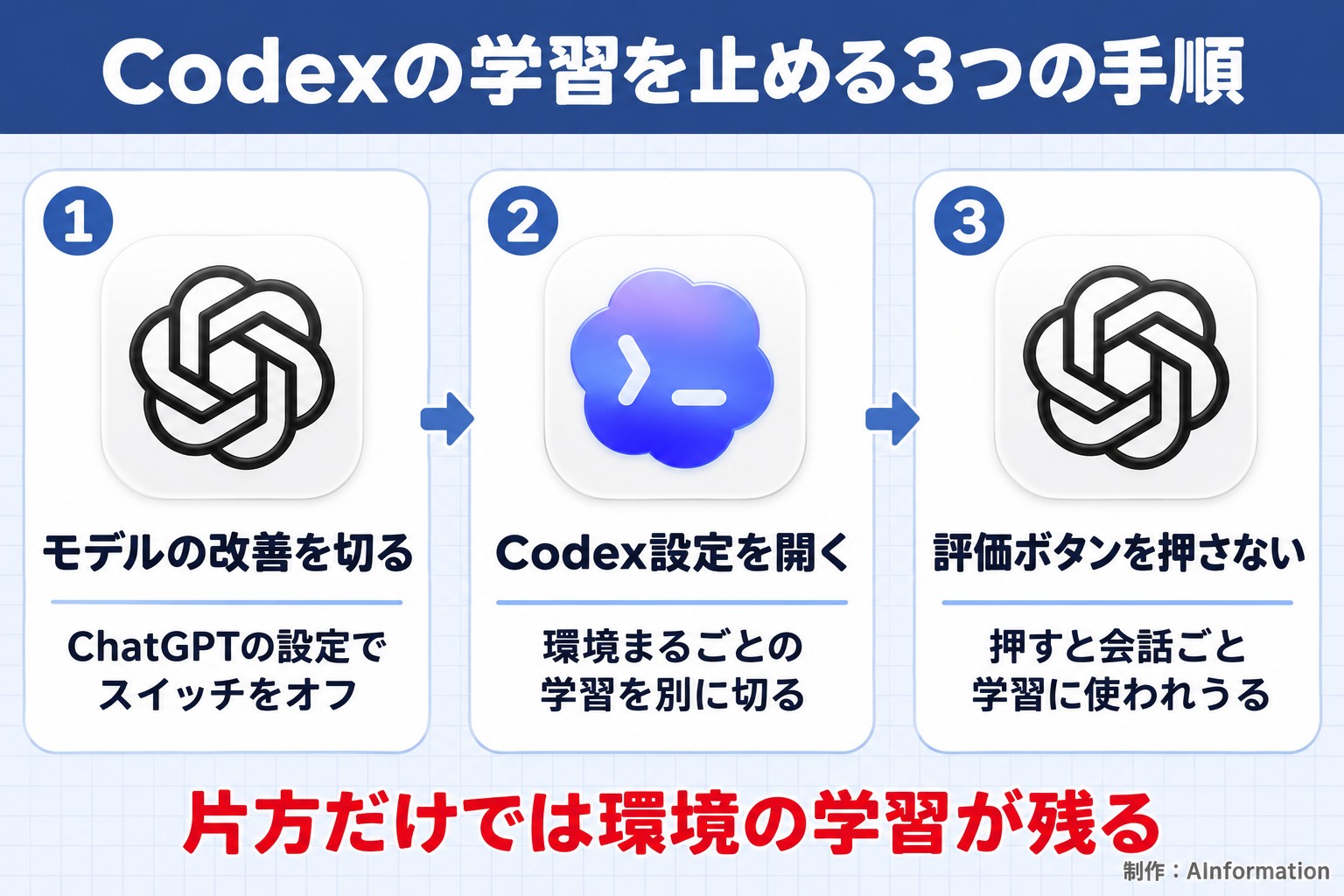
There are two places to turn off training on Codex: “Improve the model for everyone” in ChatGPT’s settings, and “Include environments” in Codex’s settings. OpenAI’s help page states that turning off the ChatGPT switch does not change the Codex environment setting.
Other coding AI tools are not built the same way. GitHub Copilot has used free and Pro/Pro+ input and output for training by default since April 24, 2026. JetBrains also turns on code sharing by default, but only for its free non-commercial license.
In November, a post appeared on the overseas forum Hacker News titled “OpenAI seems to be silently re-enabling model training on Codex chats.” It gathered 497 points and 149 comments. As of November 4, no official explanation from OpenAI has been found.
On November 4, 2026, AInformation read the original text of the official help pages, terms, and blogs of seven coding AI tools. On the same day, we counted how many times each tool’s name appeared in our own database of 2,690 AI job listings. We also checked Claude’s answers about Codex and Claude Code settings against the official text, sentence by sentence.
Turning off training on Codex requires changing settings in both ChatGPT and Codex
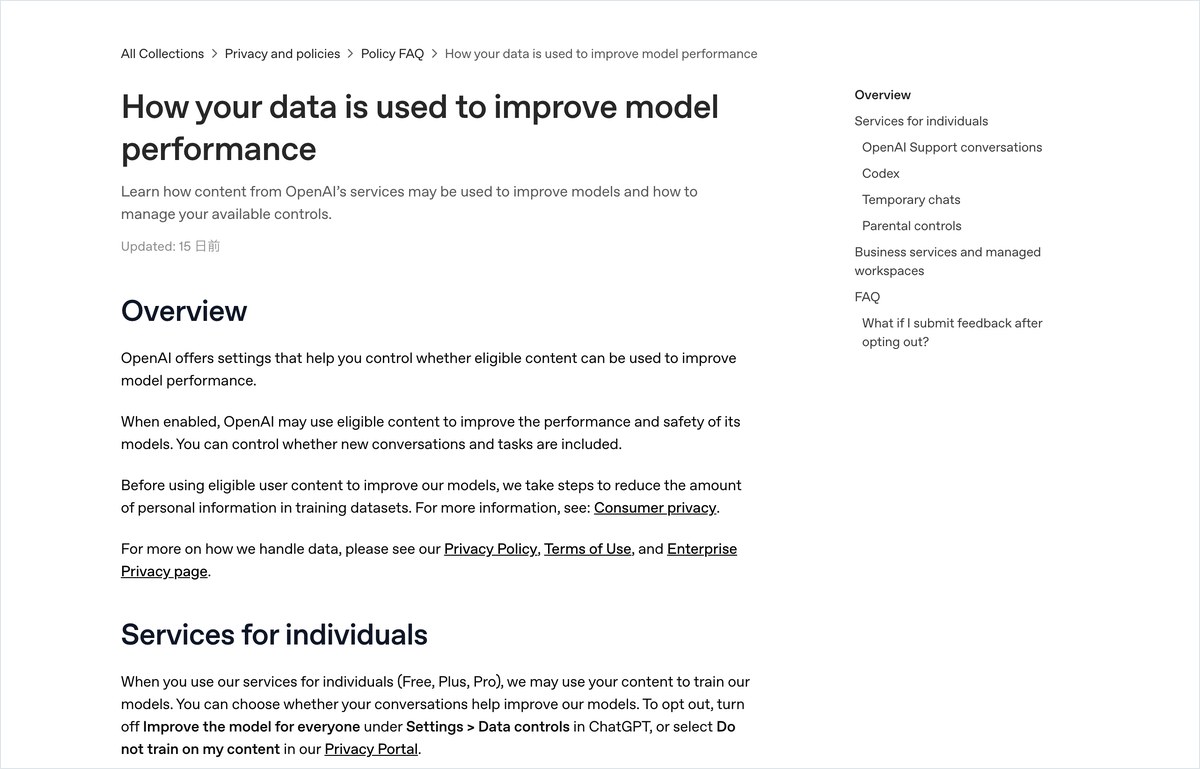
First, turn off “Improve the model for everyone” in ChatGPT
If you use Codex with a personal ChatGPT account, start by opening ChatGPT’s settings. Turn off “Improve the model for everyone.” Claude also answered that this switch is located under Data controls in ChatGPT’s settings.
OpenAI’s help page also lists another option: opting out of training through the privacy portal. Either of these two is enough on its own. The original text reads: “Either option is sufficient for ChatGPT conversations and Codex tasks.” It goes on to say you do not need to do both.
Second, turn off “Include environments” in Codex’s settings
The second setting is inside Codex itself. The help page states: “Codex has a separate Include environments setting.” It is a separate switch that decides whether entire environments can be used for training. Turning off the ChatGPT switch or opting out through the privacy portal does nothing to this setting.
The help page does not say whether this switch defaults to on or off. AInformation could not find this information either, as of our reading on November 4. The safest approach is to open the setting yourself and check with your own eyes whether it is off.
A third thing to watch: the thumbs-up and thumbs-down buttons
Even with both switches off, one exception remains. The help page states that pressing a thumbs-up or thumbs-down rating on a response can cause the entire conversation to be used for training. This applies to the 3 plans: Free, Plus, and Pro. If a conversation contains work-related code, it is safer to decide in advance not to press the rating buttons.
A prompt to have an AI check your tool’s settings
Here is a prompt you can use to have an AI check the current state of a tool’s settings. Always have it include the official URL and the last-updated date in its answer. Do not rely on the AI’s answer alone — open the URL yourself and verify it.
Please research whether code and conversations entered under a personal plan are used to train the AI, for the following tool.
Tool name: (write it here)
Please answer in four parts: (1) whether it is used for training by default, (2) the name and location of the switch to turn it off, (3) any exceptions that remain even after the switch is off, and (4) how this differs for business/enterprise plans.
For each part, include the URL and last-updated date of the official help page or terms of service.
If something cannot be confirmed from an official source, write “Not stated officially.”
The ChatGPT switch also stops Codex tasks, but environment training is handled separately
OpenAI’s help page splits the Codex explanation into three sentences
OpenAI has a help page titled “How your data is used to improve model performance.” It brings together how training is handled for both ChatGPT and Codex on one page. When AInformation read it on November 4, the explanation about Codex was split into three sentences. The first says one setting is enough. The second says there is a separate switch. The third covers the exception for the rating buttons.
Codex tasks and entire environments are treated separately
According to the help page’s wording, what the ChatGPT setting stops is “ChatGPT conversations and Codex tasks.” Conversations and task exchanges stop with one setting. Include environments, on the other hand, is a setting for whether “full environments” can be used for training. This reads as though task exchanges and the full working environment are treated as separate things.
The help page does not spell out exactly what is included in a full environment. Whether repository code or configuration files are included has not been disclosed either. Given this uncertainty, it is safer for anyone handling work code to keep this setting off.
Business, Enterprise, Edu, and API do not train by default
The help page states that Business, Enterprise, Edu, and API plans do not use data for training by default. If a company has a contract for any of these plans, its employees are already excluded from training before they ever touch the switch. The plans subject to training are the personal plans — Free, Plus, and Pro. Anyone running work code through a personal Plus plan needs to be the most careful.
The “silently re-enabled” story that gathered 497 points on Hacker News
This story grew large overseas in November. The Hacker News post was titled “OpenAI seems to be silently re-enabling model training on Codex chats” and gathered 497 points. The post claims that training settings people had turned off were switched back on without notice, but OpenAI has issued no official explanation. AInformation has not yet been able to confirm whether this actually happens.
This is exactly why you should not treat turning off the setting as a one-time task. Open your settings at least once a month and check that both switches are still off. Around the same time, a post titled “Gemini trains on chat history, even for subscribers” gathered 176 points. It claims that conversations are used for training even on paid plans, a reminder that this same check is needed for other AI tools too.
Default settings and opt-out locations for seven coding AI tools, based on official text
We put together a table of default settings and opt-out locations for personal plans across seven tools, using only the original text from each company’s official help pages, terms, and blogs. AInformation read each company’s pages on November 4, 2026. Where a default setting was not stated, we left it marked as not stated.
How 7 coding AI tools handle training on personal plans
| Tool | Default on personal plans | Where to turn it off | Notes |
|---|---|---|---|
| Codex | Free, Plus, and Pro are used for training | Two places: ChatGPT settings and Codex settings | Business, Enterprise, Edu, and API are not used for training |
| Claude Code | Used for training if the setting is on (no stated default) | Claude’s training setting | Team, Enterprise, and API are not used for training |
| GitHub Copilot | Used for training starting April 24 (Free, Pro, Pro+) | Opt-out setting | Business and Enterprise are not affected |
| Cursor | May be used for training if Privacy Mode is off | Turn on Privacy Mode | Available on both the free version and Pro |
| Google Antigravity | Uses usage records for improvement; a person may review them | Telemetry setting | Even when turned off, data is still used to provide the service and for safety purposes |
| JetBrains AI | On by default only for the free non-commercial license | Can be turned off anytime in settings | Commercial use is not collected without consent |
| Amazon Q Developer | Free Tier collects content | Turn off Amazon Q: Share Content | Pro Tier does not collect content |
Tools whose default setting is written as training-on
According to official documentation, the default setting can be read as training-on for Codex, GitHub Copilot, and JetBrains AI. For Codex, ChatGPT’s Free, Plus, and Pro plans are used for training, and for Copilot, Free, Pro, and Pro+ became subject to training starting April 24. For JetBrains, only the free non-commercial license is on by default. For Amazon Q Developer’s Free Tier, you also need to uncheck a box to stop it.
Tools whose default is not officially documented
Claude Code’s official explanation says “when this setting is on,” meaning it is used for training only if the setting is on. The page does not state a default value. Cursor also says it may use data for training when Privacy Mode is off, but we could not find the default setting for a new account. For both tools, you need to check the current state on your own screen.
Tools excluded from training once you move to a business or paid tier
Five tools state that business or paid tiers are excluded from training. This applies to ChatGPT’s Business and Enterprise plans and Claude’s Team, Enterprise, and API plans. Copilot’s Business and Enterprise plans are also excluded. Amazon Q Developer’s Pro Tier and JetBrains’ commercial license get the same treatment. In AInformation’s AI tool database, the median monthly price among 71 tools used for programming and development was ¥3,147 (as of November 2). Of those 71 tools, 52 can be started for free.
GitHub Copilot will use free and Pro input for training starting April 24
Announced March 25, 2026, and changed on April 24
Stopping Copilot from training on your data requires an opt-out action on your part. GitHub posted a policy change on its official blog on March 25, 2026. Starting April 24, Free, Pro, and Pro+ input and output will be used for training unless you opt out.
What’s covered includes input, output, code snippets, and the surrounding context. The original text reads “inputs, outputs, code snippets, and associated context.” When the editor completes code you’re writing, the surrounding code is sent along with it. That means the surrounding context is also covered by training.
Business and Enterprise are excluded, and people who already opted out stay opted out
Copilot Business and Copilot Enterprise are not affected by this change. The original text states “Copilot Business and Enterprise users are unaffected.” If you opted out of training before April, that choice carries over.
One thing to watch for is if you haven’t opened the settings even once before April. If you remember that your data used to be excluded from training, it’s easy to assume nothing has changed. If you use Copilot on a personal account and have it complete code for work, check your settings today.

Risk of getting outdated answers from AI
Since this change dates to April, AI answers can still be stuck on outdated information. On November 4, AInformation asked ChatGPT how Copilot’s free plan handles this. However, after waiting 120.4 seconds, we could not get an answer, possibly because the login session had expired. When asking AI about this kind of question, always have it include the official URL and the update date in its answer.
Claude Code keeps data for 5 years if you allow training, or deletes it in 30 days if you don’t
Free, Pro, Max, and Ultra use data for training if the setting is on
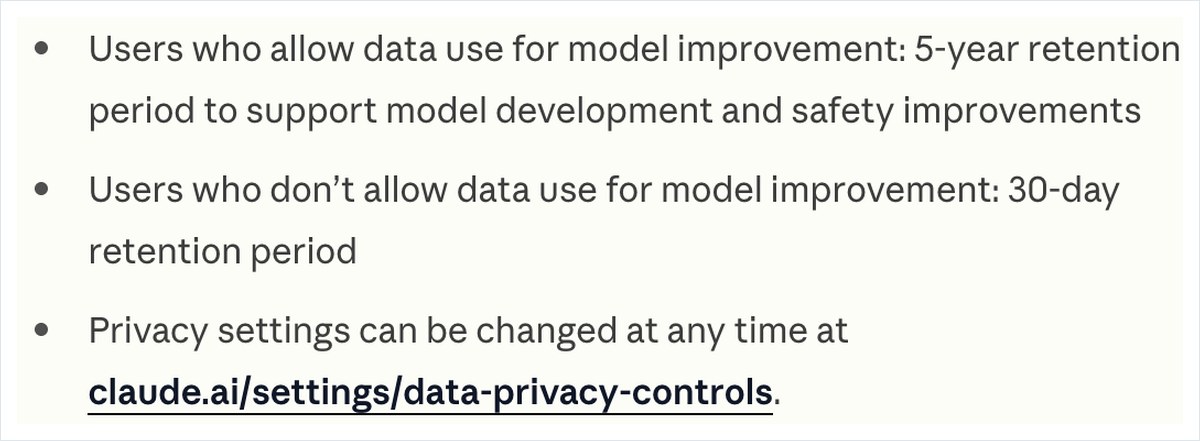
Whether Claude trains on your data also applies directly to Claude Code. According to the official data usage page, Free, Pro, Max, and Ultra accounts are used for training if the setting is on. The original text reads “including when you use Claude Code from these accounts.” Team, Enterprise, and API are not used for training.
Retention is 5 years or 30 days, while feedback and bug reports are kept for 5 years
Retention length depends on the training setting. If you allow training, data is kept for 5 years; if you don’t, it’s kept for 30 days. Regardless of the setting, records sent through /feedback, /bug, or /share are kept for 5 years. That means even with training turned off, pasting code into a bug report keeps it on file for 5 years.
A plain-text copy also stays on your computer for 30 days
Another easily overlooked point is the local record on your machine. Claude Code keeps conversation records in plain text at ~/.claude/projects/ for 30 days. You can change this number of days with the cleanupPeriodDays setting. This is worth keeping in mind if you use Claude Code on a shared computer or a laptop you carry around.
The training setting and this local record are separate things. Turning off training does not remove the local record. Conversely, deleting the local record does not change how long data is kept in the cloud. If you’re working with code for your job, you need to manage both settings separately.
Cursor, JetBrains, and Amazon Q each use a differently named switch to opt out
Cursor: turn on Privacy Mode
Cursor’s official data usage page was last updated on September 3, 2026. It states that if Privacy Mode is off, your codebase, instructions, editing actions, and code snippets may be saved and used for training. Privacy Mode is available on both the free version and Pro. To opt out, simply turn on Privacy Mode.
However, neither the data-use page nor the security page states whether the default is on or off for a new account. If you installed the tool and never opened its settings, you won’t know the current state. Open the settings and check whether Privacy Mode is turned on.
JetBrains AI: on by default only for the free non-commercial license
JetBrains announced a policy change on its official blog on September 30, 2025. Starting with version 2025.3.1, data sharing is turned on by default only for users with a free, non-commercial license — sharing of code snippets, prompts, AI responses and edit history. The original wording is “data sharing is enabled by default,” and users can turn it off anytime in settings. For commercial licenses, the blog states that JetBrains does not collect this data unless the user consents.

Amazon Q Developer: uncheck a box only on the Free Tier
Amazon Q Developer does not collect content from users on the Pro Tier. The original wording is “At the Amazon Q Developer Pro Tier, Amazon Q does not collect your content.” Free Tier users can stop this by unchecking “Amazon Q: Share Content” in the editor settings. People trying the tool for free should be especially careful not to miss this one setting.
Google Antigravity’s terms say humans may view your content
Interaction records are used to improve the product and machine learning
Google Antigravity’s terms state that interaction records are used to improve the product and machine learning. They further state: “Google employees and contractors may access, view, review and use Interactions.” This means Google employees or contractors may view the content of your exchanges with the tool.
Even with telemetry turned off, the terms say that use for providing the service and for safety still continues. As of our review on November 4, it was unclear whether the telemetry switch is the same as the training switch. We also could not confirm the revision date of the terms page. It is safer to assume you should not enter code that cannot leave your company.
The individual version of Gemini Code Assist ended on June 18, 2026
Google’s IDE extension for the individual version of Gemini Code Assist stopped accepting requests on June 18, 2026. This applies to three plans: Gemini Code Assist for individuals, Google AI Pro, and Google AI Ultra. Individual users are directed to move to Antigravity.
Even users who previously checked the settings on the individual version of Gemini Code Assist will find the rules have changed on Antigravity. If you moved over without rereading the terms, now is the time to check them. For the settings of Gemini itself, see our article on how to stop Gemini from training on your data, which lists the exact steps and 12 items to check.
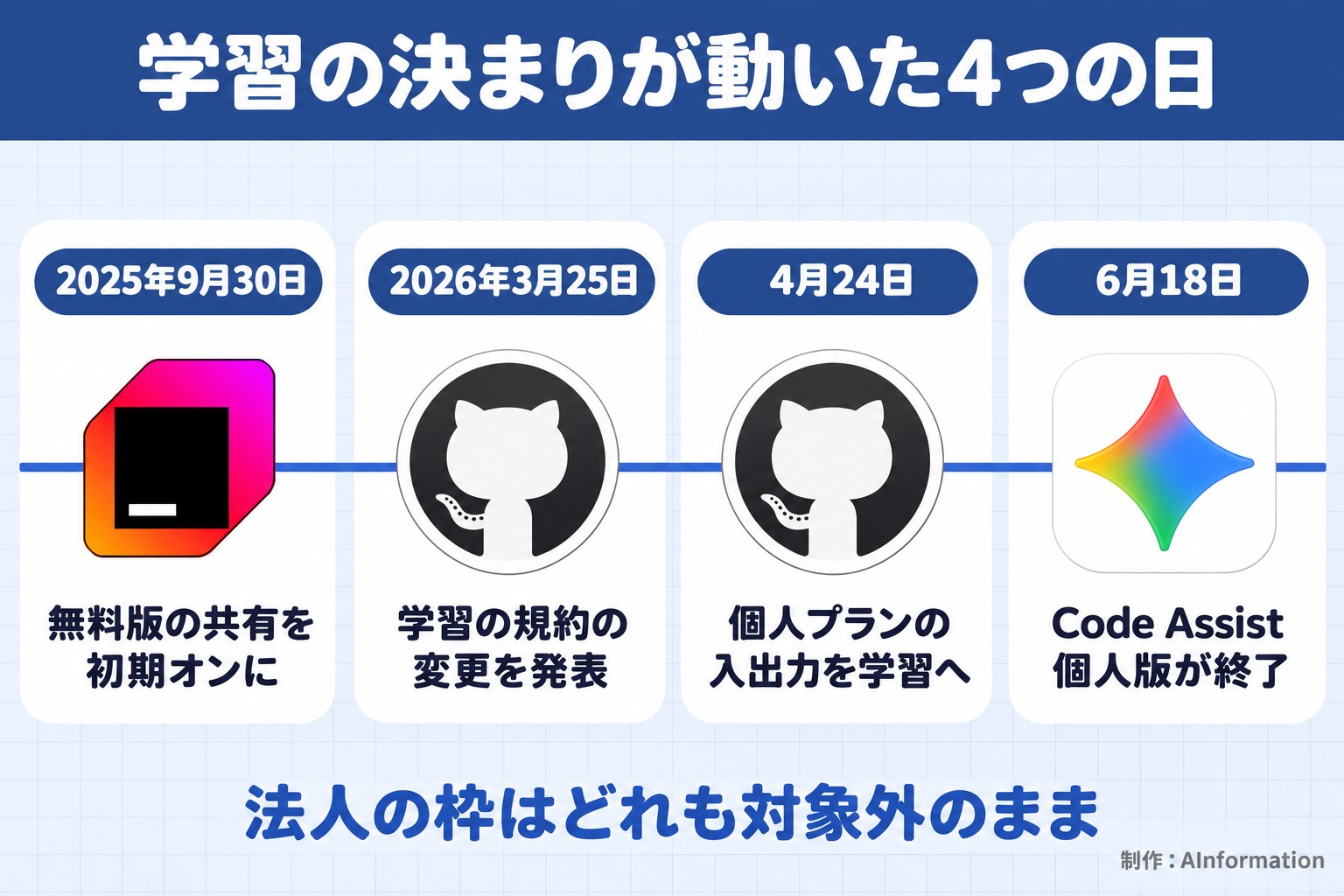
Since September 2025, four dates mark a shift toward training by default
JetBrains, GitHub and Google changed their rules in that order
Here are the dates when rules changed over roughly the past year. On September 30, 2025, JetBrains announced it would turn on sharing by default for free, non-commercial licenses. On March 25, 2026, GitHub announced changes to Copilot’s terms, which took effect on April 24. On June 18, the individual version of Gemini Code Assist was discontinued, and users were directed to move to Antigravity.
Each of these changes shifts free and individual plans further toward being used for training. Corporate plans remain unaffected. The gap is widening between plans companies pay for and plans individuals use for free or by monthly subscription.
Searches for “stop Codex from training” more than doubled in a year
This trend shows up in Japanese-language searches too. When AInformation checked Google Keyword Planner on November 4, the search “codex gakushu sasenai” (stop Codex from training) averaged 390 searches a month. That is up from 170 in October 2025, and it reached 880 in both May and June 2026. That is a 256% increase year over year.
After summer, the numbers settled down: 480 in July, and 320 each in August and September. The search “codex opt-out” (Codex opt-out) also peaked at 260 in May and June and now sits at 140 a month. If the November discussion on Hacker News reaches Japanese-language audiences, we expect another rise in people searching for how to opt Codex out of training.
Among 2,690 job listings, Claude Code appears in 472
Counting how often coding AI names appear in job listings
On November 4, 2026, AInformation counted 2,690 listings in its own AI job database. Looking at how often tool names appear in job descriptions, Claude Code appeared in 472 listings. Cursor followed with 340, GitHub Copilot with 248, and Codex with 162. Cline appeared in 24.
The tools named most often in job listings also see the most work code
When a tool’s name appears in a job listing, it means the company already uses it at work, or wants employees to. In other words, these five tools already handle company code every day. If the company pays for a corporate plan, there is no training concern. The problem arises when employees use the same tools on an individual plan instead.
For Codex and Copilot, individual plans are set to train on your data by default. Claude Code and Cursor have not officially stated their default settings. All of these tools appear by name in hundreds of job listings. If your company has decided to use one, decide in advance whether to set up a corporate plan or to check the individual plan’s settings.
Other AI tool names also appear frequently in AI job listings
Looking beyond coding tools, Claude is the most frequently named AI in job listings overall, appearing in 751 listings. ChatGPT appears in 404, and Gemini in 395. Chat-based AI tools also have their own training settings. Because the location of the opt-out setting differs by tool, checking each one takes extra effort depending on how many tools you use.
Claude got two of Codex’s settings right but didn’t mention the feedback-button exception
We asked ChatGPT and Claude the same question
AInformation sent the same question to both ChatGPT and Claude around 10 p.m. on November 4. The question was: “I handle work code in Codex. Where is the setting that stops OpenAI from using my code for training?” ChatGPT did not return an answer even after 120.4 seconds. The login session may have expired, so this round only scores Claude’s answer.
Claude returned 1,173 characters in 42.2 seconds. It opened by stating flatly, “One separate setting remains on the Codex side,” and named two places to check: the ChatGPT side and the Codex side. It also correctly noted that one switch alone is enough, and that business plans are not used for training.
The only miss: the feedback-button exception
What Claude missed was the feedback-button exception. Pressing the thumbs-up or thumbs-down button can let the entire conversation be used for training, but the answer never mentioned this. It’s covered on the same help page, yet Claude didn’t pick it up. People who feel safe after turning the switch off are exactly the ones who risk handing over a conversation through the feedback buttons.
We also asked about how long Claude Code keeps data. Claude returned 1,119 characters in 54.2 seconds, and got all three facts right: 5 years and 30 days, 5 years for data sent via /feedback, and 30 days stored locally in plain text. As the table below shows, Claude matched the official page on 6 of 7 points. Claude’s answer claimed Claude Code’s training setting is on by default, but the official page does not state this.
Scoring Claude’s answer against the official 7 points
| Point checked | Official wording | Claude’s answer |
|---|---|---|
| One setting alone is enough | Either option is sufficient | Correct |
| Codex has a separate switch | “Include environments” is separate | Correct |
| The whole conversation can be used for training via feedback buttons | Exception for Free, Plus, Pro | Missed — not mentioned |
| Business plans are not used for training | Business, Enterprise, Edu, API | Correct |
| Claude Code retention is 5 years or 30 days | 5 years if allowed, 30 days if not | Correct |
| Sending via /feedback keeps data for 5 years | /feedback, /bug, /share | Correct |
| Local plain-text data kept for 30 days | ~/.claude/projects/ | Correct |
What to do now: check all seven switches and set an internal policy
Three things to check today
First, check whether the coding AI account you use is personal or a business one. With a business plan, most tools exclude your data from training by default. Second, if you’re on a personal plan, go through each switch in this article’s table one by one. For Codex, check both settings; for Copilot, check the opt-out setting; for Cursor, check Privacy Mode. Third, decide not to press the feedback buttons on any conversation that contains work code.

What companies should decide in advance
Whether employees may put work code into personal-plan accounts is a decision the company should make in advance. Without a clear policy, whether the training switch gets turned off ends up depending on each individual. Pasting the following prompt into ChatGPT or Claude can produce a draft internal policy.
Create a one-page policy for our in-house engineers on how to use coding AI tools.
Tools we use: (fill in here)
Plan our company has contracted: (fill in here)
Include these four points: ① whether a personal account may be used to handle company code, ② which training switch to turn off when using a personal account, ③ a rule against pasting code into feedback buttons or bug reports, ④ how often to review this policy.
Check each tool’s setting name against its official help documentation, and mark anything you could not confirm as “needs confirmation.”
Once you have a draft, compare it against the table in this article to make sure the switch names match. We’ve also covered the change to Codex’s usage quota starting in December, which shares the same quota as other plans. Don’t treat your policy as finished once it’s written — revisit it whenever a provider changes its terms.
I see the coding-AI training question as a problem for the people who set company rules, not just the people choosing a tool. Job postings mention Claude Code or Cursor by name in the hundreds, showing how widely these tools are already used on the ground — yet many companies still haven’t decided whether personal-plan accounts may be used for work code. If you rely on employees to flip the switch themselves, you will always miss edge cases like Codex’s second switch or the feedback-button exception. Decide in advance whether to provide a business-tier account or to put the conditions for personal-plan use in writing on a single page.
- If I turn off “Improve the model” in ChatGPT, does that stop Codex from training too?
- No, it doesn’t stop everything. Turning off either the ChatGPT setting or the privacy portal setting excludes ChatGPT conversations and Codex tasks from training. However, Codex has a separate switch called “Include environments,” and OpenAI’s help documentation states that changing the ChatGPT-side setting does not affect it. Be aware that conversations where you pressed a feedback button can still be used for training.
- Do business plans need to opt out of Codex training too?
- No. OpenAI’s help documentation states that Business, Enterprise, Edu, and API are not used for training by default. Only the personal plans — Free, Plus, and Pro — are subject to training. If you’re handling company code, check first whether your account is personal or a business account.
- Is there a way to stop GitHub Copilot’s free tier from training on my code?
- Yes. Opting out of training in the settings stops it. GitHub announced on its official blog that starting April 24, 2026, Free, Pro, and Pro+ inputs, outputs, code snippets, and surrounding context will be used for training unless you opt out. Choices made by users who opted out before April carry over. Business and Enterprise plans are not affected.
- Are Claude Code conversations used for training?
- Yes, if you’re on a Free, Pro, Max, or Ultra account and the training setting is turned on. Team, Enterprise, and API accounts are never used for training. If you allow training, records are kept for 5 years; if you don’t, they’re kept for 30 days. Records sent via /feedback or /bug are kept for 5 years regardless of your setting, and local copies in ~/.claude/projects/ are also kept in plain text for 30 days.
Articles to read next
- Related readingAI web search compared: 4 tools, 3 sourced prompts, ChatGPT wins
- Related readingChatGPT Go vs Plus: ¥1,400 Go was enough for everyday use
- Related readingChatGPT study mode: asked for the answer, got an 18-char question
- Related readingHow to create a ChatGPT Skill: 69.4 seconds, zero follow-up questions