

Claude Code shipped four versions between October 28 and November 3, with 300 changes listed in the official changelog. The three highlights are a setting that blocks writes outside the working folder, a confirmation step before sending an email address, and resume hints that now include the launch arguments. AInformation installed each version locally and compared them; the number of commands and flags did not change.
- The four versions of Claude Code released this week (October 28–November 3) and their 300 changes
- The three highlights (a setting that blocks writes outside the working folder, a confirmation before sending an email address, and resume hints that now include launch arguments) and what AInformation found when comparing them with the previous version
- The 130 changes that matter to people using Claude Code on their own machine
- The difference between the latest version (2.1.317) and the stable version (2.1.311), and how to update
- The full list of changes across all four versions, in Japanese
AInformation normally runs 59 scheduled workflows built with Claude Code every day. Since behavior can change with each new version, we read the official changelog every week and check anything that looks concerning by installing it locally and comparing it with the previous version. This page is that record, rewritten every week. The current content covers everything through version 2.1.317, released on November 3, 2026, and was last rewritten on November 3.
What changed in Claude Code this week?
Four versions were released between October 28 and November 3, with 2.1.317 as the latest. The official changelog (CHANGELOG) lists 300 changes in total: 199 fixes, 33 changes, 33 improvements, 30 additions, 3 updates, 1 removal, and 1 deprecation notice.
npm also published 2.1.315, but the changelog has no section for this version — the next version shipped without any explanation of what it contained.
This week’s Claude Code versions (released October 28–November 3)
| Version | Released (Japan time) | Number of changes | Most common type |
|---|---|---|---|
| 2.1.317 | November 3, 8:57 a.m. | 87 | 62 fixes, 10 additions, 8 improvements |
| 2.1.316 | October 31, 9:42 a.m. | 55 | 34 fixes, 10 additions, 5 improvements |
| 2.1.315 | October 31, 6:05 a.m. | 0 | No section in the changelog |
| 2.1.314 | October 30, 9:12 a.m. | 119 | 81 fixes, 16 improvements, 13 changes |
| 2.1.312 | October 28, 3:36 a.m. | 39 | 22 fixes, 9 changes, 4 additions |
What are this week’s three highlights?
AInformation picked the changes across the four versions that matter most to people using Claude Code on their own machine. The original English text is included alongside each one.
1. A setting that blocks writes outside the working folder (2.1.314)
Added permissions.blockWritesOutsideWorkingDirectories, so Write, Edit and NotebookEdit now refuse paths outside the working directory in every permission mode.
Original text: Added permissions.blockWritesOutsideWorkingDirectories: Write, Edit and NotebookEdit refuse paths outside the working directories in every permission mode
AInformation’s check: We added the same setting to both 2.1.312 and 2.1.314, granted write permission with –allowedTools Write, and then had Claude try to create a file outside the working folder. Version 2.1.312 wrote the file, but 2.1.314 refused and named the setting as the reason. Without the setting, 2.1.314 wrote the file too — confirming that this setting is what blocks it.
2. A confirmation before sending an email address (2.1.317)
Web and shell tool calls now ask for confirmation before sending your account email address over the network.
Original text: Added a check that asks before a web or shell tool call sends your account email address to the network
3. Resume hints now include the launch arguments (2.1.317)
The “Resume this session with” hint shown at exit now repeats the flags you launched with (for example, –chrome –debug) before –resume.
Original text: Improved the “Resume this session with” hint shown at exit to repeat the flags you launched with (for example --chrome --debug) ahead of --resume
AInformation’s check: In 2.1.316, the hint showed only claude –resume plus the session number. In 2.1.317, it listed every flag used at launch — from –safe-mode to –model sonnet — before showing –resume.
What changes affect people using Claude Code on their own machine?
Excluding changes related to VS Code, the cloud, or enterprise use, 130 of the 300 changes affect anyone using Claude Code on their own machine. Below are 14 of those that change behavior or caused problems for some users, along with fixes.
- Addition Added permissions.blockWritesOutsideWorkingDirectories, so Write, Edit and NotebookEdit now refuse paths outside the working directory in every permission mode.
- Improvement Made /diff faster on large repositories by reducing the number of git commands run per update and spacing out updates when git is slow.
- Fix Fixed a bug where Claude would only read the beginning of a very large CLAUDE.md or rules file in a subdirectory, or of a file loaded with @, and then overwrite it based on that partial read. Write now requires Claude to either read the whole file or edit it directly.
- Removal Removed the Read tool’s “no changes since last read” shorthand, so re-reading an unchanged file now returns its contents again.
- Deprecation notice Marked Opus 4.8’s fast mode for deprecation. After removal, requests to Opus 4.8 will error out instead of switching to standard mode, so migrating to Opus 5.5 is recommended.
- Addition Web and shell tool calls now ask for confirmation before sending your account email address over the network.
- Addition When auto mode’s check cannot return an answer for a subagent’s tool call, the screen now shows a notification instead of going blank.
- Addition Added CLAUDE_CODE_DISABLE_ULTRATHINK to disable the ultrathink keyword.
- Addition Added CLAUDE_CODE_SUBAGENT_EFFORT, which lets you set the effort level subagents use by default instead of inheriting it from the session.
- Addition Clicking the “to send now” hint shown below a queued message in full-screen mode now sends it immediately, the same as using the keyboard shortcut.
- Change Messages to a running background agent now arrive faster, since moving a task to the background no longer stops the command that is currently running.
- Change Subagents and teammates using a different model than the main conversation now use that model’s saved effort level, or its default, instead.
- Change The built-in plugin-authoring skill now offers to help share an extension, or suggests doing so, only once after the extension has run successfully.
- Change Built-in rules no longer disappear from scheduled task prompts even when the autoMode.allow list doesn’t include $defaults.
What did AInformation find after installing this week’s versions and comparing them?
Every week, AInformation installs the previous week’s final version and this week’s latest version into separate temporary folders. The 2 are compared using the same method. Because this setup doesn’t read personal settings or plugins, only the built-in features are compared.
We compared last week’s final version (2.1.311) with this week’s latest version (2.1.317) side by side
| What we checked | 2.1.311 | 2.1.317 |
|---|---|---|
| Slash commands (built-in) | 106 | 106 |
| Flags (claude –help) | 66 | 66 |
| Subcommands | 55 | 55 |
| App size (Mac, arm64) | 276.2MB | 312.8MB |
The commands and flags were identical in both name and count. This week’s changes mainly fix existing features and add new settings.
The app grew from 276.2MB to 312.8MB, an increase of 36.6MB. The size by version is: 2.1.311 276.2MB, 2.1.312 276.0MB, 2.1.314 278.8MB, 2.1.315 310.1MB, 2.1.316 310.1MB, 2.1.317 312.8MB.
Here are the slash commands whose descriptions changed.
/upgrade: Upgrade to Max for higher rate limits and more Opus → Upgrade your plan for higher rate limits and more Opus/verify: Verify that a code change actually does what it’s supposed to by exercising it end-to-end and observing behavior — drive the → Try your change and report if it works
Our weekly baseline checks
Every week, AInformation runs the same requests against the latest version to see whether its behavior has changed.
Baseline checks on the latest version (2.1.317)
| What we checked | Result | Time taken |
|---|---|---|
| Set blockWritesOutsideWorkingDirectories and try to make it write outside the working folder | Refused (no file was created) | 9.5 seconds |
All of this week’s changes, version by version
We organized all 300 entries across the four versions in the order they appear in the official changelog. The parentheses show which part of the tool each entry relates to. You can read the original text in the official changelog (CHANGELOG).
2.1.317 (November 3, 87 items)
- Added (cloud) A warning now appears in /schedule when a new cloud scheduled task includes a connector you didn’t request, along with how to remove it.
- Added Web and shell tool calls now ask for confirmation before sending the account’s email address over the network.
- Added (Agent SDK) Added onFailure: block to Agent SDK hook callbacks so a failing callback stops processing.
- Added (Claude Desktop) Added notifications in the Claude Desktop Code tab for both when an organization’s remote management settings fail to load and when they load successfully.
- Added When the auto-mode check can’t get an answer back from a subagent’s tool call, the screen no longer goes blank — it now shows a notification.
- Added (Enterprise) Added fields such as anthropic.plan and anthropic.seat_type to OTel metrics, events, and spans.
- Added (Enterprise) Added GET /v1/organizations/analytics/cost to the Claude apps gateway admin API for retrieving costs.
- Added (Enterprise) When admin: is configured, the Claude apps gateway now records each developer’s IdP group daily, keeps it for admin.identity_retention_days, and uses it to aggregate cost reports.
- Added (Enterprise) Added CLAUDE_CODE_DISABLE_NESTED_SESSION_ID. Setting it to 1 restores the previous behavior where running claude -p inside a session on your own runner uses that session’s ID and history.
- Fixed (Claude Desktop) Fixed a bug where project and local MCP servers would disconnect after the first exchange in some Claude Desktop sessions.
- Fixed (Enterprise) Fixed a bug where auto mode failed every time when an LLM gateway set as the base URL returned a 403 or 422 from a server-side safety check. A 403 with apiKeyHelper set is unaffected.
- Fixed Fixed a bug where claude auth status could finish before saving a slow token refresh, causing a sign-out on the next launch.
- Fixed (Claude Desktop) Fixed a bug where the effortLevel setting wasn’t applied to sessions opened in a project by an app that launched first, such as new sessions created from the desktop app’s Code tab.
- Fixed Fixed a bug where claude –from-pr reported “No conversations found” in projects with many sessions if the linked session was older than the first page.
- Fixed (cloud) Fixed a bug where, if two permission confirmations appeared at once on claude.ai and the mobile app, the second one didn’t show the file path or command.
- Fixed (Agent SDK) Fixed a bug where “Don’t ask again” appeared for mod tool calls on Remote Control and SDK hosts.
- Fixed (cloud) Fixed a bug where a cloud or SDK session’s title disappeared if a new message or Stop arrived while the title was being generated.
- Fixed Fixed a bug where a self-paced /loop could fail to schedule its launch if a field was missing from the Claude request.
- Fixed (cloud) Fixed a bug where auto mode got stuck waiting for approval in cloud sessions when the Artifact tool performed an upload, wrote to a database, or saved via the outputs folder.
- Fixed Fixed a bug where a skill synced from claude.ai could disappear or get re-downloaded if it couldn’t be written to disk.
- Fixed (cloud) Fixed a bug where the result didn’t show the next run time and link after creating or updating a cloud scheduled task with /schedule.
- Fixed Fixed a bug where, in screen reader mode, the elapsed time and token count of a running subagent were read aloud on every change.
- Fixed Fixed a bug where regional or network blocks (HTTP 403) were shown as sign-in failures; it now explains what the block means.
- Fixed (cloud) Fixed a bug where a working claude.ai connector showed as needing authentication or as failed in a cloud session if a synced plugin included the same server.
- Fixed Fixed a bug where claude -p exited with code 0 when a full disk or quota caused history or ~/.claude.json writes to be lost; it now shows an error and exits with code 1 in text and json output. Full NFS exports may still be missed.
- Fixed Fixed a bug where a config file edited right after startup wasn’t applied until another config change happened.
- Fixed (Enterprise) Fixed a bug where old history wasn’t cleaned up on terminals where cleanup doesn’t run, such as with –setting-sources.
- Fixed Fixed a bug where a deleted agent team’s inbox could be recreated by a delayed message from a teammate.
- Fixed Fixed a bug where a recreated agent teammate dropped out of the team due to an earlier shutdown approval.
- Fixed Fixed a bug where saved scheduled tasks couldn’t be listed or deleted after scheduled tasks were turned off.
- Fixed Fixed a bug where Claude deleted the most recently updated /team-onboarding guide when asked to delete one without specifying which.
- Fixed Fixed a bug where Claude said it had deleted a /team-onboarding guide even when the server rejected the deletion.
- Fixed (Enterprise) Fixed a bug where the Claude apps gateway hid Amazon Bedrock’s “Input is too long.” error and failed every time with “upstream rejected the request” instead of compacting.
- Fixed (Enterprise) Fixed a bug where restarting while a plan was pending approval erased the last exchange or the entire conversation in a self-hosted runner session.
- Fixed Fixed a bug where a very large CLAUDE.md that changed since the last send caused “Prompt is too long” after auto-compaction, in sessions where this occurred.
- Fixed Fixed a bug causing high memory use and slow startup in headless sessions with many command-registering plugins.
- Fixed (Enterprise) Fixed a bug where a stdio MCP server received an empty AWS_BEARER_TOKEN_BEDROCK when it was set to empty in env; it’s now left unset so the terminal’s own AWS credentials can be used.
- Fixed (Enterprise) Fixed a bug where API requests failed with “unable to get local issuer certificate” behind some TLS-inspecting proxies after a root certificate update.
- Fixed Fixed a bug where earlier summaries were lost in very long conversations when the compaction request itself needed to be shortened.
- Fixed Fixed a bug where Read and @-mention counted fewer pages than a PDF actually had, due to the PDF’s own metadata.
- Fixed Fixed a bug where DISABLE_PROMPT_CACHING_OPUS and DISABLE_PROMPT_CACHING_SONNET had no effect on [1m] or on default model names without a region or date.
- Fixed Fixed a bug where shared artifacts didn’t appear in the /artifacts and Artifact tool share lists if you had 200 or more of your own artifacts.
- Fixed Fixed a bug where Claude treated partial results from Grep and Glob searches as complete when the searches hit a time limit.
- Fixed (Enterprise) Fixed a bug where, when sending OpenTelemetry data to an https:// endpoint through a proxy, a send that started while another was in progress never went out.
- Fixed (Enterprise) Fixed a bug where the app kept retrying connections to a proxy that rejected http:// OpenTelemetry sends with an HTTP 403.
- Fixed (Enterprise) Fixed a bug where OpenTelemetry sends could hang indefinitely behind an unresponsive proxy; they now time out after 10 seconds or OTEL_EXPORTER_OTLP_TIMEOUT (up to 30 seconds).
- Fixed Fixed a bug where resuming a session told Claude again about file changes it already knew about.
- Fixed Fixed a bug where, after a tool was disabled and a call to it failed, resuming the session could cause Claude to stop using that built-in tool.
- Fixed Fixed a bug where /remote-control replied “Unknown command” when Remote Control was disabled via the disableRemoteControl setting.
- Fixed Fixed a bug where agent team members running in tmux or iTerm2 panes started in auto mode even when the lead session was in manual mode.
- Fixed Fixed a bug where a recently changed permission mode could be lost when upgrading or ending a background session.
- Fixed Fixed a bug where pressing Ctrl+C to clear text being typed in the prompt stopped all running background agents.
- Fixed Fixed a bug where /feedback showed “Enter to confirm” while a report was still being sent.
- Fixed Fixed a bug where SIGTERM was sent twice to the child processes of a stopped shell command, causing some programs to skip cleanup.
- Fixed (cloud) Fixed a bug where running claude -p inside a cloud or self-hosted runner session shared that session’s ID, which could resume a different conversation on restart.
- Fixed (cloud) Fixed a bug where running claude -p inside a cloud or self-hosted runner session created its own title and sent it to that session.
- Improved (Enterprise) Reworked the error shown when Microsoft Foundry can’t load Azure credentials: it now prompts you to check or refresh them and reports it as cloud_credential_error.
- Improved /design-sync now tells you up front if your design system has moved to Claude, before building, to prevent upload failures.
- Improved (Enterprise) Reworked the startup error shown when a required Claude apps gateway can’t be reached: it now explains it’s a network issue and also flags cases where a TLS certificate can’t be verified.
- Improved The “Resume this session with” message shown on exit now includes the flags used at startup (for example, –chrome –debug) before –resume.
- Improved (Enterprise) When a self-hosted runner recovers from a 5xx error other than 501 or 529, it now opens a new connection on the next poll instead of reusing the failed one.
- Improved (Enterprise) When a self-hosted runner session recovers from a 5xx error other than 501 or 529, it now opens a new connection instead of reusing the failed one.
- Improved (Enterprise) When a connection stops responding in a self-hosted runner session, it now opens a new connection instead of trying each waiting connection in turn.
- Changed Messages to a running background agent now arrive faster, since the running command is moved to the background instead of being stopped.
- Changed Subagents and teammates using a different model from the main conversation now use that model’s saved effort level, or its default.
- Changed The plugin monitor no longer shows a “Background work is running” confirmation on exit.
- Changed The built-in plugin-authoring skill now offers to help share an extension you built, just once, after it runs successfully.
- Removed Removed the Read tool’s “No changes since last read” shorthand; re-reading an unchanged file now returns its contents.
- Fixed (Windows) Fixed a bug where all tool calls were rejected on some Windows volumes where native path lookup fails; working folder checks now compare folder identity instead.
- Fixed (Windows) Fixed a bug where temporary paths, such as a session’s scratchpad, grew longer with the project path’s length in sessions not launched by Claude Desktop, which could push a cloned repository past the 260-character path limit.
- Fixed (Enterprise) Fixed a bug where the status line and /usage showed 100% usage of a developer’s own spending limit once a group’s shared budget ran out.
- Fixed (Enterprise) Fixed a bug on self-hosted runners where interrupted tool calls were invisible after a session moved to a new runner, if the exchange was older than CLAUDE_CODE_RESUME_INTERRUPTED_TURN_MAX_AGE_MS.
- Fixed (Enterprise) Fixed a bug where a disabled MCP server got re-enabled when a session moved to another machine while the session service was rejecting saves of that change.
- Improved (cloud) Reworked fork naming on Remote Control for when the app doesn’t supply a name: long names now keep (fork), and naming via claude remote-control is now cleaner too.
- Fixed (VS Code) Fixed a bug where messages went missing in forked conversations — only one side of a pair of parallel tool calls could remain, or the last message kept by compaction could be dropped, leaving Claude’s answer without its original question.
- Fixed (VS Code) Fixed a bug where messages were lost if Claude didn’t finish starting up in time; the extension now retries launching Claude before showing an error.
- Fixed (VS Code) Fixed a bug where the sign-in screen opened when a request was rejected due to regional or network restrictions.
- Fixed (VS Code) Fixed the plan name in the VS Code Account panel showing its second word in lowercase.
- Fixed (VS Code) Fixed a bug where file links in the Claude tab opened on top of the chat instead of in a separate editor group.
- Fixed (VS Code) Fixed a bug where attachment chips, menus, banners, and dialogs in the Claude panel stayed small even after increasing chat.fontSize.
- Fixed (VS Code) Fixed a bug where ultrathink didn’t raise that turn’s effort or show the rainbow display when telemetry was off in VS Code.
- Added (cloud) Added link cards to cloud sessions so you can open or decline a link an MCP server asks you to open.
- Changed (cloud) The organization environment dialog in cloud sessions now uses the same short layout as the personal one, and confirms before closing if there’s unsaved input.
- Fixed (cloud) Fixed a bug where adding a network secret to a host that already had one silently replaced it; the add form now rejects this and shows the existing secret.
- Fixed (cloud) Fixed a bug where a new scheduled task ignored the organization’s default environment; the form now starts from the environment the admin chose.
- Fixed (Remote Control) [Remote Control] Fixed a bug where a message sent right after restarting claude remote-control got stuck with no response.
- Changed (Slack) Artifact links pasted in Slack now show as a simple card with an Open button that opens in Claude, instead of in the side panel.
2.1.316 (October 31, 55 items)
- Added Added CLAUDE_CODE_DISABLE_ULTRATHINK to disable the ultrathink keyword.
- Added (Enterprise) Added pooled group budgets to the Claude apps gateway. You can now set a shared monthly group budget on top of each member’s own limit using the pooled_budget field in the spend limits management API.
- Added (Enterprise) Added CLAUDE_CODE_DISABLE_LOOPED_CROSS_CERT_DROP, which keeps cross-certificates for systems that loop through mutual attestation.
- Added Added CLAUDE_CODE_SUBAGENT_EFFORT, which lets you set the effort level subagents use by default instead of inheriting it from the session.
- Added (Enterprise) Added managed.policy_mode: layered to the Claude apps gateway, so all policies that apply to a developer are layered and applied in order.
- Added (Enterprise) Added guardrail.input_tagging to the Bedrock upstream of the Claude apps gateway, letting you attach tags to prompts for Amazon Bedrock guardrail’s prompt attack filter.
- Deprecation notice Marked Opus 4.8’s fast mode for deprecation. After it’s removed, requests to Opus 4.8 will error instead of falling back to standard mode, so we recommend migrating to Opus 5.5.
- Fixed (Mac) Fixed a bug where shell commands kept running on macOS and Linux after Claude Code exited on its own, such as when credentials were denied or a cloud session was archived.
- Fixed Fixed a bug where, outside Git Bash, bash aliases with values containing line breaks or functions whose names start with a dash would get mangled or dropped in the Bash tool’s shell.
- Fixed Fixed a bug where bash scripts launched from the Bash tool would stall on the first command if SHELLOPTS was exported.
- Fixed (Windows) Fixed a bug where the PowerShell hook could not stop a command with exit code 2 when the command started with type cast, param, using, or an attribute.
- Fixed Fixed a bug where some network requests would hang when a compressed response was truncated or corrupted midway.
- Fixed (Enterprise) When sonnet, opus, or haiku can’t use a new model on Vertex AI or Amazon Bedrock, Claude Code now falls back to the older model instead of erroring mid-session.
- Fixed (Enterprise) Fixed a bug where the Claude apps gateway didn’t check every model name in a request against availableModels, deniedModels, and models. Requests that include a blocked model name now return a 400 that identifies the offending field.
- Fixed (Enterprise) Fixed a bug where claude auth login didn’t work in environments where managed settings require the Claude apps gateway; the terminal now shows the gateway sign-in.
- Fixed Fixed a bug where, in –restricted sessions, files outside the working directory could still be uploaded if a Read permission rule targeted them.
- Fixed Fixed a bug that required pressing Enter twice to send a prompt containing invisible characters. Normal prompts are now cleaned up and sent with a single Enter, and commands still wait for confirmation as before.
- Fixed Fixed a bug where a subagent that inherited its parent subagent’s model would switch to the main model once it started running from a background job or message.
- Fixed (Enterprise) Fixed a bug where, with a managed autoMode.allow list that doesn’t include $defaults, built-in exceptions could leak in from the host app’s –settings, the first rule in /permissions, or /auto-mode-setup.
- Fixed (Cloud) Fixed a bug where cloud sessions and scheduled tasks were marked as failed when the server didn’t return a safety verdict and auto mode stopped the turn.
- Fixed Fixed a bug where claude -p’s text output sometimes didn’t show the reason auto mode stopped a turn while a background agent was running.
- Fixed (Claude Desktop) Fixed a bug where CLAUDE_CODE_AUTO_MODE_SERVER=1 was ignored when a host app such as Claude Desktop ran behind a proxy or LLM gateway with experimental betas disabled.
- Fixed Fixed a bug where putting a toggle value such as 1 in an environment variable named after a credential would corrupt the CLAUDE_PLUGIN_ROOT and server URL received by a plugin MCP’s headersHelper script.
- Fixed (Agent SDK) Fixed a bug where the SDK’s register_repo_root control request didn’t load CLAUDE.md files from directories outside the working directory when CLAUDE_CODE_ADDITIONAL_DIRECTORIES_CLAUDE_MD=1 was set.
- Fixed Fixed a bug where the Artifact tool showed “?” for the database access rule of self-level artifacts, and a bug where the rule wasn’t shown when a republish that would lose that rule was denied.
- Fixed Fixed a bug where a model specified with /model <id> wasn’t recognized by this version, so no warning appeared when auto-compact assumed a 200K context window.
- Fixed Fixed a bug where the “hold space to speak” hint used up its three displays per session too quickly, and a bug where the key display was blank when push-to-talk wasn’t configured.
- Fixed (Windows) Fixed a bug where Grep and Glob wouldn’t return on Windows if the search process couldn’t be terminated and got stuck on timeout.
- Fixed Fixed a bug where resuming a conversation sometimes failed to restore the plan if /clear or /resume ran while part of the conversation was still being saved.
- Fixed Fixed a bug where words were missing from the first-run security explanation and the terminal settings explanation in narrow terminals.
- Fixed (Enterprise) Fixed a bug where the Enterprise survey card accepted a 1 or 0 entered after a short pause as the answer; Enter is now required after entering a value.
- Fixed (Enterprise) Fixed a bug on self-hosted runners where a message sent while Claude was working would get a response after Stop, once the process had been swapped out.
- Fixed (Enterprise) Fixed a bug where, on self-hosted runners, MCP server on/off settings could be lost when a session moved to a different machine.
- Fixed (Windows) Fixed a bug where Git Bash’s Bash tool lost aliases and functions on Windows when the rc file had errexit and pipefail set, and there was either only a winpty alias or nothing at all.
- Improved (Cloud) Fixed /code-review started from the Code tab in Claude Desktop or on the web, so cloud and claude remote-control sessions now show results as finding cards instead of a plain list of text.
- Improved Sped up /diff on large repositories by reducing the number of git commands run per update and spacing out updates when git is slow.
- Improved (Cloud) Reworked the message shown when /ultrareview, cloud sessions, or cloud agents can’t find a GitHub remote. It now points to https://github.com/new for creating one and no longer suggests gh commands that gh would reject.
- Improved SSL certificate errors now show likely causes, such as a server missing an intermediate certificate, along with the name of the fix for each.
- Changed Built-in rules no longer disappear from scheduled task prompts even when the autoMode.allow list doesn’t include $defaults.
- Changed (Enterprise) Changed server-managed settings for Team and Enterprise logins: settings fetched from the Anthropic API are now applied without confirmation, and saved settings that can’t be verified are no longer used.
- Added (VS Code) Added sign-in to the Claude apps gateway from the chat panel, so it no longer requires the terminal.
- Changed (VS Code) ultrathink turns now run at xhigh effort and show in the chat box in rainbow colors, matching the terminal.
- Fixed (VS Code) Fixed a bug where the Effort slider, the Ultracode switch, and the model name disappeared when the model setting had a [1m] tag, such as opus[1m].
- Fixed (VS Code) Fixed a bug where saved /btw question history disappeared too quickly when there was an error in the settings file.
- Fixed (VS Code) Fixed a bug where a conversation whose plan had been approved with “Yes, and manually approve edits” reverted to Auto mode after a reload or restart.
- Added (Cloud) Added form cards to cloud sessions, so you can fill in or decline a form from an MCP server without opening it before the request is canceled.
- Added (Cloud) Added a “Catching up…” indicator for cloud and Remote Control sessions while they bring messages up to date after switching back.
- Changed (Enterprise) Fixed network secrets so Enterprise members can add and remove them, not just view them, in their own cloud environment.
- Improved (Cloud) Reworked the Changes panel in cloud sessions, moving the note about content not shown in the list from a line above the diff to a badge next to the branch name.
- Fixed (Cloud) Fixed a bug where the Files panel in cloud sessions showed folders as ../.. in search results after Claude changed directories; it now shows the path from the project root.
- Fixed (Slack) Fixed a bug where a canvas created in a Slack channel could no longer be edited or appended to from that channel after being shared to another channel or a DM.
- Fixed (Slack) Fixed a bug in Slack Connect threads, where both organizations have Claude installed, that caused untagged replies to be ignored when they reached the other organization’s app.
- Fixed (Slack) Fixed a bug where a cloud scheduled task’s Slack status checklist would get stuck partway through; it now allows editing the top-level message posted while the task is running.
- Changed (Slack) Replaced the Slack channel auto-response switch with a “How Claude participates” selection, available on the channel’s Configure page and in Claude Tag’s admin settings.
- Added (Enterprise) Added a finding-count-by-severity card to the Code Review analytics page, showing the total count for the period, a daily graph by severity, and the count for each severity level.
2.1.314 (October 30, 119 changes)
- Added permissions.blockWritesOutsideWorkingDirectories, so Write, Edit, and NotebookEdit now refuse paths outside the working directory under any permission mode.
- Added (Enterprise) An optional groups list for upstreams in the Claude apps gateway, so only developers in the specified IdP groups are routed to that upstream, including during failover.
- Added (Enterprise) guardrail_trace for the Bedrock upstream in the Claude apps gateway, so it can log which Amazon Bedrock guardrail filter fired without recording the matched text.
- Added (VS Code) Idle compaction for the Code tab in VS Code and Claude Desktop, so conversations left idle at over 200K tokens get summarized, and the summary is used on the next message if the prompt cache has expired.
- Fixed (Enterprise) A bug where every turn failed with “Invalid effort level” when an organization admin restricted a model’s effort; Claude Code now lowers the effort and retries, showing the level it used.
- Fixed A bug where claude -p printed nothing and exited with code 0 when startup failed; it now shows an error and exits with code 1.
- Fixed (Enterprise) A bug causing “400 Input is too long.” on every turn in image-heavy Bedrock sessions; /compact now strips old images before compacting.
- Fixed (Enterprise) A bug where sessions failed on Microsoft Foundry when there was no standard Sonnet, Opus, or Haiku deployment; Claude Code now switches to an older model in the same family.
- Fixed (Enterprise) A bug causing repeated rejections through gateways that don’t support tool_reference blocks for tool search; Claude Code now drops tool search and resends once, and the session remembers this.
- Fixed A bug where TLS connections failed with UNABLE_TO_GET_ISSUER_CERT when the system’s certificate store had an updated root certificate cross-signed with the previous one.
- Fixed A bug where MCP servers that work without sign-in showed “needs authentication” after a saved sign-in expired; they now work in the signed-out state.
- Fixed (Mac) A bug where claude mcp logout reported success even though the MCP sign-in wasn’t removed, which could happen when the macOS keychain was locked, such as over SSH.
- Fixed A bug causing extra sign-in refreshes when multiple sessions shared an Anthropic profile login and credentials locking got congested.
- Fixed (Enterprise) A bug where claude ultrareview and claude remote-control asked workspace trust questions in CI jobs that have a terminal; untrusted folders are now rejected immediately when CI is configured.
- Fixed (Claude Desktop) A bug where the admin’s TLS trust setting in managed settings wasn’t applied to Claude Desktop sessions.
- Fixed (Enterprise) A bug on machines with managed plugin settings where model switching was refused if a custom –plugin-dir or –plugin-url plugin’s manifest was broken or failed to download.
- Fixed (Enterprise) A bug where the Bedrock and Vertex model upgrade notice appeared on every startup even when managed settings pinned the model.
- Fixed (Enterprise) A bug where forceRemoteSettingsRefresh, when set only via remote managed settings, stopped working after the cached settings expired; this prevented sessions from starting without a policy when the server was unreachable.
- Fixed A bug where “auto-continue at usage limit” kept continuing without confirmation if a task restarted itself during the wait period.
- Fixed (Cloud) A bug where Ultracode turned back on when resuming a background or cloud session, even after being turned off.
- Fixed A bug where the last failed reply and retry notice stayed in the conversation after Claude gave up on an unparseable tool call.
- Fixed A bug where very large PreCompact hook output caused compaction to fail or repeat; each hook’s output is now capped at 10,000 characters.
- Fixed A bug where a background diff update briefly held the repository’s index lock, causing concurrently run git commands to fail.
- Fixed A bug where markdown tables kept switching between grid view and stacked view during streaming, and long tables reverted to a plain vertical-bar layout.
- Fixed A bug where sessions that only ran slash commands showed the body text of CLAUDE.md or CLAUDE.local.md as the title in the /resume list.
- Fixed A bug where asking
/btwfrom a subagent’s open history answered from the main conversation instead. - Fixed (Linux) A bug where pasting an image on a Linux machine over SSH did nothing; it now prompts to copy the file and paste the path instead.
- Fixed A bug where
claude remote-controlsessions failed to start when the session service was briefly under load; worker registration now retries with increasing wait times. - Fixed A bug where switching models in Remote Control took over 8 seconds and returned a “still pending” error instead of a result.
- Fixed (Enterprise) A bug where the description for
sandbox.excludedCommandssaid it always ran outside the sandbox; the docs now correctly state that every command in the call must match the condition. - Fixed A bug where shell or MCP calls that weren’t actually blocked or stopped by auto mode, deny rules, or a PreToolUse hook appeared to have run inside a collapsed tool group.
- Fixed A bug where sandbox protection didn’t apply to a worktree entered via
claude -p --resumeor--continue. - Fixed A bug where hooks matching Bash didn’t apply to shell commands launched by the Monitor tool; such hooks can now block or confirm but not approve or rewrite them.
- Fixed A bug where settings files excluded via
--setting-sourceskept being used for some content, such as auto mode rules or saved permission settings. - Fixed A bug where auto mode reported calls that a safety check didn’t actually rule on as blocked, including showing them in
/permissions. - Fixed (Enterprise) A bug where the Vertex upstream in the Claude apps gateway hung for several minutes when Google’s token endpoint stayed connected without responding.
- Fixed (Claude Desktop) A bug where the gateway’s startup warning said a deprecated Claude Desktop key would “stop being accepted” even though the documentation says it still works past the end date.
- Fixed (Claude Desktop) A bug where
/upgradeopened a browser and started a new login even for plans billed through the App Store or Google Play; it now points to where to change the plan instead. - Fixed A bug where rewinding to a point before a model switch (after
--resumeor a rejection) moved a session with an unrecognized model name to a different model. - Fixed (Enterprise) Requests that failed because a gateway or cloud provider rejected Claude Code’s beta header by name are now resent without that header.
- Fixed (Enterprise) A bug where dotted model IDs like claude-opus-4.8 were treated as an older model through an LLM gateway, affecting context size, output limit, thinking mode, and cost.
- Fixed A bug where an extra “Compacted (ctrl+o to view summary)” line remained in the Remote Control client after /compact.
- Fixed (Enterprise) A bug where notices and pending notifications for cloud sessions and Remote Control appeared even when an organization had turned those features off.
- Fixed (Cloud) A bug where a resumed claude.ai cloud session made an unrequested model call if the previous worker stopped right after receiving files for a new chat.
- Fixed (Cloud) A bug where WebFetch silently skipped any part of a PDF beyond 100,000 characters in Cowork cloud sessions; it now reports how much was unread and how to read the rest.
- Fixed (Cloud) A bug where stopping a command with Esc or Stop in a cloud session or IDE only reported that Claude refused, without noting that it may have already run.
- Fixed A bug where a blank line at the start of a code block disappeared when the block began with a quote.
- Fixed A bug where a blank line appeared above some
⎿lines in the history view (Ctrl+O). - Fixed A bug where
dw,dW,yw, andyWin vim mode moved past the end of a line;wandWnow stop at blank lines. - Fixed A bug where x and Enter in the agent panel acted on the wrong agent when another agent started or finished.
- Fixed A bug where pasted text or dragged files were lost in Claude’s question dialog if the “Other” row didn’t have focus.
- Fixed A bug where pasted text was lost while a line in the prompt footer was selected.
- Fixed A bug where
pin vim mode ignored whether the yanked text was a whole line when pasting over a character selection. - Fixed A bug where
awandiwin vim mode also captured the line break at the end of a line. - Fixed A bug where pressing ↓ in the ? help menu, the command list, or paste hints selected a hidden footer item.
- Fixed A bug where pressing Esc in a command panel like
/btwalso interrupted an open subagent’s history. - Fixed A bug where the full-screen welcome header showed the session’s model even while viewing a subagent or teammate running on a different model.
- Fixed A bug where using “Restore conversation” from the rewind menu while scrolled up left the full-screen history stuck partway through the conversation.
- Fixed A rare bug where a deleted session still appeared, nearly empty, in the resume list.
- Fixed A bug where prompts containing
<bash-stdout>or<local-command-stdout>tags weren’t passed to the local stream-json host. - Fixed A bug where a session stayed untitled if the conversation continued after the first prompt failed, such as from hitting a usage limit.
- Fixed A bug where skill file watching checked deleted skills in
~/.claude/skills/.trashevery time, adding extra load. - Fixed A bug where a session name set with /rename disappeared while Claude was waiting on a permission or plan decision.
- Fixed A bug where a background session that failed to start showed as a deleted daemon binary even when the binary was still present.
- Fixed A bug where push notification hints and idle reminders appeared even when push settings were hidden in /config or Remote Control was off.
- Fixed A bug where
~/.claude/skills/.trashand~/.claude/plugins/.trashgrew without limit; each is now capped at about 1,024 items or more regardless of the cleanupPeriodDays setting. - Fixed A bug where resaving a CRLF file with git’s line-ending conversion made Bash’s diff view show the whole file as changed, even in unchanged parts.
- Fixed (Enterprise) A bug on custom runners where an idle session didn’t pause and instead moved to another runner if the pause request expired before Anthropic’s response.
- Improved (Agent SDK) Memory usage in long headless or SDK turns running many subagents, by no longer keeping each subagent’s tool results in the parent session until the turn ends.
- Improved Ctrl+R in prompt history now also searches text inside collapsed [Pasted text] pills.
- Improved The upload confirmation screen for /design-sync now shows the folders, projects, and files to be uploaded or deleted.
- Improved The confirmation tab in /permissions (renamed to Recently blocked) now shows the Esc action in the footer.
- Improved Auto mode’s block notice, which now shows the command name, states that Claude can retry and that auto mode will re-check, and points to where to check in
/permissions. - Improved The permission confirmation screen now shows fewer lines for long reasons, so fewer terminals hide the command to approve off-screen.
- Improved (Cloud) The cloud session error shown when a claude.ai login request is rejected and retried now also suggests claude auth login.
- Improved (Enterprise) Behavior of saved logins for claude.ai, Team, and Enterprise when MDM and remote settings specify different base URLs or apiKeyHelper values.
- Improved /config in the agent view now shows how to stop the agent view from opening by default.
- Improved Sessions that start from a prompt-based command, such as a skill or /security-review, now get an automatic title from that prompt instead of staying untitled.
- Improved Speed and memory usage of –resume for broken transcripts.
- Improved Speed of the /context display in sessions with many MCP tools.
- Improved (Enterprise) The error shown on self-hosted runners when a session’s branch is missing from the git remote, which now also covers unpushed branches, explains what to do, and no longer suggests retrying.
- Updated The
/claude-apiskill, which now sends the samedd-llmobs-enabled: trueheader as the Console when setting up Datadog API tracing, and removed the outdated macOSxattrstep from theantinstall instructions. - Updated The bundled dataviz skill, which now keeps y-axis tick marks shown in full up to a certain range instead of abbreviating them, and keeps x-axis labels unabbreviated when they fit.
- Updated The built-in dataviz skill, which now answers requests for donut or pie charts with a ranked bar chart or a stacked bar chart that shows values instead.
- Changed (Enterprise) Claude’s file tool now confirms before editing a local copy of an organization-managed settings file, just as it does for its own settings file.
- Changed /ultrareview now checks workspace trust before running git, the same as claude ultrareview.
- Changed The Bash tool’s shell now clears inherited aliases and functions for which, so which resolves to the system command or zsh’s built-in.
- Changed Recently blocked in /permissions now refuses to approve a command whose full content can’t be read, such as when the terminal is too narrow to show it all.
- Changed (Cloud) In auto mode for Cowork cloud sessions, an MCP tool call allowed by a hook is now still treated as unanswered and left to the classifier or a permission prompt.
- Changed A hook if condition like Monitor(tail *) now matches shell commands run by the Monitor tool the same way Bash(tail *) does.
- Changed (Enterprise) The claude-api skill now asks permission to read a Managed Agents workflow before trying to improve how it runs.
- Changed (Enterprise) Requests flagged because only an older Opus model is available or allowed, via
ANTHROPIC_DEFAULT_OPUS_MODEL,availableModels, ordeniedModels, are now retried with a different model instead of ending in rejection. - Changed Idle compaction now works for subscription users who disabled telemetry, and also works on Bedrock, Vertex, Foundry, and LLM gateways when the one-hour prompt cache is enabled.
- Changed Setting FORCE_HYPERLINK=false, no, or off now disables hyperlinks instead of enabling them.
- Changed (Mac) Most commands Claude runs now run git grep in the C locale, avoiding a memory leak in macOS’s regex library on non-UTF-8 files.
- Fixed (VS Code) A bug in VS Code where Clear authentication showed success even when removing an MCP server’s sign-in failed.
- Fixed (VS Code) A bug in VS Code where the spinner and Stop button didn’t appear while a hook ran for a queued message.
- Fixed (VS Code) A bug in VS Code where changes to a session group, such as deletion, failed silently if they couldn’t be saved; it now shows an error notice.
- Fixed (VS Code) A bug where Cmd+F / Ctrl+F didn’t open the search widget in the plan preview tab.
- Fixed (VS Code) A bug where the voice input shortcut (Ctrl+D) didn’t work on non-Latin keyboard layouts such as Russian, Greek, or Hebrew.
- Fixed (VS Code) A bug where an unrun, one-time saved scheduled task was deleted without confirmation when opening the extension without chat.
- Changed (VS Code) Setting CLAUDE_CODE_DISABLE_CFC_PROMPT now stops the Claude in Chrome notice from being added to session messages; the browser tool itself still works.
- Added (Cloud) An Include completed button on the Scheduled tasks page, so completed one-time tasks can be shown without opening the Sort menu, for when they’re the only ones hidden.
- Fixed (Cloud) A bug where recently used self-hosted environments didn’t appear in the recent environments list on the new session card.
- Fixed (Cloud) A bug where a branch showed uncommitted changes every time after Claude moved it to a commit pushed from a different worktree.
- Fixed (Enterprise) A bug where the self-hosted environment details dialog in managed settings was cut off in small windows or at high display scaling; the dialog now scrolls.
- Fixed (Cloud) A bug where the permission mode selector stayed on Auto after a running cloud or Remote Control session refused a switch; it now shows and reports the mode actually in use.
- Improved (Cloud) Scheduled task runs on Anthropic’s cloud now load plugins enabled on the claude.ai account.
- Improved (Cloud) Test connection for GitHub Enterprise in cloud session admin settings now checks the connection the same way a cloud session does, and shows a warning on failure.
- Improved (Cloud) Readability of cloud session logs: rename entries now show the new title, and repository and environment lists appear as tables instead of single-line JSON.
- Changed (Cloud) Cloud sessions started from web, desktop, or mobile no longer fail to start if the setup script exits with an error.
- Fixed (Remote Control) A bug where the permission mode button in a Remote Control session showed the wrong mode until input was given; it now shows the actual mode on open if the PC is online.
- Added (Slack) A dismissible link to the Claude Tag API documentation on the Bundles and Channels tabs in admin settings, for Enterprise organizations with Slack connected.
- Fixed (Slack) A bug where @Claude !restart stopped if a workspace check failed once in a shared Enterprise Grid channel; it now retries and, if it still fails, suggests running it again.
- Fixed (Slack) A bug where linking the same Claude account twice within a few minutes from the same Claude Tag link produced a duplicate confirmation DM and channel note.
- Fixed (Slack) A bug where follow-up messages showed no progress while a Claude session waited for a self-hosted runner; Claude now posts a waiting notice in the thread.
- Fixed (Slack) A bug where tags in a Slack Connect channel, where both organizations have Claude installed, sometimes went unanswered within one’s own thread.
- Fixed (Slack) A bug where unsaved access changes were lost after a failed load when pressing Retry on the plugins or skills page in Claude Tag admin settings; edits are now preserved.
- Fixed (Slack) A bug where the same action appeared twice in the repository field of Claude Tag admin settings; the menu now shows only the button and one other action.
2.1.312 (October 28, 39 items)
- Added (Enterprise) Added oidc.user_id_claim to the Claude apps gateway. This lets you identify people using id_token claims other than sub, such as Microsoft Entra ID’s oid.
- Added Clicking the “to send now” hint below a queued message in full screen now sends it immediately, just like the keyboard shortcut.
- Fixed (VS Code) Fixed a bug where managed settings and organization policies were not fetched for the rest of a session after signing in from the VS Code extension.
- Fixed Fixed a bug where very large CLAUDE.md or rules files in subdirectories, and files loaded with @, would only have their beginning read before being overwritten. Write now requires Claude to read the whole file or edit it directly.
- Fixed Fixed a bug where directory-level and paths: specified skills could not be found after using Bash’s cd to move deep into a git repository.
- Fixed Fixed a rare bug where the first reply right after resuming a session in the terminal would be missing the next time the session was resumed.
- Fixed Fixed a bug where a command with an invalid name would stop all commands from loading, causing claude -p to produce no output.
- Fixed Fixed a bug where, if run at the same time as cleanup of old session files, the Read tool could fail on PDF pages with “pdftoppm failed: Could not write image.”
- Fixed Fixed a bug where the spinner, the OpenTelemetry
effortvalue, and the transcript showed a newly selected effort level before the model actually applied it during a task. They now show the level that is actually in effect. - Fixed Fixed a bug where the /model or /effort cache warning only appeared after waiting for a reload until the next message. It can now trigger sooner if Claude makes a change while working.
- Fixed Fixed a bug where a session was shown as waiting on you just because an item awaiting your input appeared mid-sentence in the last message.
- Fixed Fixed a bug where input text cleared with Ctrl+C right before exiting would be restored in the agent view the next time you launched Claude.
- Fixed Fixed a bug where the agent view reopened in shell mode after exiting an empty ! input with Ctrl+D.
- Fixed Fixed a bug in vim mode where
d,c, orycombined withgjorgkand a count larger than the remaining lines would delete or copy text. It now only moves the cursor, matching Vim’s behavior. - Fixed Fixed a bug where /verify showed a long description meant for Claude in the /help and / command menus. It now shows a short description.
- Improved Fixed the effort display in prompts. It now shows that an in-progress change may wait for the next message, and removes the note once it is no longer needed.
- Improved (Cloud) Fixed WebFetch errors in cloud sessions. Claude now explains that a host that cannot be resolved may be outside the allowed network range, and tells you which hostname should be allowed.
- Changed (Enterprise) On Bedrock, Vertex, Foundry, and Mantle, Claude Code now uses the short system prompt for model names it doesn’t recognize, even if Sonnet or Haiku is actually in use. Set CLAUDE_CODE_SIMPLE_SYSTEM_PROMPT=0 to use the full prompt instead.
- Changed (Enterprise) Automatic model switching after a flagged message now also supports model names Claude Code doesn’t recognize, such as custom deployment names. Set CLAUDE_CODE_DISABLE_REFUSAL_FALLBACK=1 to disable the switch.
- Changed Usage limit messages now call the 5-hour limit the “5-hour limit” instead of the “session limit.”
- Changed (Cloud) Cloud sessions started from the CLI now get their session name and branch name from the server side.
- Changed Prompt and agent hooks now run up to 24 at once per session, including subagents, and up to 12 can keep running past their timeout while waiting. A timeout of under 1 second is treated as 1 second.
- Changed (Agent SDK) A subagent’s
autoCompactWindownow reflects shrinking fromCLAUDE_CODE_AUTO_COMPACT_WINDOW, though it still does not expand. - Changed (Enterprise) For remote MCP servers at a fixed URL declared by a plugin in Anthropic’s official marketplace, OpenTelemetry’s
mcp_server.namenow reports the actual name instead ofcustom. - Changed (Enterprise) Stopped sending the OpenTelemetry claude_code.safety_event event.
- Fixed (VS Code) Fixed a bug where a session would quit silently if the organization’s settings failed to load or were rejected at startup. The tab now shows the reason, with an option to Retry or Sign in again.
- Changed (VS Code) The usage limit reset display now shows a time such as “Resets at 3:10 PM” and labels it the “5-hour limit.”
- Added (Cloud) You can now choose an effort level in the model picker when creating or editing a routine that runs in the cloud.
- Added (Cloud) Added a Bash editor with syntax highlighting, line numbers, and a copy button to the setup script field in cloud environment settings.
- Improved (Cloud) Improved the display of the step where Claude adds a repository to a cloud session. Opening it now shows a simple table instead of raw JSON.
- Fixed (Cloud) Fixed a bug where resending the same message after a failed send in a cloud session could occasionally run it twice.
- Fixed (Cloud) Fixed a bug where an error from a failed cloud environment creation only appeared as a toast outside the dialog. It now appears inside the dialog.
- Fixed (Cloud) Fixed a bug where clicking Edit on a routine in the Routines page menu would navigate to a page instead of opening the edit dialog.
- Fixed (Remote Control) Fixed a bug where a session unarchived in Remote Control stayed shown as working until the PC reconnected. It now shows idle.
- Improved (Slack) Retry notifications for Slack cloud tags now report the model name in use or that a rate limit was hit, instead of a generic API error.
- Fixed (Slack) Fixed a bug where Claude Tag on/off settings and agent settings reset to the workspace default when a previously private Slack channel became public and got a new ID.
- Fixed (Slack) Fixed a bug where Claude in Slack would not reply in a channel whose environment had network access set to None.
- Fixed (Slack) Fixed a bug where Claude in Slack would post a file to the wrong thread while replying in a different thread in the same channel.
- Fixed (Code Review) Fixed a bug where Code Review looked at an outdated commit, or none at all, when a GitHub push event arrived late. It now looks at the pull request’s latest commit.
Changes AInformation made on November 3 compared with the previous version
From here on, this is a record we don’t delete during the weekly rewrite. AInformation picked four changes from this week that it could test hands-on, and gave the same task to the version before and after the change to compare them.
Each version runs from a temporary folder only, started in a way that does not read personal settings or plugins.
A setting that blocks writes outside the working folder (added in 2.1.314)
With the new permissions.blockWritesOutsideWorkingDirectories setting turned on, Write, Edit, and NotebookEdit refuse paths outside the working folder. According to the official description, this refusal happens under any permission mode.
In the test, we granted write-tool permission with –allowedTools Write, then had it try to create a file in a different folder under /tmp.
Results when writing outside the working folder (after allowing it with –allowedTools Write)
| Version | Setting | Result | Time taken |
|---|---|---|---|
| 2.1.312 | Enabled | Wrote the file | 5.6 sec |
| 2.1.314 | Enabled | Refused | 10.9 sec |
| 2.1.314 | Disabled | Wrote the file | 4.8 sec |
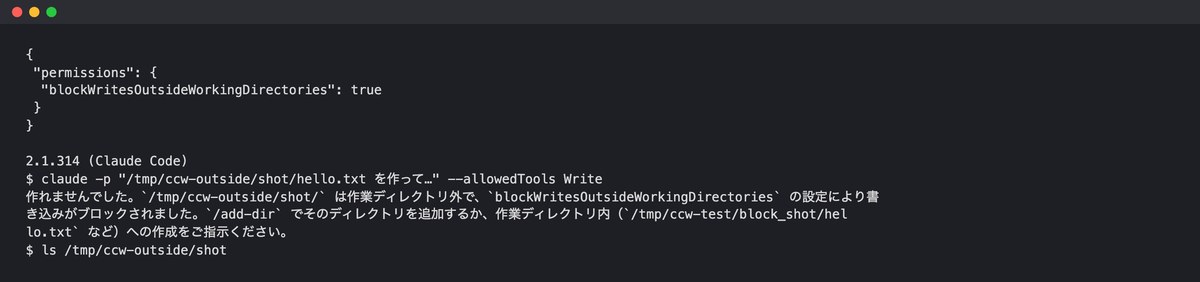
2.1.314 named the setting and refused, saying the path was “outside the working directory,” then suggested adding the folder with /add-dir or turning off the setting. 2.1.312 wrote the file silently even with the same setting enabled. Older versions skip settings they don’t recognize, so you need to upgrade before turning this on.
The working folder used for this test had not gone through a trust check. Because of that, the allow rules in the settings file were skipped as “untrusted.” Even so, this particular setting still took effect.
Resume instructions on exit (improved in 2.1.317)
When you close Claude Code, it shows a command for resuming the session. Starting with 2.1.317, this command also includes the launch arguments. We sent one message using the same setup, closed with /exit, and compared the two versions side by side.
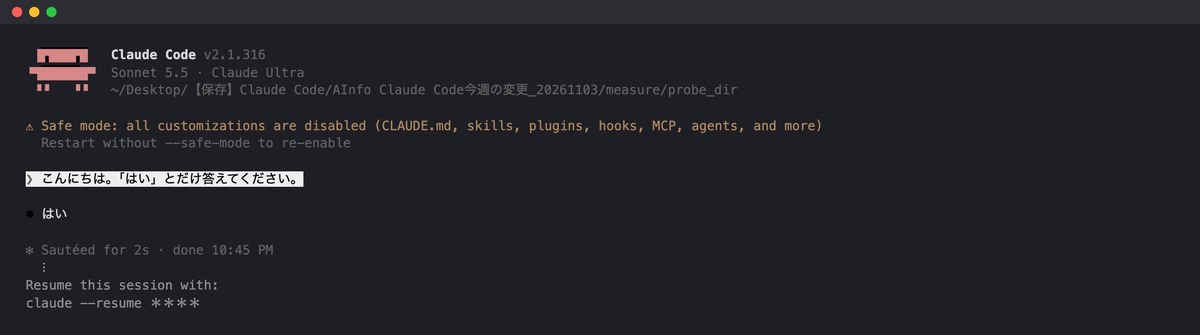
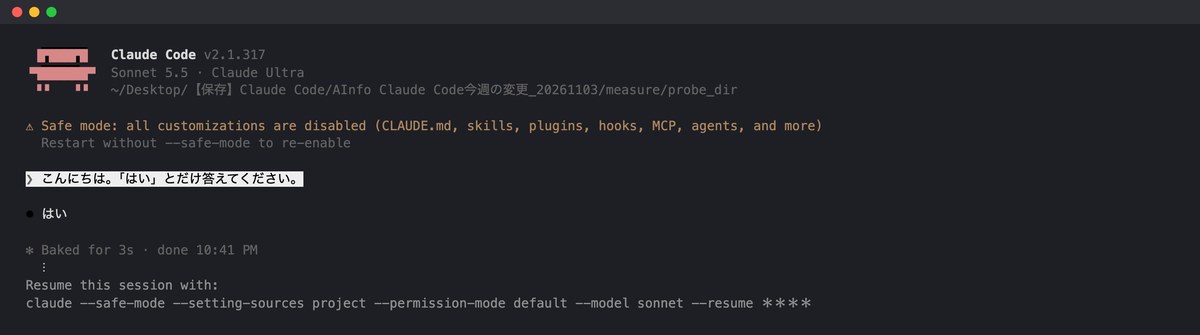
2.1.316 showed only the session number. 2.1.317 also included flags such as –safe-mode and –model sonnet, so pasting the command as is restores the same setup.
Response when Remote Control is turned off by a setting (fixed in 2.1.317)
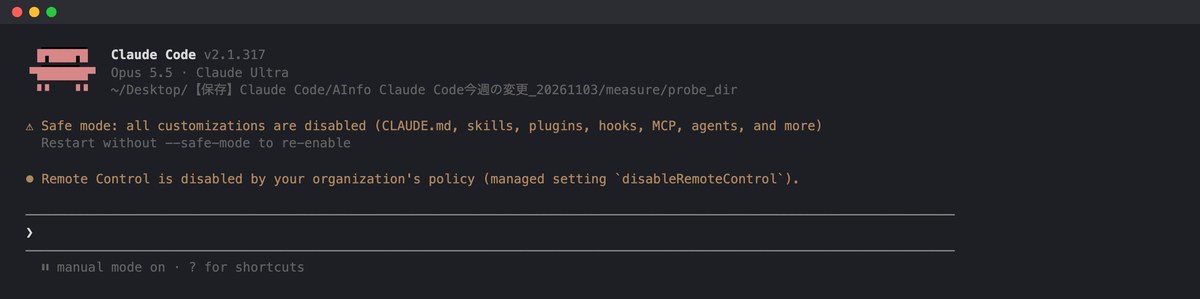
We left the disableRemoteControl setting enabled and ran /remote-control. 2.1.316 replied with “Unknown command,” so there was no way to tell whether the command didn’t exist or was simply blocked. 2.1.317 even named the setting that was blocking it.
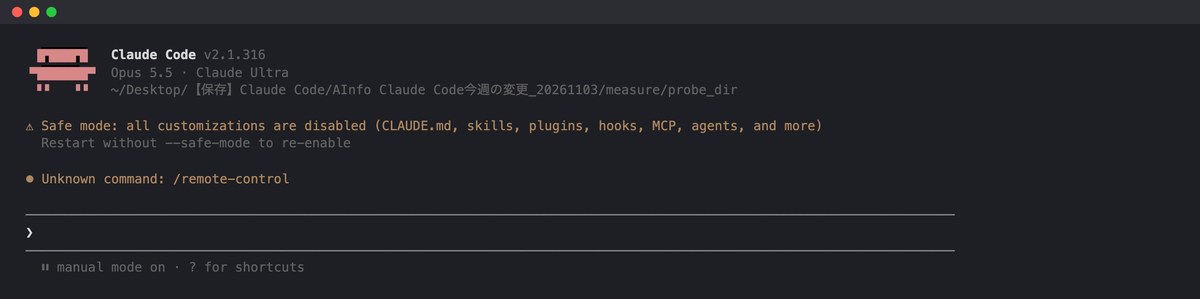
Response when the same file is read twice (removed in 2.1.317)
The changelog says the behavior where reading an unchanged file again with Read returns only a short message saying “unchanged since it was last read” has been removed.
We had 2.1.316 and 2.1.317 read the same memo twice, and in both cases the second read returned the full contents. This held whether the two reads happened at the same time or one after another, and we never saw 2.1.316’s short reply in AInformation’s own testing.
2.1.316 took 8.4 seconds (14.3 seconds when read sequentially), and 2.1.317 took 18.2 seconds.
Two changes not mentioned in the changelog
We copied the slash command descriptions from each version and compared them, and found wording changes not listed in the changelog. In 2.1.317, the description of /upgrade changed from “Upgrade to Max” to “Upgrade your plan.”
In 2.1.314, the word “classifier” disappeared from the description of claude auto-mode. The shortened description of /verify in 2.1.312 matched what the changelog said.
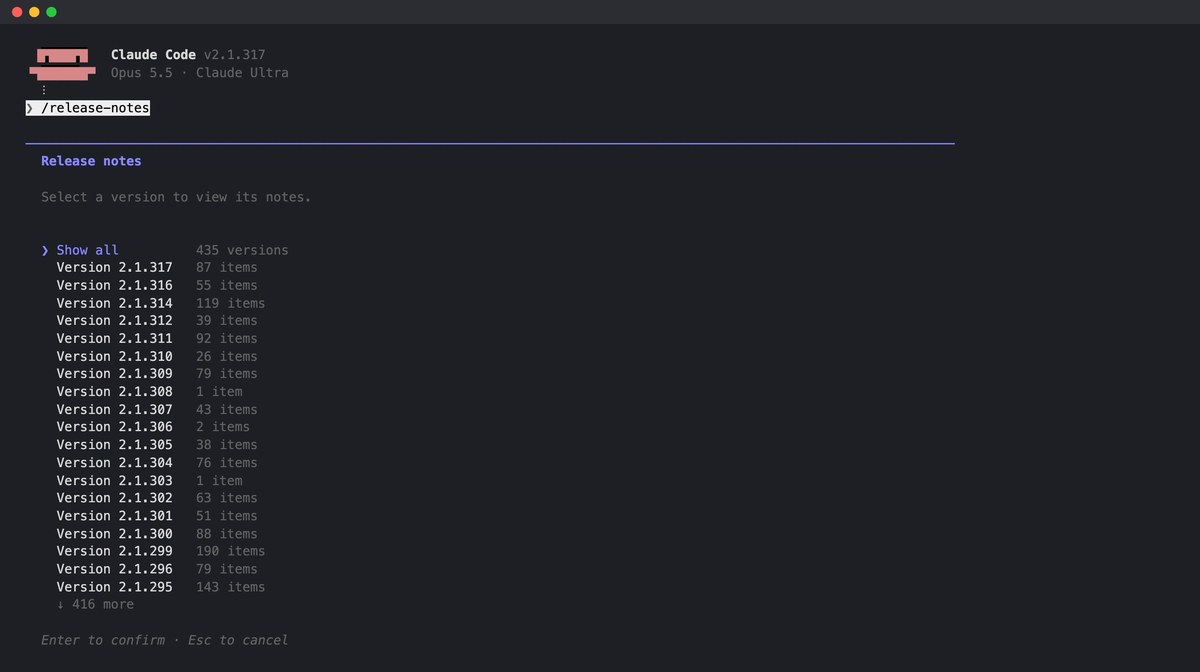
You can also see the number of changes inside Claude Code by running /release-notes. The counts per version matched the numbers AInformation counted from the changelog.
How do I check the latest version of Claude Code?
Run claude –version in your terminal, and it shows the current version, such as 2.1.317 (Claude Code). You can read what changed with /release-notes. To upgrade, use claude update. Doing this in order gives you the following four steps.

According to the official documentation, Claude Code installed through the official installation method updates automatically in the background. If you want to upgrade by hand right away, use claude update. After upgrading, it shows “Successfully updated from” followed by the previous and new versions, and if you’re already on the latest version, it shows “Claude Code is up to date.”
How do you update Claude Code?
How you update depends on how you installed it. Here is a summary of the official documentation (Set up Claude Code, saved November 3):
How to update Claude Code by installation method
| Installation method | Updates automatically? | Manual update command |
|---|---|---|
| Official installer (install.sh) | Yes | claude update |
| npm | Yes (shows a notice if it can’t write to the install location) | claude update |
| Homebrew | No | brew upgrade claude-code |
| WinGet | No | winget upgrade Anthropic.ClaudeCode |
To turn off automatic updates, set DISABLE_AUTOUPDATER to 1 in the env section of settings.json. This only stops the background check; claude update still works. To also block manual updates, use DISABLE_UPDATES.
If a version change mid-task is a problem for you, you can switch to the stable release instead.
Latest vs. stable: which should you use?
Claude Code has two release channels. Latest ships as soon as a version is ready, and it’s the default setting. Stable, according to the official documentation, is about a week behind and skips any version with a major bug. On November 3, latest was at 2.1.317 and stable was at 2.1.311.
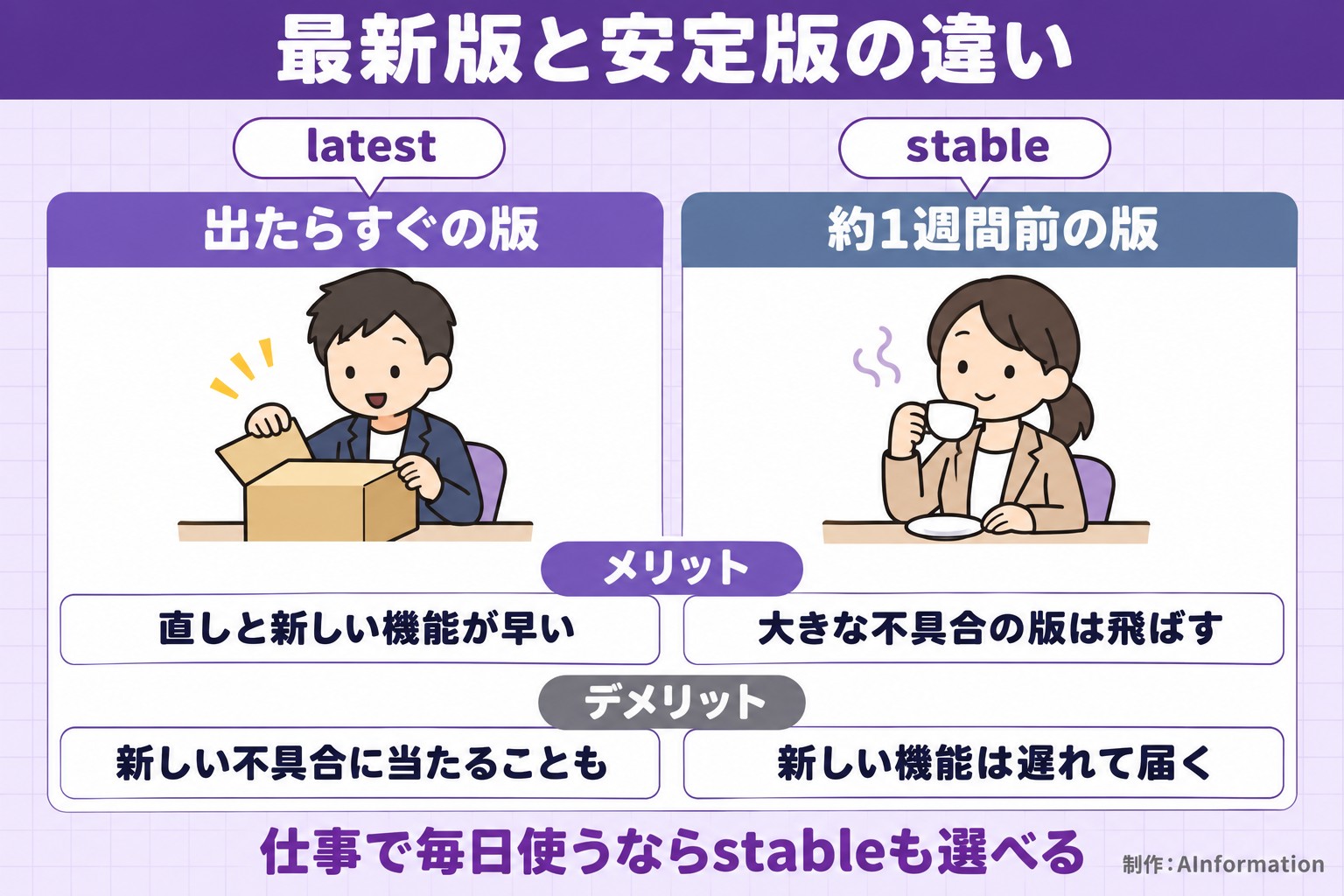
You choose the channel through /config’s Auto-update channel setting, or by setting autoUpdatesChannel in settings.json. The official documentation notes that right after a new model is released, it may not yet be available on the stable channel. AInformation keeps the systems that run our article pipeline on latest, and we read the changelog on this page every week.
How do you read the English changelog?
The official changelog is in English, and each line starts with a word that tells you the type of change. This week’s 300 entries broke down to 199 fixes, 33 changes, 33 improvements, 30 additions, 3 updates, 1 removal, and 1 deprecation notice. Fixes are by far the most common. Read the lines that change behavior first.
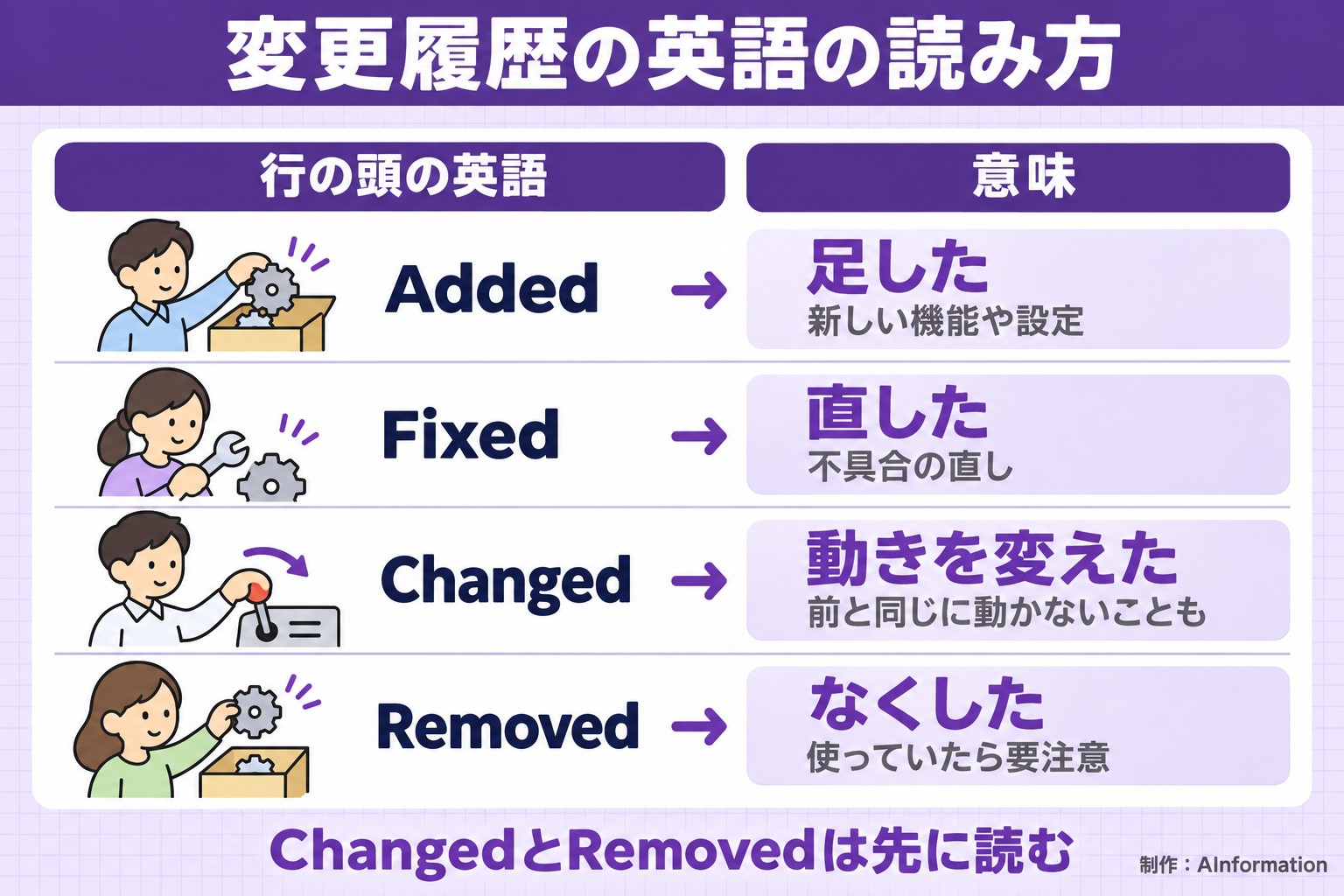
Lines with a prefix like [VSCode] or Windows: only apply to that specific context. This week, 130 of the 300 entries were changes that affect anyone using Claude Code on their own machine. For an overview of how to use Claude Code, see our guide to using Claude Code. For what each command means, see our list of Claude Code commands. If something stops working, see our article on Claude Code errors and limits.
How this page was made
Every Monday morning, we pull the official changelog and the npm release history, and collect every version that came out since the previous roundup. AInformation’s scheduled system translates each entry’s Japanese using a flat-rate Claude plan, and discards and retranslates any translation that introduces a number not present in the original.
We pick highlights based on what matters most to people using Claude Code on their own machine. We save the last version from the previous week and this week’s latest version to a temporary folder, and compare command and flag counts using the same method each time. In weeks with no new version, we don’t rewrite the article, and we don’t change the last-updated date either.
For a comparison of AI coding tools overall, see our AI coding hub. For getting started with automation, see our Claude Code guide for non-engineers. For how to write hooks, see our article on Claude Code hooks. For pricing, see our Claude Code pricing article.
Frequently asked questions about Claude Code updates
- What is the latest version of Claude Code?
- As of November 3, the latest version confirmed was 2.1.317. Both npm and the official distribution matched. The stable release, about a week behind, was 2.1.311.
- How many Claude Code updates came out this week?
- Four versions were released between October 28 and November 3, with 300 changes listed in the official changelog. The breakdown: 199 fixes, 33 changes, 33 improvements, 30 additions, 3 updates, 1 removal, and 1 deprecation notice.
- How do I update Claude Code?
- With the standard install method (the official installer), running claude update in your terminal upgrades it to the latest version right away. Once done, it shows Successfully updated from followed by the old and new versions. For Homebrew, use brew upgrade claude-code; for WinGet, use winget upgrade Anthropic.ClaudeCode.
- Does Claude Code update automatically?
- With the official installer, it updates automatically in the background. If installed via Homebrew, WinGet, or a Linux package, automatic updates are off by default.
- How do I turn off automatic updates?
- Set DISABLE_AUTOUPDATER to 1 in the env section of settings.json. This only stops the background check; claude update still works. If you also want to block manual updates, use DISABLE_UPDATES.
- What’s the difference between the latest and stable channels?
- The latest channel is the newest release as soon as it comes out, and it’s the default setting. The stable channel is about a week older and skips any version with major bugs. As of November 3, the stable version was 2.1.311 (released October 27). You can switch channels via the autoUpdatesChannel setting or /config.
- How do I check which version I have installed?
- Run claude –version in your terminal, and it will show the version, such as 2.1.317 (Claude Code). claude doctor also shows the result of the last automatic update.
- Where can I read the changelog?
- Running /release-notes inside Claude Code shows a list you can browse by the number of changes per version. The original source is CHANGELOG.md in anthropics/claude-code on GitHub. This page translates that content into Japanese every week.
- How do I roll back to a previous version?
- The official installer lets you specify a version number when installing. On Mac, run curl -fsSL https://claude.ai/install.sh | bash -s followed by the version number. After rolling back, also set DISABLE_AUTOUPDATER so it doesn’t update automatically again.
- Did this week’s releases add any new commands?
- When AInformation compared 2.1.311 and 2.1.317 directly, the names and number of slash commands, flags, and subcommands were unchanged.